AX-R551
BK
SEA
operation
Commande SEA
FM/AM
broadcast
Emission
en
FM/AM
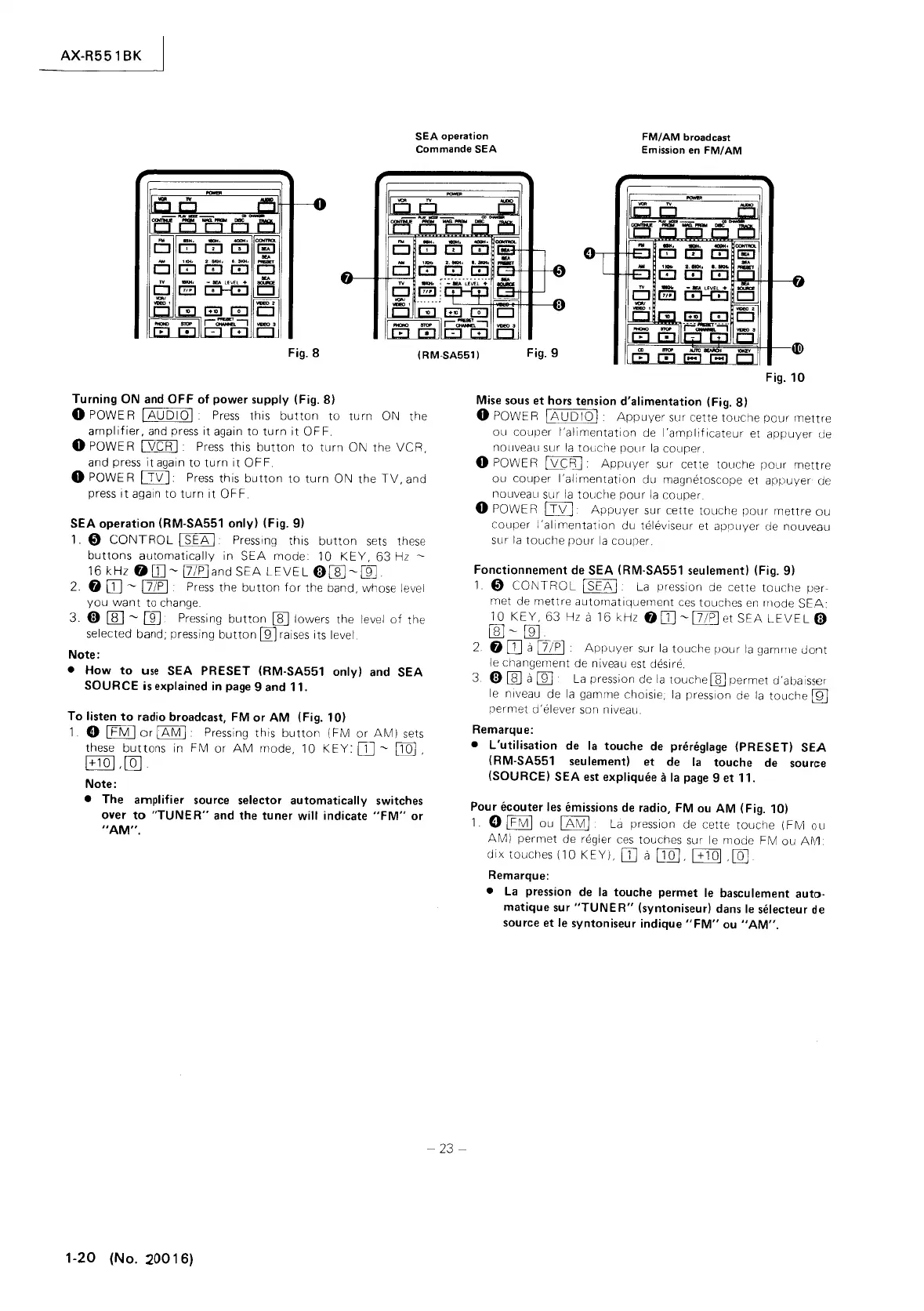
Fig. 8
(RM·SA551)
Fig. 9
Turning
ON
and
OFF
of
power supply (Fig. 8)
o POWER
[AUDIO[
Press
this
button
to
turn
ON the
amplifier,
and
press
it
again
to
turn
it
OFF.
o POWER
[VCR
[
Press
this
button
to
turn
ON the
VCR,
and press
it
again
to
turn
it
OFF.
o POWE R
CTIZJ.
Press
this
button
to
turn
ON the
TV,
and
press
it
again
to
turn
it
OF
F.
SEA operation (RM-SA551 only) (Fig.
9)
1.
Cl)
CONTROL
[
SEA
[ Pressing this
button
sets
these
buttons
automatically
in
SEA
mode
10
KEY,
63
Hz
-
16
kHz
O[}]-[7/P[and
SEA
LEVEL
0[E-ffi]
2. 0
DJ
-
[7/P
[
Press
the
button
for
the band, whose level
you
want
to change.
3.
0
rn:J
-
[[]
Pressing
button
rn:J
lowers the level
of
the
selected band; pressing
button
lli1
raises its level.
Note:
•
How
to
use
SEA PRESET (RM·SA551 only)
and
SEA
SOURCE
is
explained
in
page
9 and 11,
To
listen
to
radio broadcast,
FM
or
AM
(Fig. 10)
1.
e
[fMJor[AMI
Pressing
this
button
(FM
or
AM)
sets
these
buttons
in FM
or
AM
mode, 10
KEY:
[l]
-
[IQ]
,
[+101 ,[Qj.
Note:
• The amplifier
source
selector automatically
switches
over
to
"TUNER"
and the tuner will indicate
"FM"
or
"AM".
1-20
(No. :20016)
-
23-
Fig.
10
Mise
sous
et
hors
tension d'alimentation (Fig.
8)
o POWE R
lAUD
10
1
Appuyer
sur cette
touche
pour
mettre
ou couper
I'alimentation
de
I'amplificateur
et
appuyer
de
nOllveau sur
la
touche
pour
la
couper.
o POWE R
l\Z£;R]:
Appuyer
sur cette
touche
pour
mettre
ou
couper
I'alimentation
du magnetoscope et
appuyer
de
nouveau sur
la
touche
pour
la
couper.
o POWE R
Lf\/J
Appuyer
sur cette touche
pour
mettre
ou
couper
I'allmentation
du televiseur et appuyer de nouveau
sur
la
touche
pour
la
couper.
Fonctionnement
de
SEA (RM·SA551 seulement) (Fig.
9)
1 0
CONTROL
I
SEA
I
La
pression de cette
touche
per-
met de
mettre
automatiquernent
ces
touches
en
Illode
SEA:
10
KEY,
63
Hz a
16
kHz
00]
-17/pl
et
SEA
LEVEL
0
ffi]-ffi]
2.
0
DJ
a
[7lP]
Appuyer
sur
la
touche
pour
la
gamlTle
dont
le
changement de niveau est desire .
3.
0 [ill a
[]]
La
pression de
la
touche
[ill permet d'abaisser
le
niveau de
la
gamme choisie,
la
presslon de
la
touche
U'D
permet
d'
elever son n iveau.
Remarque:
• L'utilisation de
la
touche
de
pniniglage (PRESET) SEA
(RM-SA551 seulement) et
de
la
touche
de
source
(SOURCE) SEA
est
expliquee
11
la
page
9 et 11.
Pour ecouter
les
emissions
de
radio,
FM
ou
AM
(Fig. 10)
1 0
IFMI
ou
IAMI
La
pression de cette
touche
(FM
ou
AM)
permet
(Je
reg)er
ces
touches sur
le
mode FM
ou
A~1
dix
touches (10
KEY),
DJ
a
[JQJ,
1+101
,[Q]
Remarque:
•
La
pression
de
la
touche permet
le
basculement auto·
matique
sur
"TUNER"
(syntoniseur)
dans
le
selecteur
de
source
et
le
syntoniseur indique
"FM"
ou
"AM".



 To Next Page
 Loading...