EasyManua.ls Logo

JVC AX-R551BK - Service Procedures and Technical Diagrams; Component Removal and Adjustment Procedures

JVC AX-R551BK
66 pages
Print Icon
To Next Page IconTo Next Page
To Previous Page IconTo Previous Page
Loading...
AX-R551 BK
Removal Procedures
Removing
the
Top Cover
1.
Remove
six screws.
2.
Remove
the
top
cover
by
lifting
up
its rear
section
and
pulling
it
backward
while
holding
it
on
incline.
Removing
the
Front Panel
1.
Remove
the
top
cover.
2.
Remove
three
plastic
rivets on
the
upper
part
of
the
front
panel
and
three
screws
from
the
lower
part.
3. Pull
out
the
volume
knob
and
remove
the
front
panel.
Remove
the
Motor
Volume
PC Board
1.
Remove
the
front
panel.
2.
Remove
screws
®
~
®,
and
pull
out
the
front
bracket.
3.
Turn
the
holder
counterclockwise
securely,
and
re-
1-30
(No. 2001
6)
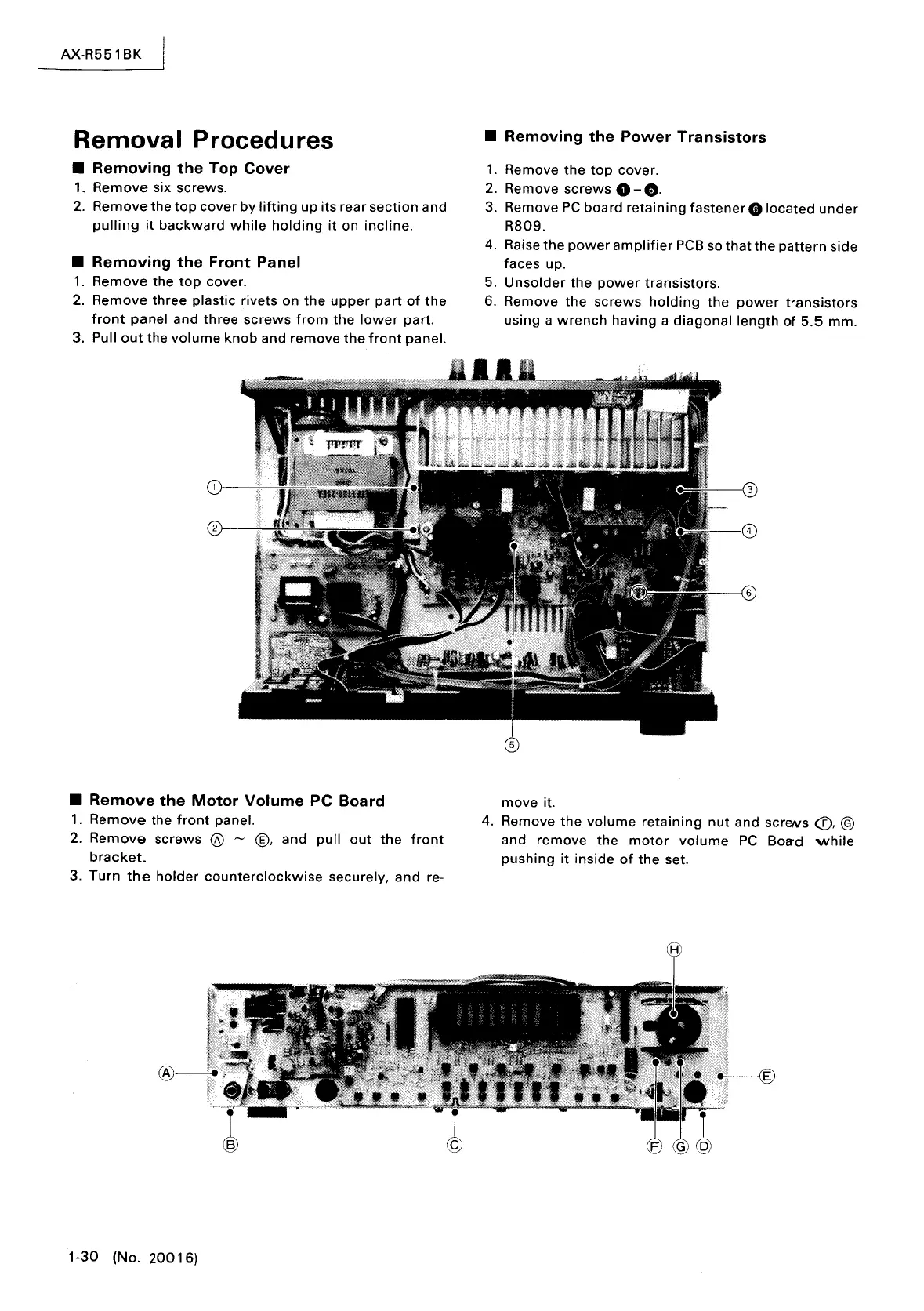
Removing
the
Power
Transistors
1.
Remove
the
top
cover.
2. Remove
screws
0 -
e.
3. Remove
PC
board
retaining
fastener
G
located
under
R809.
4. Raise
the
power
amplifier
PCB
so
that
the
pattern
side
faces up.
5.
Unsolder
the
power
transistors.
6. Remove
the
screws
holding
the
power
transistors
using a
wrench
having
a
diagonal
length
of
5.5
mm.
move
it.
4. Remove
the
volume
retaining
nut
and
screNS
<£),
@
and
remove
the
motor
volume
PC
Boa'd
while
pushing
it
inside
of
the
set.

Table of Contents

Related product manuals