AX-R551
BK
FM/
AM
broadcast or
TV
Emission
en
FM/AM
ou
TV
2. 0
DJ
~
[IQ]
, [±J]J,
[]]
Of
the preset channels, pro-
grammed in
the
tuner,
check the
number
of
the channel
of
your
choice, and press the
button
corresponding
to
that
channel number. Examples
Channels 1
~
10
For
Channel 5, press
numeric
button
[§J.
For
Channel
10,
press
numeric
button
[IQ]
.
Channel 17
Press
[iJ]J
button
once and
then
numeric
button
17
IP
I.
Channel
20
Press
G:IQJ
button
once and then
numeric
button
[IQ]
.
Channel
25
Press
[iJ]J
button
twice
and then
numeric
button
[§]
.
3.
ID>
PRESET
CHANNEL
B
8J
These
buttons
are
for
Incrementing
or
decrementing the
number.
That
is,
select-
Ing
the
next
channel above
or
below
the
currently
selected
channel
To
listen
to
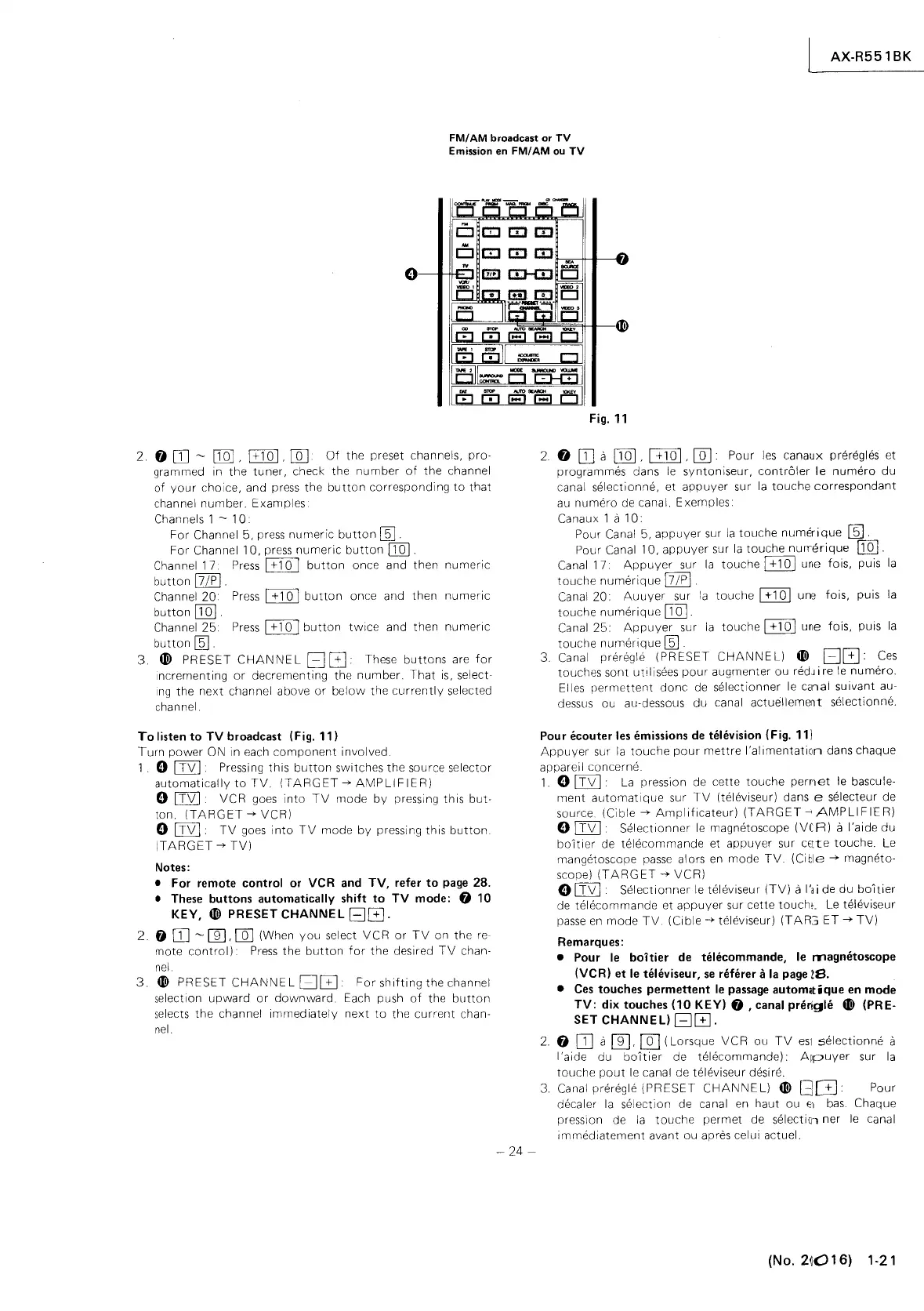
TV broadcast (Fig.
11)
Turn
power
ON in each
component
involved.
1.
0 I
TV
I Pressing
this
button
switches the source selector
automatically
to
TV.
(TARGET
--+
AMPLIFIER)
o
ITVI
VCR goes
into
TV
mode
by
pressing
this
but-
ton.
(TARGET
--+
VCR)
o I
TV
I.
TV
goes
into
TV
mode
by
pressing this
button.
(TARGET
--+
TV)
Notes:
• For remote control or VCR and TV, refer
to
page
28.
• These buttons automatically shift
to
TV mode: 0
10
KEY,
ID>
PRESET CHANNEL
ElG.
2.
fj
DJ
~
[[], []] (When
you
select
VCR
or
TV
on
the
re-
mote
control)
Press
the
button
for
the
desired
TV
chan-
nel.
3.
~
PRESET
CHANNE
L
BC±J
For
shifting
the channel
selection
upward
or
downward.
Each push
of
the
button
selects
the
channel
immediately
next
to
the
current
chan-
nel.
-
24-
Fig. 11
2.
f)
DJ
a
[IQ]
,
[±IQ]
,
[QJ.
Pour
les
canaux preregles et
programmes dans
le
syntoniseur, contr61er
le
numero
du
canal selectionne, et
appuyer
sur
la
touche
correspondant
au
numero
de canal. Exemples
Canaux 1
a
10.
Pour Canal 5,
appuyer
sur
la
touche
numerique
ill].
Pour Canal 10,
appuyer
sur
la
touche
nUrTerique
[IQ].
Canal 17
Appuyer
sur
la
touche
[±IQ]
une fois, puis
la
touche
numerique
17/pI
Canal
20.
Auuyer
sur
la
touche
0Q]
une
fois, puis
la
touche
numerique
[IQ].
Canal
25.
Appuyer
sur
la
touche
[±IQ]
une fois, puis
la
touche
numerlque
ffil
3. Canal preregle
(PRESET
CHANNEL)
ID>
BG.
Ces
touches sont
ut,l
isees
pour
augmenter ou
redJ
i re
le
numero.
Elles
permettent
donc
de
selectionner
le
canal suivant au-
dessus ou au-dessous du canal
actuelleme~t
selectionne.
Pour ecouter les emissions de television (Fig.
111
Appuyer
sur
la
touche
pour
mettre
I'alimentation
dans chaque
appareil concerne
1.
0 I
TV
I·
La
pression de cette
touche
pernet
le bascule-
ment
automatique
sur
TV
(televiseur) dans e selecteur de
source. (Cible
--+
Amplificateur)
(TARGET~AMPLlFIER)
o I
TV
I Select
ionner
le
magnetoscope
(VC
R)
a I
'a
ide
du
boitier
de
telecommande
et appuyer sur
cECte
touche. Le
mangetoscope
passe
alors
en
mode
TV.
(Citle
--+
magneto-
scope)
(TARGET
--+
VCR)
o I
TV
I·
Selectionner
le
televiseur
(TV)
a
I'a
i de du
boitier
de
telecommande
et
appuyer
sur cette touch!_ Le televiseur
passe
en
mode
TV.
(Cible
--+
televiseur)
(TAR:;
ET
--+
TV)
Remarques:
• Pour le
boitier
de telecommande, le
magnetoscope
(VCR)
et
le televiseur, se rMerer a
la
page
IS.
• Ces
touches
permettent
le passage
autom,tique
en
mode
TV: dix
touches
(10
KEY) 0
,canal
prerigle
ID>
(PRE-
SET CHANNEL)
GG.
2.
0
DJ
a []],
[QJ
(Lorsque
VCR
ou
TV
eSI
selectionne
a
I 'aide du
boitier
de telecommande).
AIPuyer
sur
la
touche
pout
le
canal de televiseur desire.
3.
Canal preregle
(PRESET
CHANNEL)
ID>
GG
Pour
decaler
la
selection de canal
en
haut ou
El
bas.
Chaque
pression de
la
touche
perm et de selectien
ner
le
canal
i m med iatement avant ou apres
cel
u i actuel.
(No.
2~O
1 6) 1-21



 To Next Page
 Loading...