EasyManua.ls Logo

JVC D-M3 - Page 10

JVC D-M3
28 pages
Print Icon
To Next Page IconTo Next Page
To Previous Page IconTo Previous Page
Loading...
D-M3
A/B/C/E/J/U
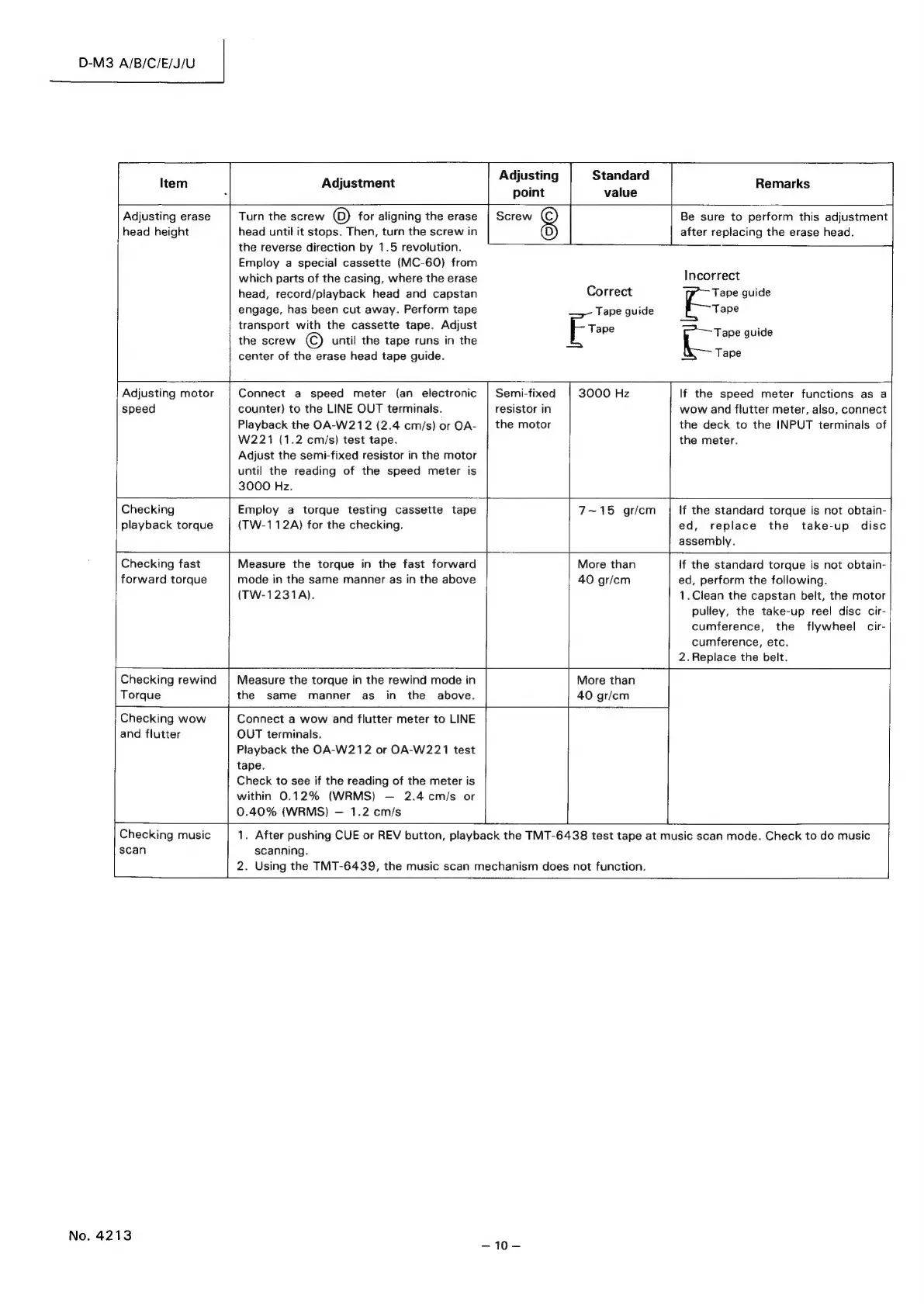
Item
Adjustment
Adjusting
sioncatd
a
Remarks
:
point
value
Adjusting
erase
Turn
the
screw
©
for
aligning
the
erase
|
Screw
(C)
Be
sure
to
perform
this
adjustment
head
height
head
until
it
stops.
Then,
turn
the
screw
in
(D)
after
replacing
the
erase
head.
the
reverse
direction
by
1.5
revolution.
Employ
a
special
cassette
(MC-60)
from
which
parts
of
the
casing,
where
the
erase
Incorrect
head,
record/playback
head
and
capstan
Correct
Tape
guide
engage,
has
been
cut
away.
Perform
tape
Tape
guide
Tape
transport
with
the
cassette
tape.
Adjust
Er
Tapeguide
the
screw
©
until
the
tape
runs
in
the
a
center
of
the
erase
head
tape
guide.
Tape
Adjusting
motor
Connect
a
speed
meter
(an
electronic
|
Semi-fixed
3000
Hz
If
the
speed
meter
functions
as
a
speed
counter)
to
the
LINE
OUT
terminals.
resistor
in
wow
and
flutter
meter,
also,
connect
Playback
the
OA-W212
(2.4
cm/s)
or
OA-
|
the
motor
the
deck
to
the
INPUT
terminals
of
W221
(1.2
cm/s)
test
tape.
the
meter.
Adjust
the
semi-fixed
resistor
in
the
motor
until
the
reading
of
the
speed
meter
is
3000
Hz.
Checking
Employ
a
torque
testing
cassette
tape
playback
torque
(TW-112A)
for
the
checking.
7~15
gr/cm
If
the
standard
torque
is
not
obtain-
ed,
replace
the
take-up
disc
assembly.
Checking
fast
Measure
the
torque
in
the
fast
forward
More
than
If
the
standard
torque
is
not
Bbtane|
forward
torque
mode
in
the
same
manner
as
in
the
above
40
gr/cm
ed,
perform
the
following.
(TW-1231A).
1.Clean
the
capstan
belt,
the
motor
pulley,
the
take-up
reel
disc
cir-
cumference,
the
flywheel
cir-
cumference,
etc.
2.
Replace
the
belt.
Checking
rewind
Torque
More
than
40
gr/cm
Measure
the
torque
in
the
rewind
mode
in
the
same
manner
as
in
the
above.
Connect
a
wow
and
flutter
meter
to
LINE
Checking
wow
and
flutter
OUT
terminals.
Playback
the
OA-W212
or
OA-W221
test
tape.
Check
to
see
if
the
reading
of
the
meter
is
within
0.12%
(WRMS)
2.4
cm/s
or
0.40%
(WRMS)
1.2
cm/s
ae
Checking
music
1.
After
pushing
CUE
or
REV
button,
playback
the
TMT-6438
test
tape
at
music
scan
mode.
Check
to
do
music
scan
scanning.
2.
Using
the
TMT-6439,
the
music
scan
mechanism
does
not
function.
No.
4213
~10—

Related product manuals