EasyManua.ls Logo

JVC D-M3 - Page 12

JVC D-M3
28 pages
Print Icon
To Next Page IconTo Next Page
To Previous Page IconTo Previous Page
Loading...
D-M3
A/B/C/E/J/U
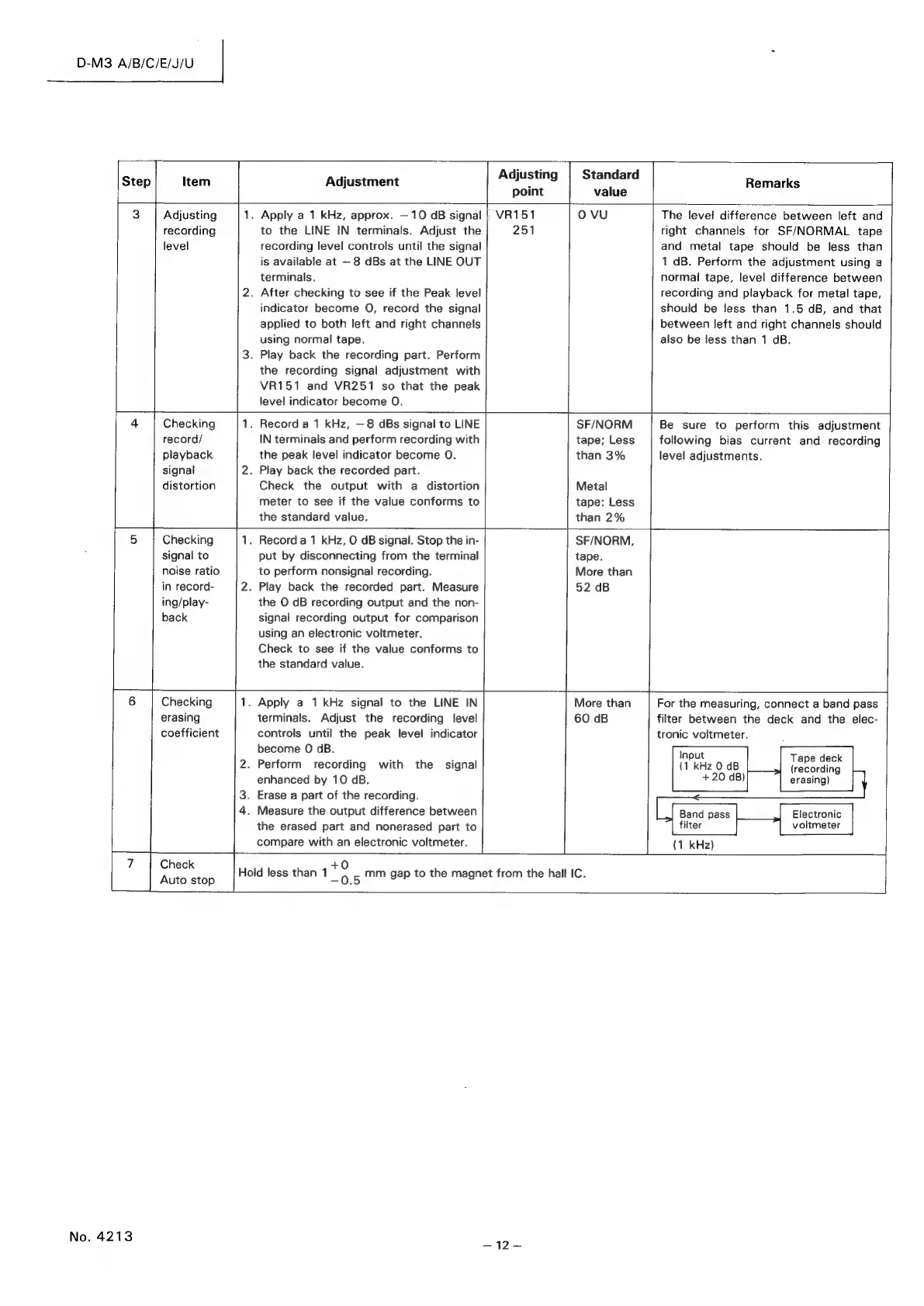
Step Item
Adjustment
Adjusting
Standard
Remarks
point
value
3
Adjusting
1.
Apply
a
1
kHz,
approx.
—
10
dB
signal
|
VR151
0
VU
The
level
difference
between
left
and
recording
to
the
LINE
IN
terminals.
Adjust
the
251
right
channels
for
SF/NORMAL
tape
level
recording
level
controls
until
the
signal
and
metal
tape
should
be
less
than
is
available
at
—
8
dBs
at
the
LINE
OUT
1
dB.
Perform
the
adjustment
using
a
terminals.
normal
tape,
level
difference
between
2.
After
checking
to
see
if
the
Peak
level
recording
and
playback
for
metal
tape,
indicator
become
O,
record
the
signal
should
be
less
than
1.5
dB,
and
that
applied
to
both
left
and
right
channels
between
left
and
right
channels
should
using
normal
tape.
also
be
less
than
1
dB.
3.
Play
back
the
recording
part.
Perform
the
recording
signal
adjustment
with
VR151
and
VR251
so
that
the
peak
level
indicator
become
O.
4
|
Checking
1.
Record
a
1
kHz,
—8
dBs
signal
to
LINE
SF/NORM
Be
sure
to
perform
this
adjustment
record/
IN
terminals
and
perform
recording
with
tape;
Less
following
bias
current
and
recording
playback
the
peak
level
indicator
become
O.
than
3%
level
adjustments.
signal
2.
Play
back
the
recorded
part.
distortion
Check
the
output
with
a
distortion
Metal
meter
to
see
if
the
value
conforms
to
tape:
Less
the
standard
value.
than
2%
5
Checking
1.
Record
a
1
kHz,
O
dB
signal.
Stop
the
in-
SF/NORM,
signal
to
put
by
disconnecting
from
the
terminal
tape.
noise
ratio
to
perform
nonsignal
recording.
More
than
in
record-
2.
Play
back
the
recorded
part.
Measure
52
dB
ing/play-
the
O
dB
recording
output
and
the
non-
back
signal
recording
output
for
comparison
using
an
electronic
voltmeter.
Check
to
see
if
the
value
conforms
to
the
standard
value.
Checking
.
Apply
a
1
kHz
signal
to
the
LINE
IN
More
than
For
the
measuring,
connect
a
band
pass
erasing
terminals.
Adjust
the
recording
level
60
dB
filter
between
the
deck
and
the
elec-
coefficient
controls
until
the
peak
level
indicator
tronic
voltmeter.
become
O
dB.
2.
Perform
recording
with
the
signal
kHz
0
dB
eee
enhanced
by
10
aB.
+20
dB)
erasing)
3.
Erase
a
part
of
the
recording.
4.
Measure
the
output
difference
between
the
erased
part
and
nonerased
part
to
filter
voltmeter
compare
with
an
electronic
voltmeter.
(1
kHz)
i
alee
Hoid
less
than
1
Sipe
mm
gap
to
the
magnet
from
the
hall
IC.
Auto
stop
-0.5
ee
|
No.
4213
—12~—

Related product manuals