EasyManua.ls Logo

JVC D-M3 - Page 5

JVC D-M3
28 pages
Print Icon
To Next Page IconTo Next Page
To Previous Page IconTo Previous Page
Loading...
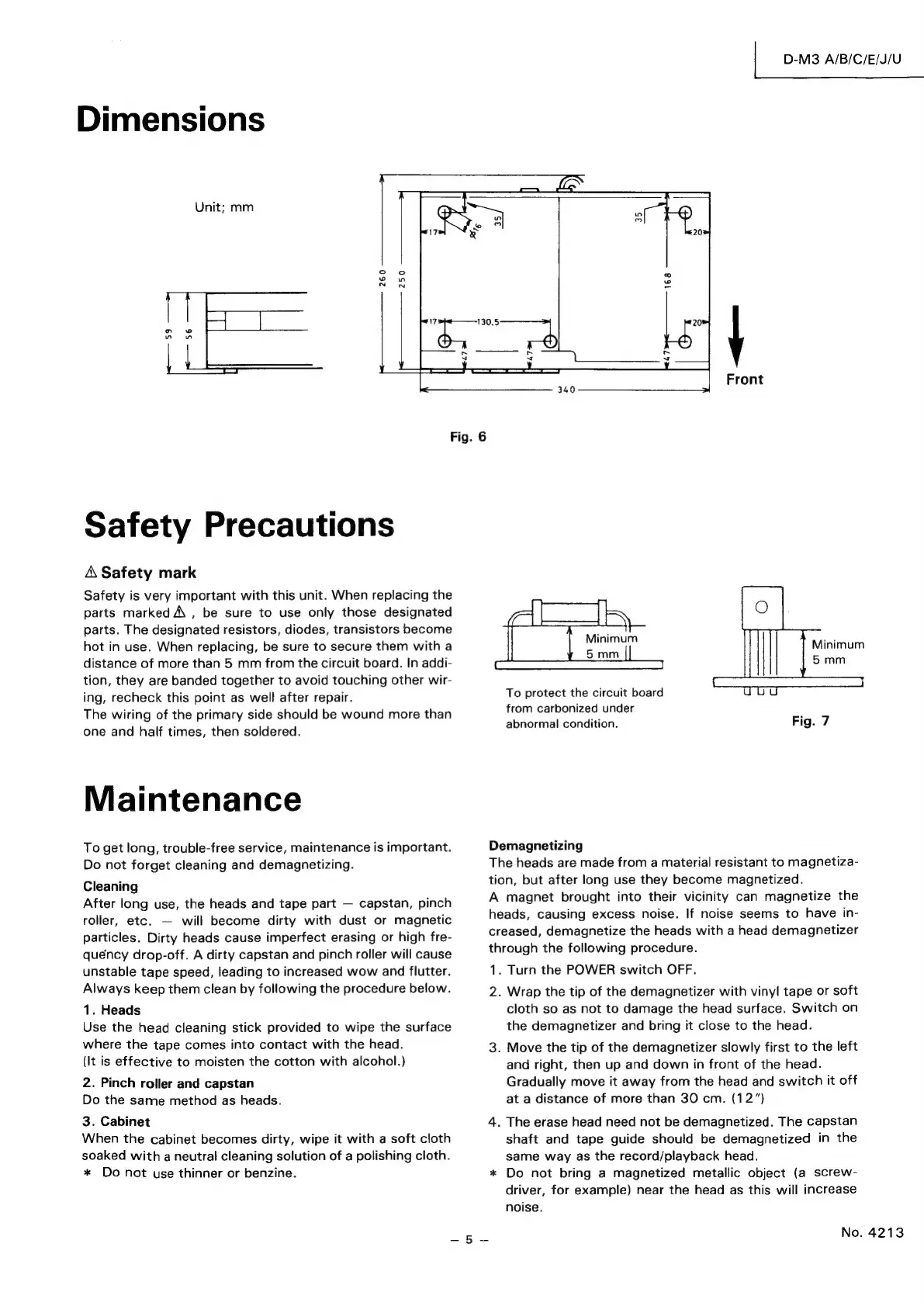
Dimensions
|
D-M3
A/B/C/E/J/U
Unit;
mm
7
130.5
n
wo
wow
er
y
ei
Front
Fig.
6
Safety
Precautions
A
Safety
mark
Safety
is
very
important
with
this
unit.
When
replacing
the
parts
marked
A
,
be
sure
to
use
only
those
designated
parts.
The
designated
resistors,
diodes,
transistors
become
hot
in
use.
When
replacing,
be
sure
to
secure
them
with
a
distance
of
more
than
5
mm
from
the
circuit
board.
In
addi-
tion,
they
are
banded
together
to
avoid
touching
other
wir-
ing,
recheck
this
point
as
well
after
repair.
The
wiring
of
the
primary
side
should
be
wound
more
than
one
and
half
times,
then
soldered.
Maintenance
To
get
long,
trouble-free
service,
maintenance
is
important.
Do
not
forget
cleaning
and
demagnetizing.
Cleaning
After
long
use,
the
heads
and
tape
part
—
capstan,
pinch
roller,
etc.
—
will
become
dirty
with
dust
or
magnetic
particles.
Dirty
heads
cause
imperfect
erasing
or
high
fre-
quency
drop-off.
A
dirty
capstan
and
pinch
roller
will
cause
unstable
tape
speed,
leading
to
increased
wow
and
flutter.
Always
keep
them
clean
by
following
the
procedure
below.
1.
Heads
Use
the
head
cleaning
stick
provided
to
wipe
the
surface
where
the
tape
comes
into
contact
with
the
head.
(It
is
effective
to
moisten
the
cotton
with
alcohol.)
2.
Pinch
roller
and
capstan
Do
the
same
method
as
heads.
3.
Cabinet
When
the
cabinet
becomes
dirty,
wipe
it
with
a
soft
cloth
soaked
with
a
neutral
cleaning
solution
of
a
polishing
cloth.
*
Do
not
use
thinner
or
benzine.
Minimum
5
mm
To
protect
the
circuit
board
from
carbonized
under
abnormal
condition.
Demagnetizing
The
heads
are
made
from
a
material
resistant
to
magnetiza-
tion,
but
after
long
use
they
become
magnetized.
A
magnet
brought
into
their
vicinity
can
magnetize
the
heads,
causing
excess
noise.
If
noise
seems
to
have
in-
creased,
demagnetize
the
heads
with
a
head
demagnetizer
through
the
following
procedure.
1.
Turn
the
POWER
switch
OFF.
2.
Wrap
the
tip
of
the
demagnetizer
with
vinyl
tape
or
soft
cloth
so
as
not
to
damage
the
head
surface.
Switch
on
the
demagnetizer
and
bring
it
close
to
the
head.
3.
Move
the
tip
of
the
demagnetizer
slowly
first
to
the
left
and
right,
then
up
and
down
in
front
of
the
head.
Gradually
move
it
away
from
the
head
and
switch
it
off
at
a
distance
of
more
than
30
cm.
(12ā€)
4.
The
erase
head need
not
be
demagnetized.
The
capstan
shaft
and
tape
guide
should
be
demagnetized
in
the
same
way
as
the
record/playback
head.
*
Do
not
bring
a
magnetized
metallic
object
(a
screw-
driver,
for
example)
near
the
head
as
this
will
increase
noise.
No.
4213

Related product manuals