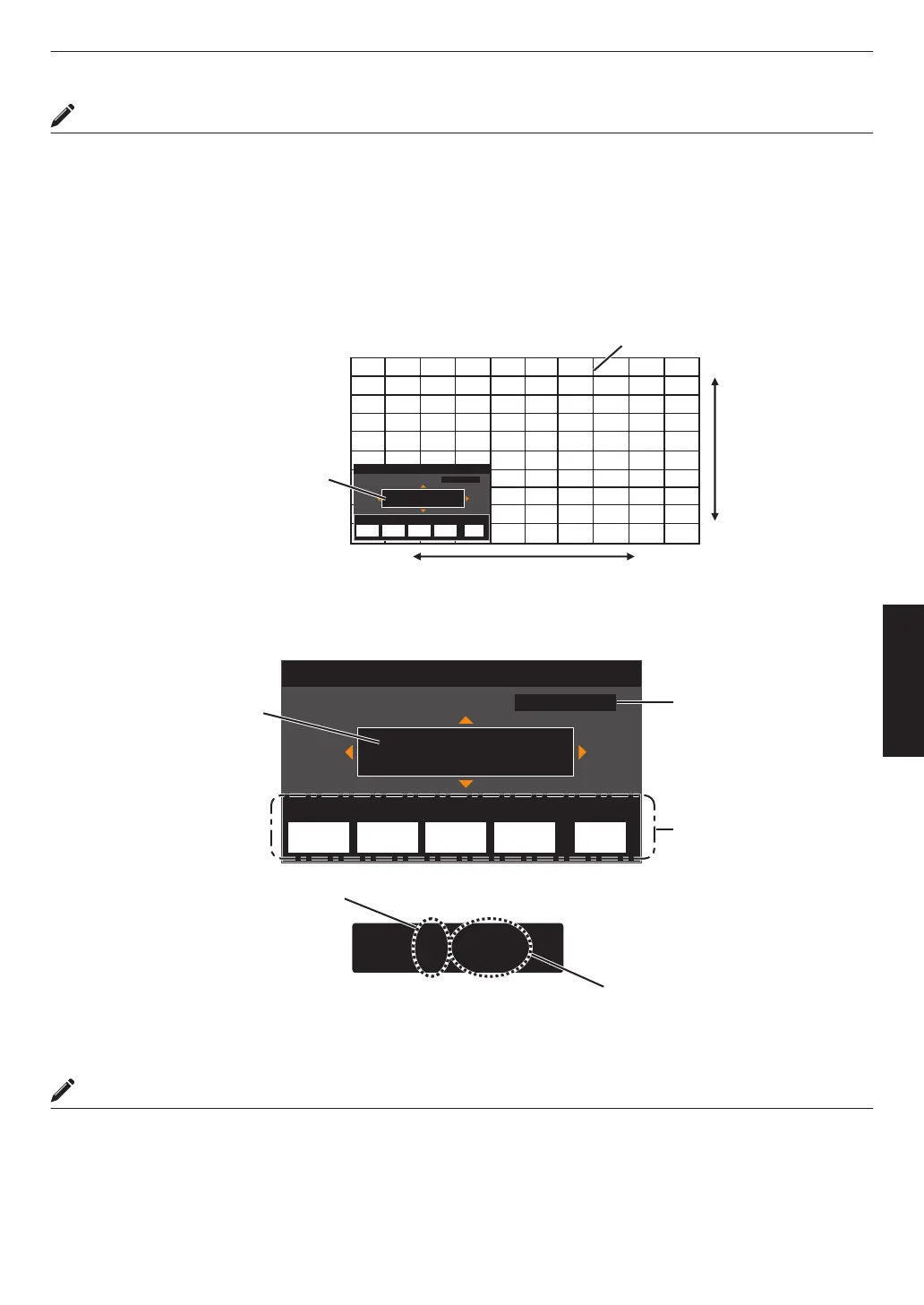
Whole Adjust (Fine) Operation Procedure
For making general adjustments on the misalignment of the entire screen using “Adjust (Pixel)”, followed by making
fine adjustments.
A
Set “Adjust Area” to “Whole”
B
Select “Adjust Color” and “Adjust Pattern Color”
C
Select Adjust (Fine), and press the [OK] button
0
The Adjustment mode is activated, and the selected adjustment pattern and Fine window are displayed.
0
The adjustable range may be smaller depending on the pixels being adjusted on the entire screen.
Adj.AreaPat.Col.Pixel/FineAdj.Col.
H 0( 0/ 0)
V 0( 0/ 0)
BACK
ADVANCED
MENU
GAMMA
SETTINGS
C.M.D.
PICTURE
MODE
Red
Whole Adjust (Fine)
Pixel Adjust
Back
V (Vertical)
H (Horizontal)
Fine Window
Adjustment Pattern
D
Use the [JKH I] keys to move and adjust the vertical and horizontal pixels of the entire zone
0
The adjustment setting appears at the center of the Fine window.
Adj.AreaPat.Col.Pixel/FineAdj.Col.
H 0( 0/ 0)
V 0( 0/ 0)
BACK
ADVANCED
MENU
GAMMA
SETTINGS
C.M.D.
PICTURE
MODE
H -20(-20 / -20)
V 5 ( 5 / 5)
Red
Whole Adjust (Fine)
Pixel Adjust
Back
Indicates the maximum and
minimum misalignment value of
the entire screen.(Max. / Min.)
Adjustment Setting
Remote Control
Operation Guide
Color for
Adjustment
Pixel Adjustment Setting
E
After adjustment is complete, press the [BACK] button twice to exit the Adjustment mode
MEMO
0
If both the maximum overall screen misalignment of H (horizontal direction) and V (vertical direction) are “31”, you
cannot select a value that is larger than the displayed setting even when the adjustment setting is lower than the
maximum value.
0
If the minimum overall screen misalignment is “-31”, you cannot select a value that is smaller than the displayed
setting even when the adjustment setting is higher than the minimum value.
57
Adjust/Set



 To Next Page