(No.PA045<Rev.001>)1-25
5.3 ERROR LOG (SELF-DIAGONOSIS RECORD AND INDICATION)
5.3.1 Outline
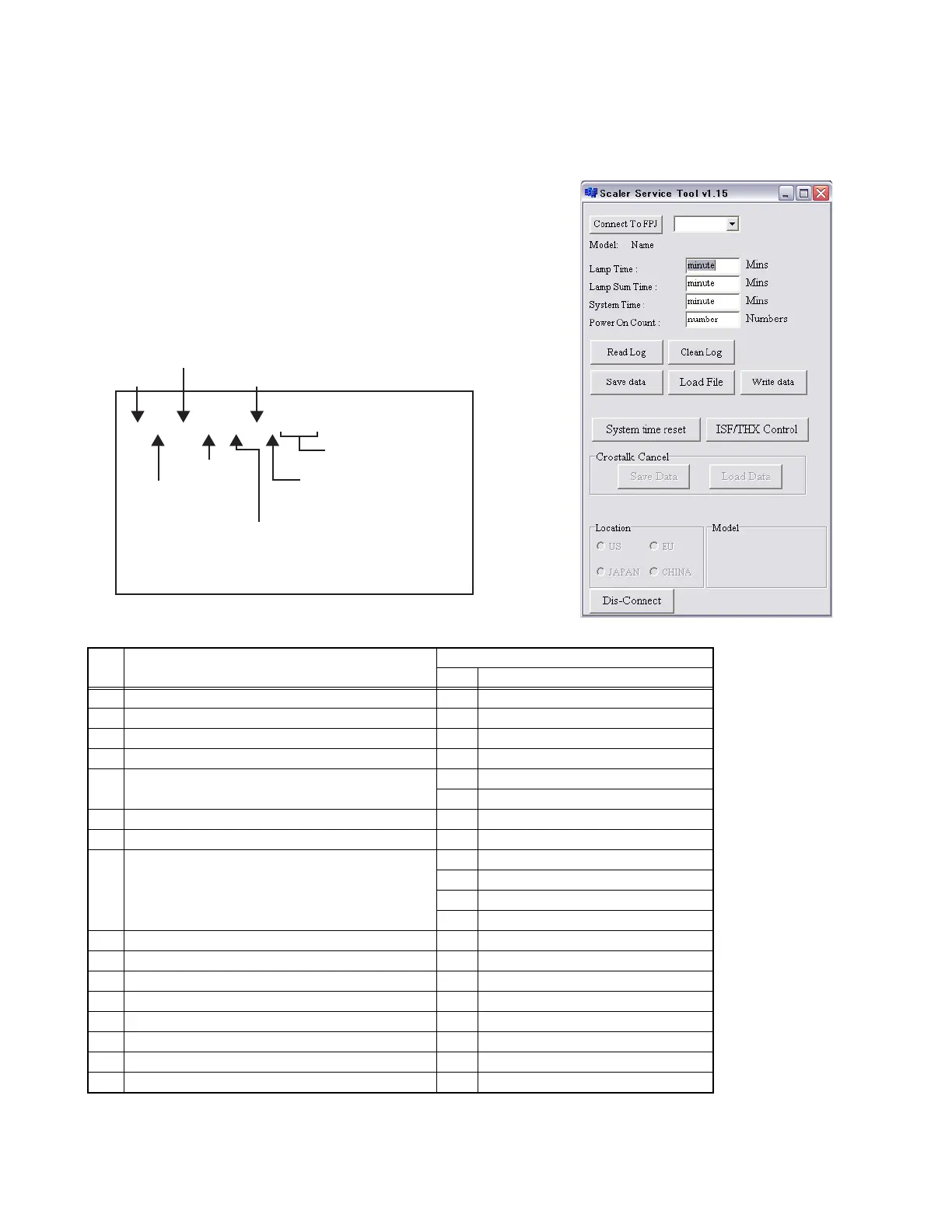
By using the special setting and adjustment software, data related to abnormal operation (history) stored in the projector can be load.
On the basis of contents "LED (INDICATOR) WARNING INDICATONS" set and lamp use time, internal and external temperature,
and ther data prior to the previous usage time can be viewed as a table.
z HOW TO LOAD THE DATA FROM UNIT
(1) Install the software in a personal computer and connect
by RS-232C IN terminal (use cross cable).
(2) Set the projector to stand-by mode.
(3) Start the setting and adjustment software.
(4) Click the [Read Log] button and save the TEXT file. Data
become the latest data so as to go below.
(5) The first number is error code.
(6) Click the [Clean Log] button and delete all data stored in
projector.
zERROR LOG SCREEN ITEMS
zPOWER STATUS
0: STAND-BY MODE
1: POWER ON MODE
2: COOLING MODE
ERROR CODE
SETUP NUMBER
LAMP TIME(Min)
SYSTEM TIME(Min)
OUTSIDE TEMPERATURE
INSIDE TEMPERATURE
POWER STATUS
NOT USED
F1, 17, 568, 1840, 42, 44, 1, 00, 00
No Content
Log
code Remarks
1 The lamp don't light 01
2 The lamp turn off 06
3 The lamp cover opening 15
4 Power board occurs error 1A
5 The fan lock
07 Other fans
0D PWM Fan
6 The internal temperature is too high 08
7 The exterior temperature is too high 09
8 DDM reset or start error
17 DDM reset
18 DDM did not start.
0E CMD IC on MD board did not start.
0F Driver IC on DD board did not start.
9 Can't communicate with DDM 16
10 SCALER board occurs error 19
11 Lens barrier occurs error 1B
12 Lamp time warning 02
13 Just after power on F0
14 After power on, once a hour F1
15 When power was off (Include emergency) F2
16 When a lamp was off by a sleep time function 20


 To Next Page