1-10 (No.PA045<Rev.001>)
2.6 SERVICE MENU
The service menu contains items not ordinarily needed by the user. Use these as necessary during service.
2.6.1 ENTER
(1) No menu shown.
(2) Press the [] button.
(3) Within press the [] button.
(4) Within press the [] button.
(5) Within press the [] button.
(6) Within press the [OK] button to display the service menu.
NOTE:
When the Service Menu Screen is not displayed, go back to
the beginning. It is recommended that you press the buttons a
little earlier and steadily.
2.6.2 RELEASE
Press the [MENU] button to exit the menu indication.
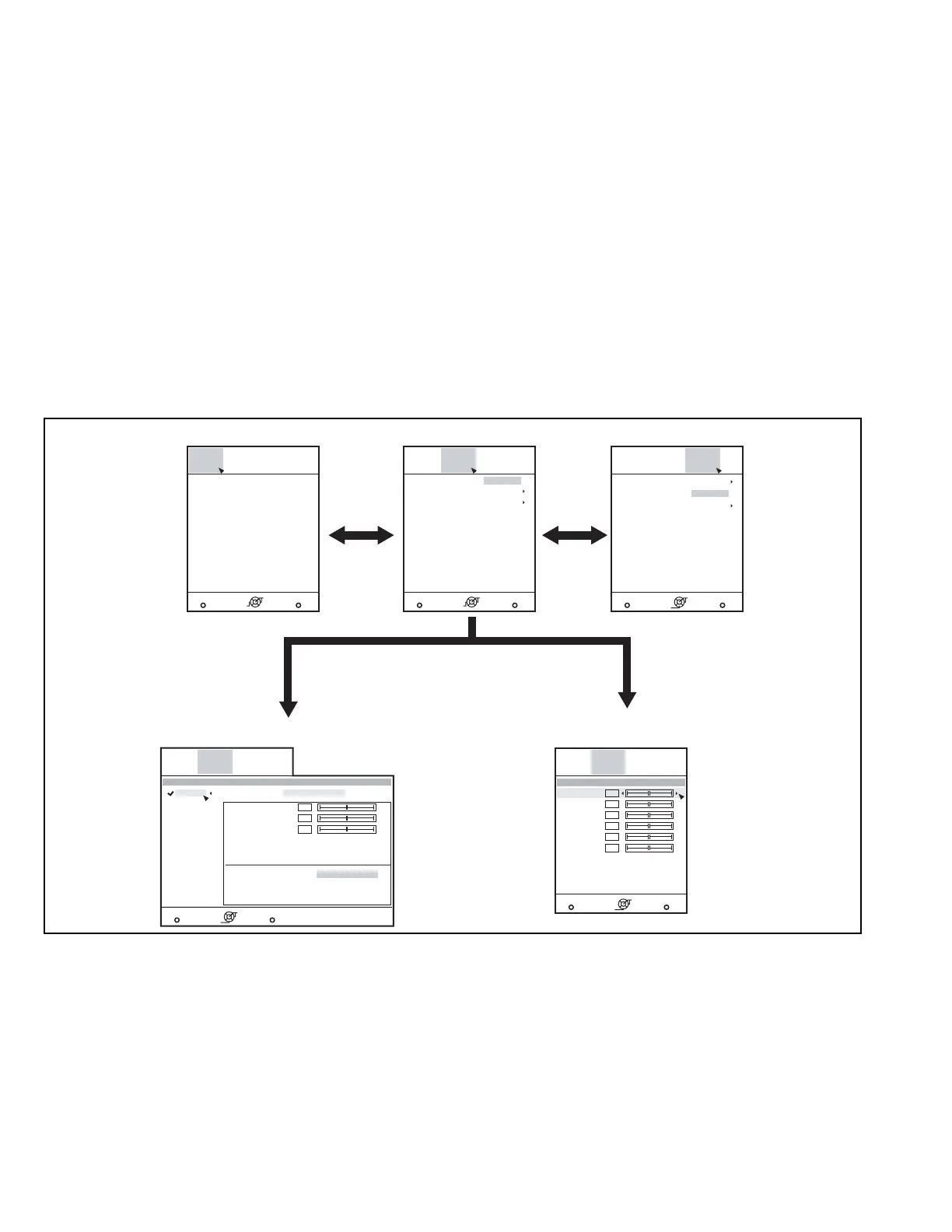
2.6.3 BASIC OPERATION
Use the following buttons to operate the service menu.
(1) Choose the SETTING MENU with the [] or [] button.
(2) When the [] button is pressed after choosing the SET-
TING MENU, the cursor will shift to the SETTING / AD-
JUSTMENT ITEMS of each SETTING MENU.
(3) When the cursor is shifted, choose the SETTING / AD-
JUSTMENT ITEMS with the [] or [] button.
(4) Using the [] or [] button, change the setup values and
adjustment values, respectively.
(5) When the [EXIT] button is pressed, the cursor will return to
the SETTING MENU.
(6) When the [MENU] button is pressed, the SERVICE MENU
will go out of the screen.
NOTE:
The SERVICE MENU will go out of the screen automatically
after 10 seconds if you do not press the [MENU] button.
MENU BACK
BackExit
Soft Ver. Adjust
Model : **********
Main : **********
Sub : **********
DD : **********
Driver 1 : **********
Driver 2 : **********
Color : **********
CMS : **********
Swither : **********
Location : **********
Option
Operate
Select
Soft Version Screen
MENU BACK
BackExit
Soft Ver. Adjust
Color Temp.
Preset
Option
Operate
Select
MENU BACK
BackExit
Soft Ver. Adjust
Lens Slide Cover
Off
Option
Operate
Select
Option Screen
Pixel Shift
Adjust Pattern
Factory Reset
Reset
MENU BACK
BackExit
Soft Ver. Adjust
> Color Temp.
Preset
5500K
Option
Operate
Select
Gain Red
Gain Blue
Gain Green
Picture mode: User 1
0
0
0
Color Temp. Screen
MENU BACK
BackExit
Soft Ver. Adjust
> Pixel Shift
Horiz. Red
Horiz. Green
Horiz. Blue
Vert. Red
Vert. Green
Vert. Blue
Option
Operate
Select
4
4
4
3
3
3
Pixel Shift Screen
Lens Position Reset
Adjust Screen


 To Next Page