1-22 (No.PA045<Rev.001>)
4.4 ADJUSTMENT PROCEDURE
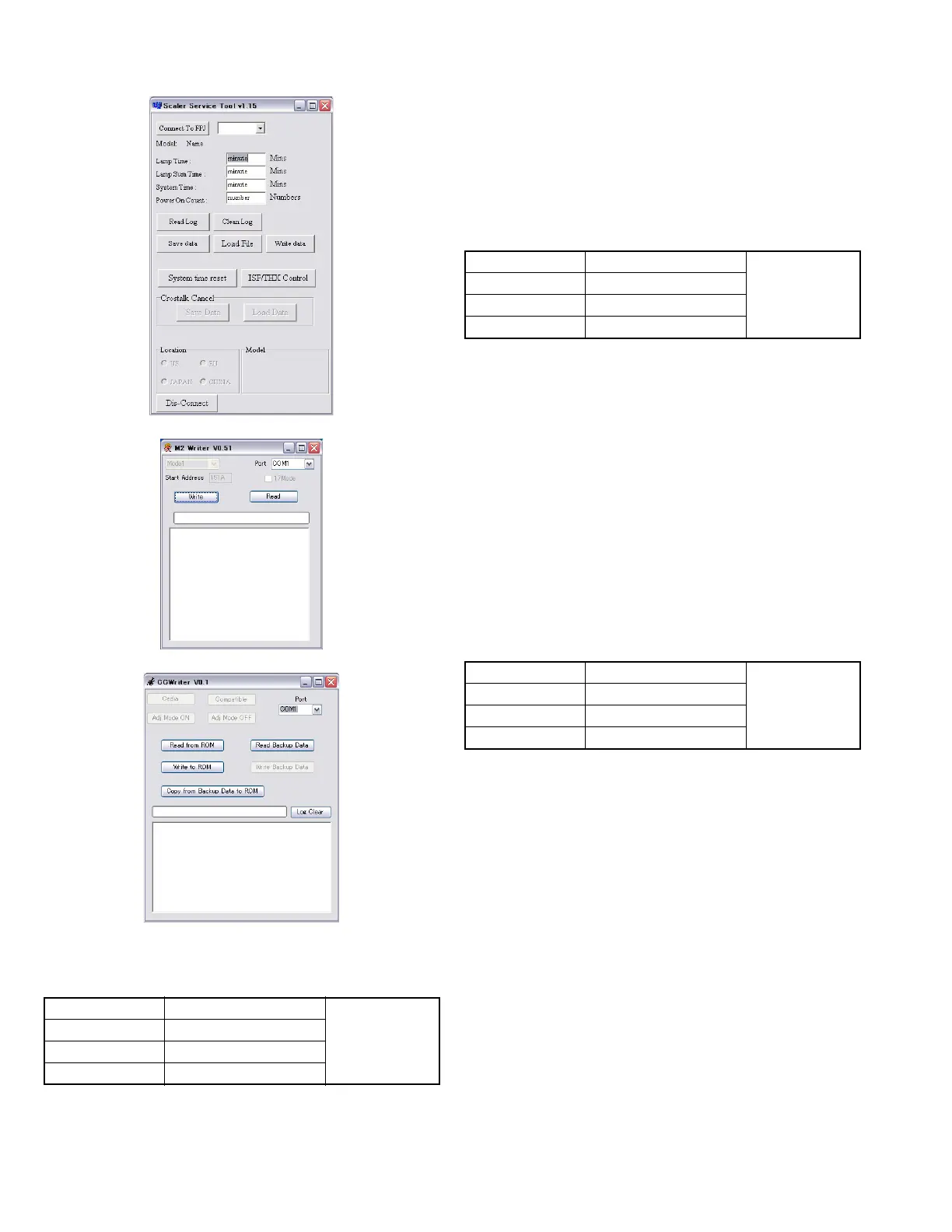
Fig.4-1 Scaler Service Software
Fig.4-2 Scaler Service Software
Fig.4-2 Scaler Service Software
4.4.1 LAMP TIME and COLOR TEMPERATURE DATA
BACKUP
Note :
Perform this operation during standby mode.
ADJUSTMENT
(1) Run Scaler Service Software.
(2) Select Com Port, click [Connect to FPJ] to connect the
PC and the projector.
(3) Click [Save data] and save text file to PC.
(4) After replacing the PROCESSOR PWB, click [Write data]
and select the saved text file.
(5) The backup Color temperature and Lamp time will be re-
written.
4.4.2 CROSTALK CORRECTION DATA BACKUP
Note :
Perform the operation with the power ON.
ADJUSTMENT
(1) Run Scaler Service Software.
(2) Select Com Port, click [Connect to FPJ] to connect the
PC and the projector.
(3) Click [Save Data] under [Crostalk Cancel], and save the
TXT file to the PC.
(4) After replacing the processor board, click [Load Data]
under [Crostalk Cancel], and select the saved TXT file.
(5) The backup Crostalk correction data is now imported.
*1: If the Crostalk correction data cannot be backed up, trans-
fer the Crostalk correction data from the 4.4.8DD board.
*2: If the Crostalk correction data cannot be transferred from
the DD board, replace the optical unit.
4.4.3 ISF/THX DATA BACKUP
Note :
Perform the operation with the power ON.
ADJUSTMENT
(1) Run Scaler Service Software.
(2) Select Com Port, click [Connect to FPJ] to connect the
PC and the projector.
(3) Click [ISF/THX Control].
(4) Click [ON] in Power.
(5) Click [Cedia] in Protocol.
(6) Click [Adjust] in ISF mode.
*If it is not switched to Adjust, press [Compatible] once,
and then click [Adjust] again.
(7) Click [ISF File Save] to save the CSV file in the PC.
(8) After replacing the processor PWB, click [ISF File Load]
to select the saved CSV file.
(9) The backed up ISF file is written in.
(10) Click [OFF] in Power to finish the procedure.
(11) Repeat the same procedure for the THX File.
Instruments Scaler Service Software REPLACING
COMPONENTS
zPROCESSOR
PWB
Te st p o i nt
Adjustment menu
Preparation
Instruments Scaler Service Software REPLACING
COMPONENTS
zPROCESSOR
PWB
Te st p o i nt
Adjustment menu
Preparation
Instruments Scaler Service Software REPLACING
COMPONENTS
zPROCESSOR
PWB
Te st p o i nt
Adjustment menu
Preparation


 To Next Page