34
Operation
3
Basic Operation (continued)
Frequently used useful functions
Setting the Screen Size
Masking the Surrounding Area of an Image
Temporary turning-off of the video
Adjustment of the keystone correction
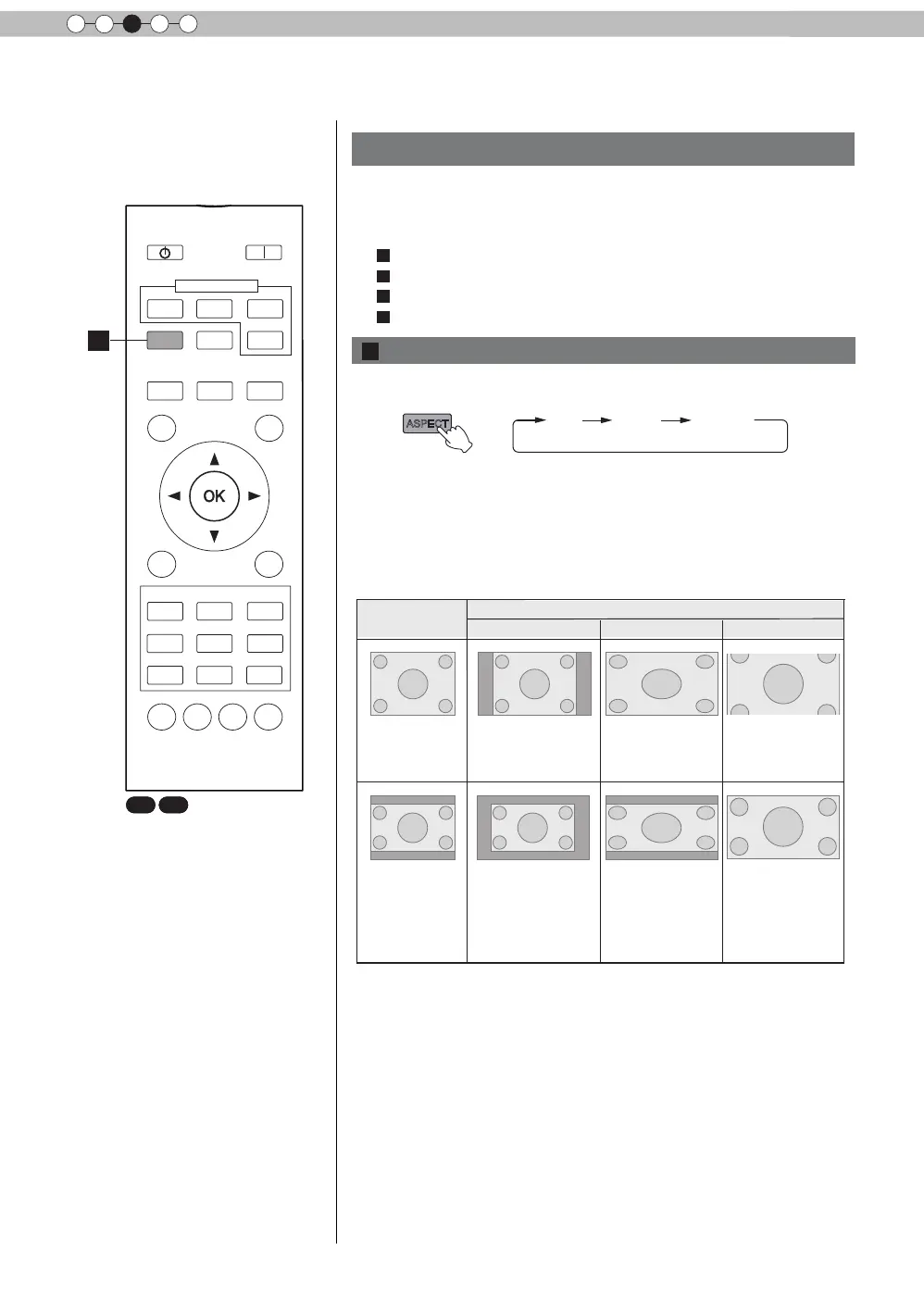
The projected image can be set to a most appropriate screen
size (aspect ratio).
● The screen size can also be set from
“
Aspect(Video)
”
of the
setting menu. (Reference page: 50)
● When PC signals are input, the
“
Aspect(Computer)
”
setting will be
available instead. (Reference page: 50)
■
Input Image and Projected Image by Different Screen
Size
Screen Size
4:3
16:9
Zoom
Input Image
SDTV(4:3)
Aspect Ratio:Same
Most appropriate
screen size
Aspect Ratio:
Landscape
Image is stretched
horizontally
Aspect Ratio:Same
Top and bottom of
the image are
missing
SDTV(4:3)
Image recorded in
landscape (black
bands on top and
bottom) of DVD
software
Aspect Ratio:Same
Small image is
projected
Aspect Ratio:
Landscape
Image is stretched
horizontally
Aspect Ratio:Same
Most appropriate
screen size
● Depending on the input image, selecting
“
4:3
”
may result in a
vertically stretched image, while selecting
“
16:9
”
provides you
with the most appropriate screen size.
● When there is 3D signal input, the ratio is xed to
“
16:9
”
.
ASPECT
You can change the screen size of the projected image or
hide the surrounding area of an image for which quality at the
outer area has deteriorated.
A
Setting the Screen Size
X7 X9
BACK
HIDE
LIGHT
LENS AP.
C.M.D
PC
HDMI 1
STAND BY
ASPECT
HDMI 2
ANAMO
COMP.
LENS.
CONTROL
MENU
GAMMA
P.FILE
COLOR
ADJ.
PIC.
ON
FILM
NATURAL
STAGE 3D
USER1
USER2
THX
ANIME
CINEMA
PICTURE MODE
INPUT
TEMP
COLOR
A
A
B
C
D



 To Next Page