11
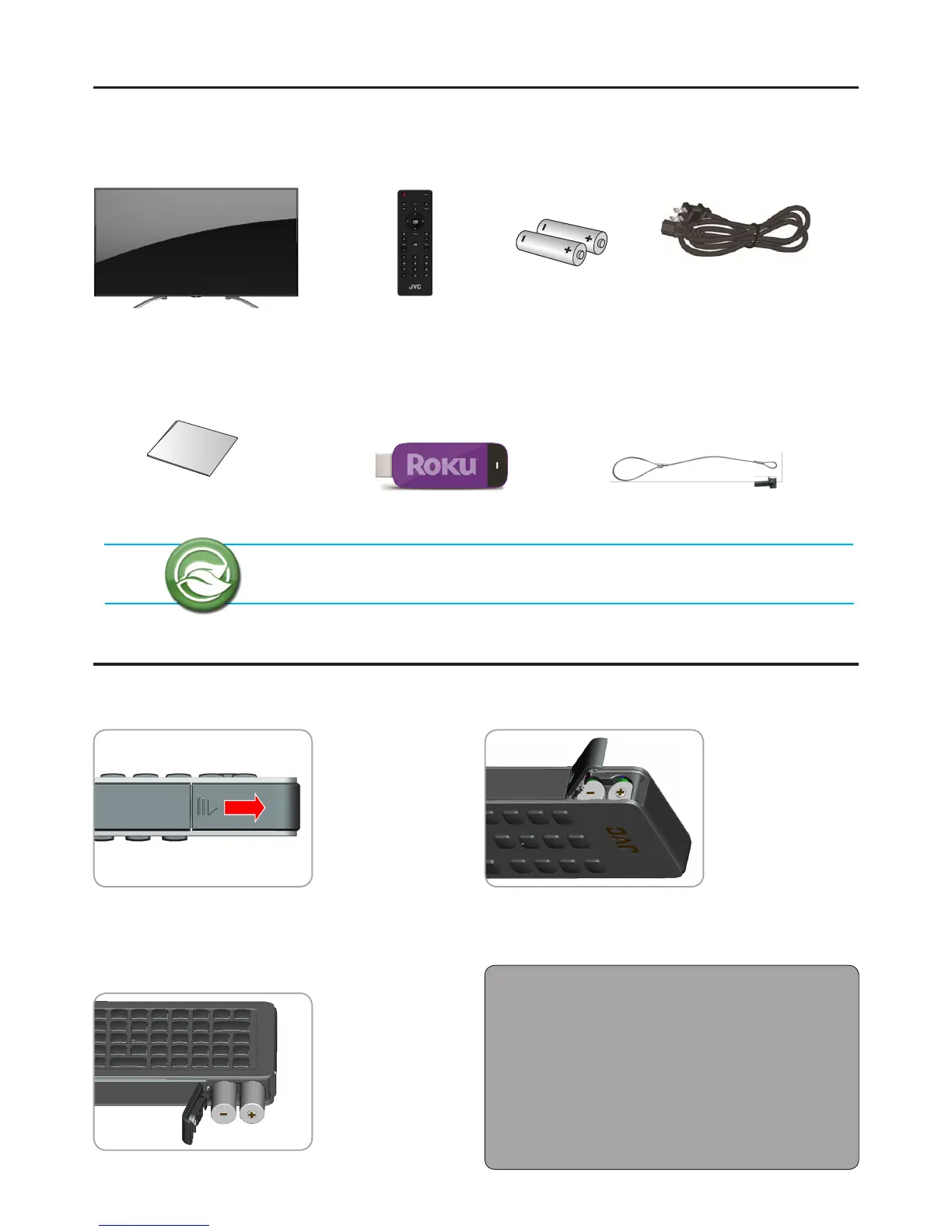
Package Contents
Batteries
Remote Control Batteries
1 Push the tab, then lift to open the cover.
2 Insert the batteries, making sure the [+] and [-]
polarities are correct.
3 Close the battery cover.
Battery Precautions:
Be sure to follow the correct polarity. Incorrect installation
may cause battery leakage or damage the remote control.
Always replace batteries in pair. Do not combine a used
battery with a new one.
Do not use dierent battery types together
(e.g. “Alkaline” and “Carbon-zinc”).
If the remote control is not to be used for a long period of
time, remove the batteries to prevent battery leakage.
Ultra High Denition TV
DOWNLOAD FULL VERSION USER MANUAL
http://jvc-tv.com/support
Quick Start Guide
Power Cord
Roku
®
Streaming Stick
™
(Roku Ready
®
Version)
Check if the following items are included in your package.
Remote Control
Safety Strap / Screw & Washer
(Included in DM85UXR only)


 To Next Page