23
Adjusting the Menu Settings
Picture Mode
Select the picture mode.
Custom For custom picture settings.
Standard For standard picture settings.
Movie For moving pictures such as movies.
Game For fast and dynamic pictures suitable with playing games.
Vivid For bright and vivid picture settings.
Sport Suggested settings for sporting events.
Analog MTS
Select the Analog MTS modes.
Digital MTS
Select Digital MTS modes.
Sleep Timer
Sleep timer sets the TV to automatically turn o after a preset amount of time.
Analog/Digital Closed Caption
Closed Caption decodes and displays closed caption data of television programs as subtitles.
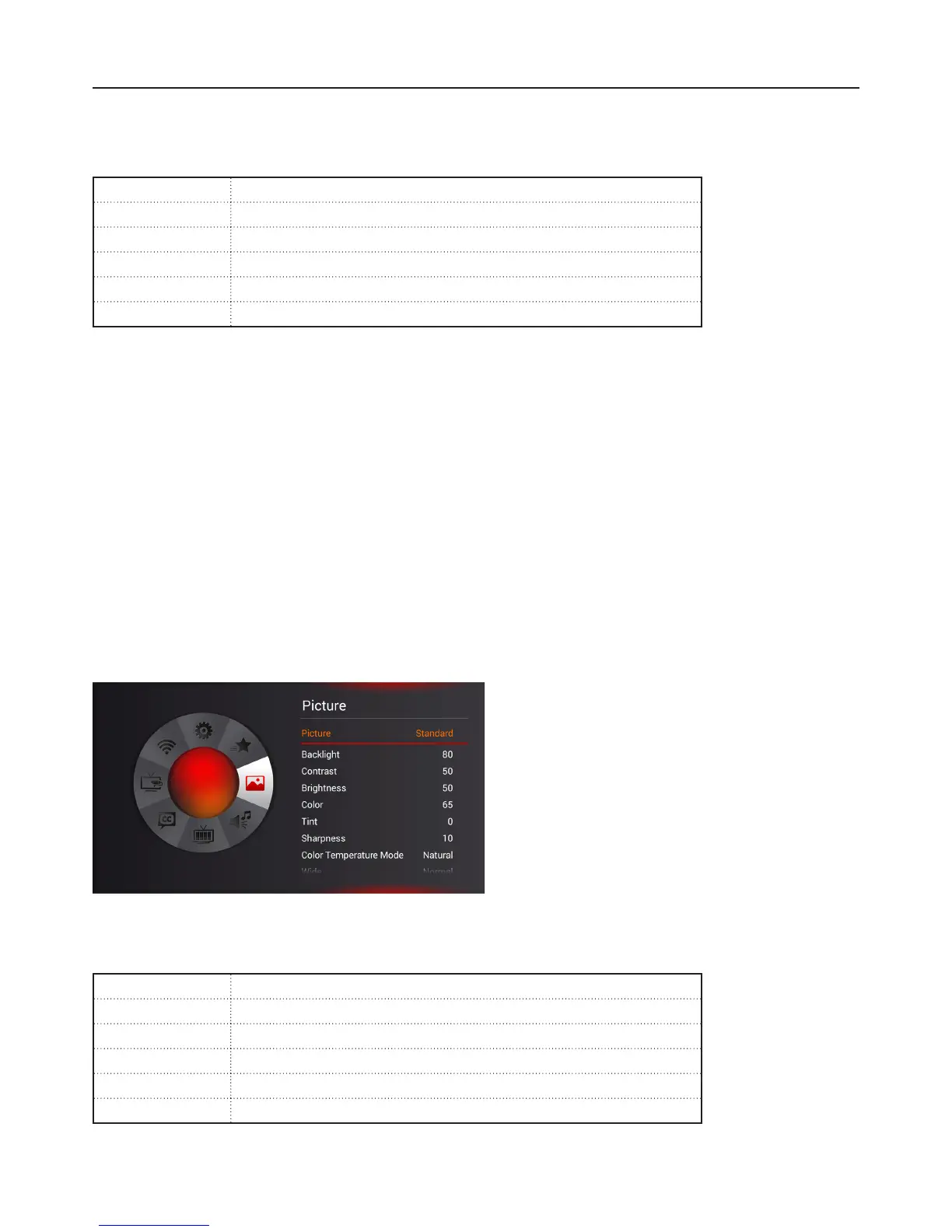
Picture Menu
Adjust picture options such as Brightness, contrast, and advanced picture settings.
Picture
Select the picture mode.
Custom For custom picture settings.
Standard For standard picture settings.
Movie For moving pictures such as movies.
Game For fast and dynamic pictures suitable with playing games.
Vivid For bright and vivid picture settings.
Sport Suggested settings for sporting events.


 To Next Page