18
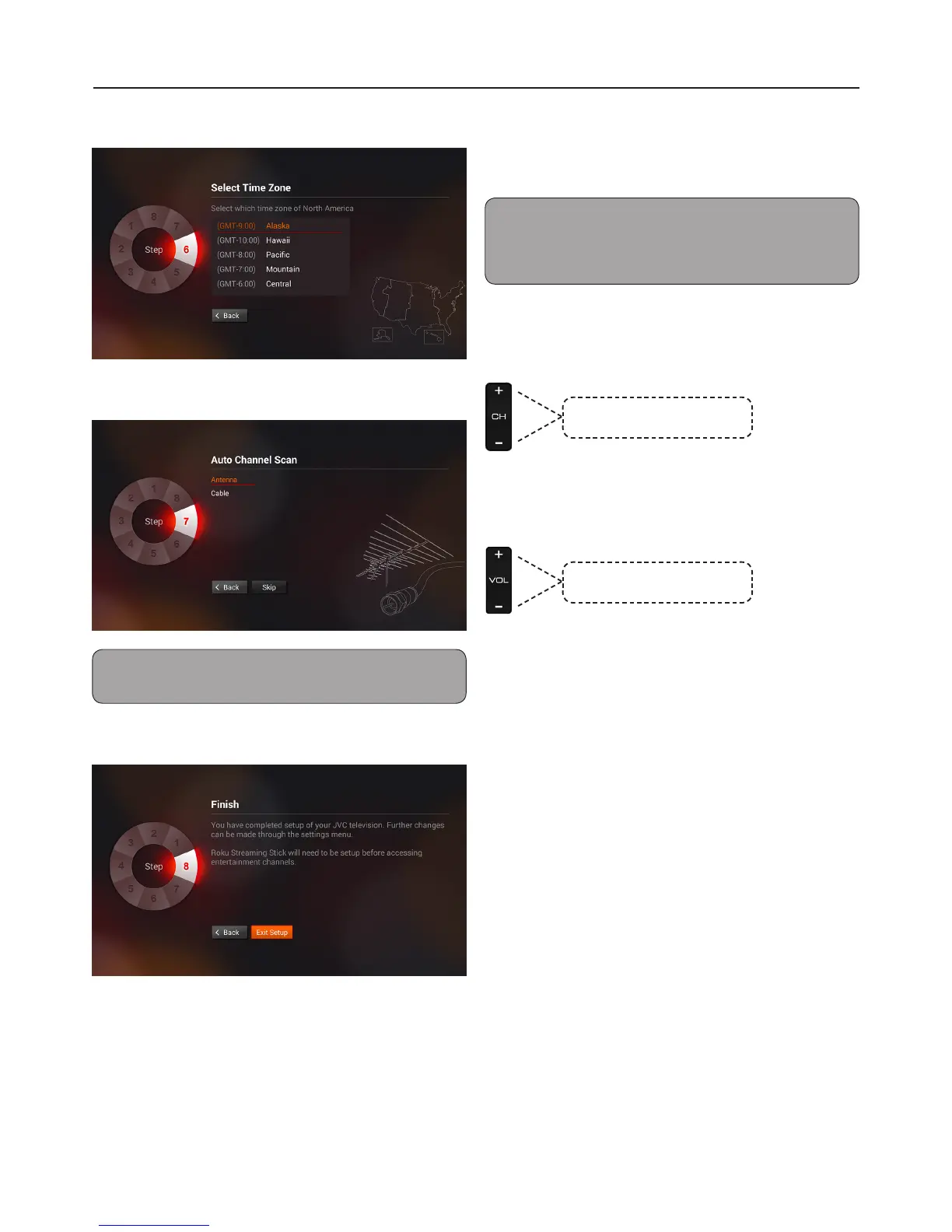
6 Select Time Zone.
7 Select Auto Channel Scan.
Note: Scanning may take some time to complete.
Select Stop Scan to cancel the auto scan at any time.
8 Finish.
Basic Operations
Changing Channel/Volume
Press the number buttons to directly select
channels.
Note: After pressing the number buttons, there will be
a few seconds delay before the TV changes channel. To
change to the channel right away, press OK after pressing
the number buttons.
To Browse Channel
Press the Channel +/- buttons on the remote
control.
Press to scroll through the
channels manually.
To Adjust Volume
Press the Volume +/- buttons on the remote
control.
Press to adjust volume level.
To Select Analog Channels
1~9 Press 1~9 as needed.
Example, to select channel 2,
press 2, then press OK.
10~99 Press the 2 digits in order.
Example, to select channel 15,
press 1, 5, then OK.
100~135: Press the 3 digits in order,
Example, to select channel 130,
press 1, 3, 0, then press OK.


 To Next Page