29
Adjusting the Menu Settings
Power Indicator
To turn on/o the LED power indicator while TV is on.
Date and Time
Congure TV Date and Time manually or automatically (require network connection).
Parental Control
The Parental Control feature allows you to control and restrict TV programs by Channel Lock, TV Rating,
or Movie Rating.
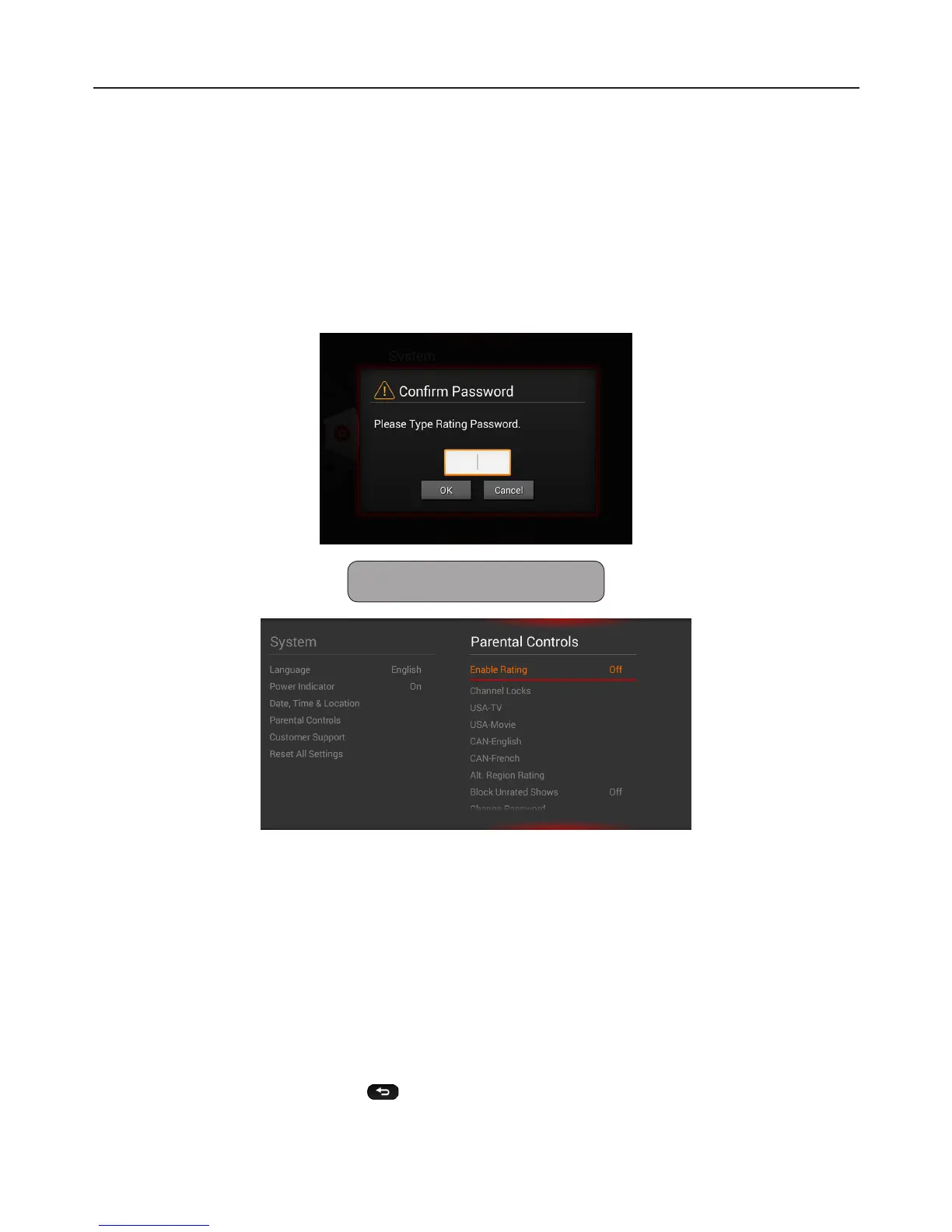
Access Parental Control Menu
The Parental Control menu requires you to enter the 4 digit password to access its submenu.
Note: The default password is “0000”.
Restrict By Channel
Use the Channel Lock feature to restrict viewing a specied channel . Once locked channel is selected,
the TV displays a blank screen.
1 Go to “Enable Rating” and select “On”.
2 Select “Channel Lock”, then press OK.
3 Highlight a channel that you want to lock.
4 Press OK to mark and lock the channel.
5 Press the Global return button to exit.



 To Next Page