Scene Selection
Common scenes that are often encountered can be recorded with the most
suitable settings.
Memo :
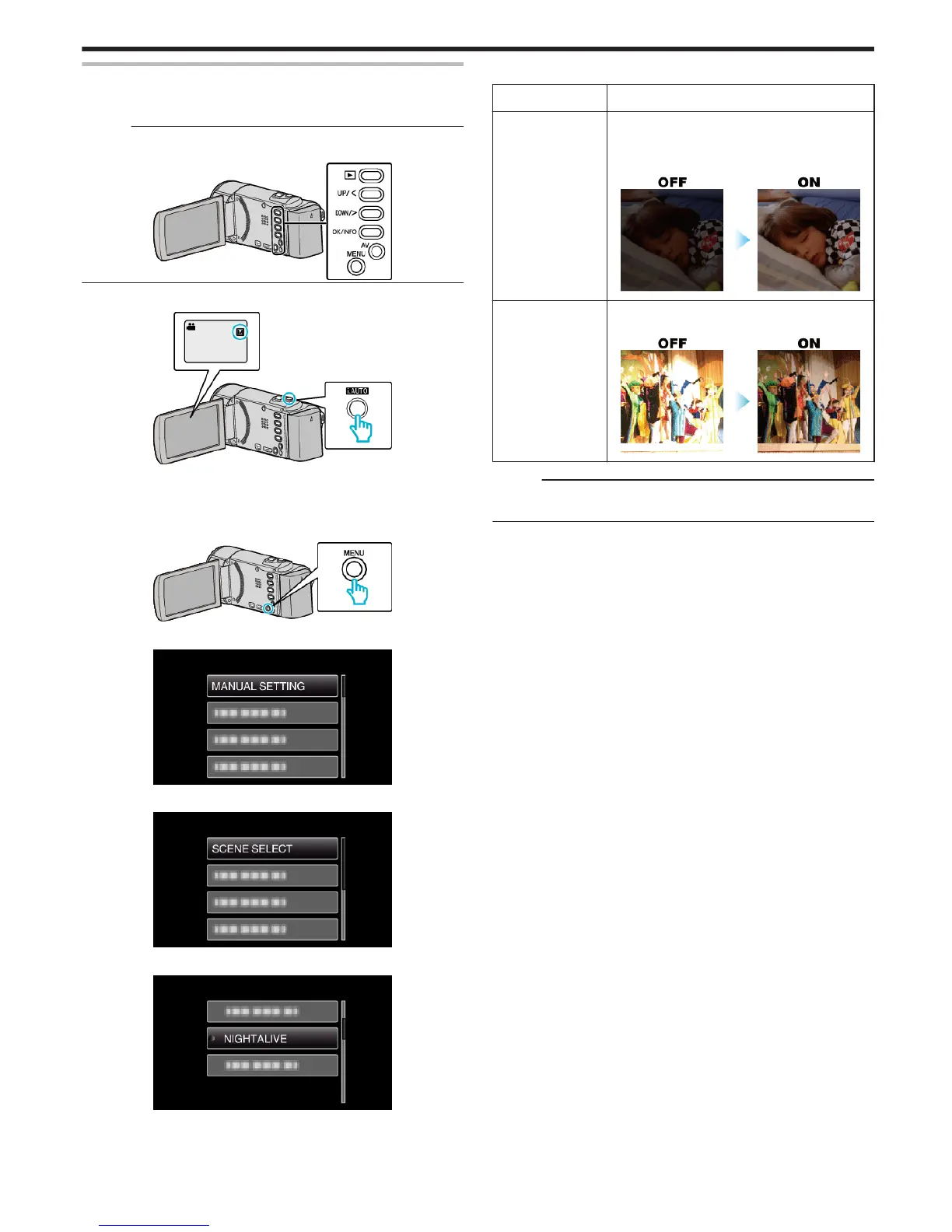
To select/move cursor towards up/left or down/right, press the button UP/<
or DOWN/>.
.
1
Select the Manual recording mode.
.
0
If the mode is P Intelligent Auto, press the i.AUTO button to switch
to H Manual.
The mode changes between Intelligent Auto and Manual with every
press.
2
Press MENU.
.
3
Select “MANUAL SETTING” and press OK.
.
4
Select “SCENE SELECT” and press OK.
.
5
Select the scene and press OK.
.
0
After setting, press OK.
*The image is only an impression.
Setting Effect
b NIGHTALIVE Increases gain and brightens the scene
automatically using a slow shutter when the
surrounding is dark.
To prevent camera shake, use a tripod.
.
g SPOTLIGHT Prevents the human subject from appearing too
bright under light.
.
Memo :
0
All scenes of “SCENE SELECT” cannot be set during “TIME-LAPSE
RECORDING”.
Recording
25








 To Next Page