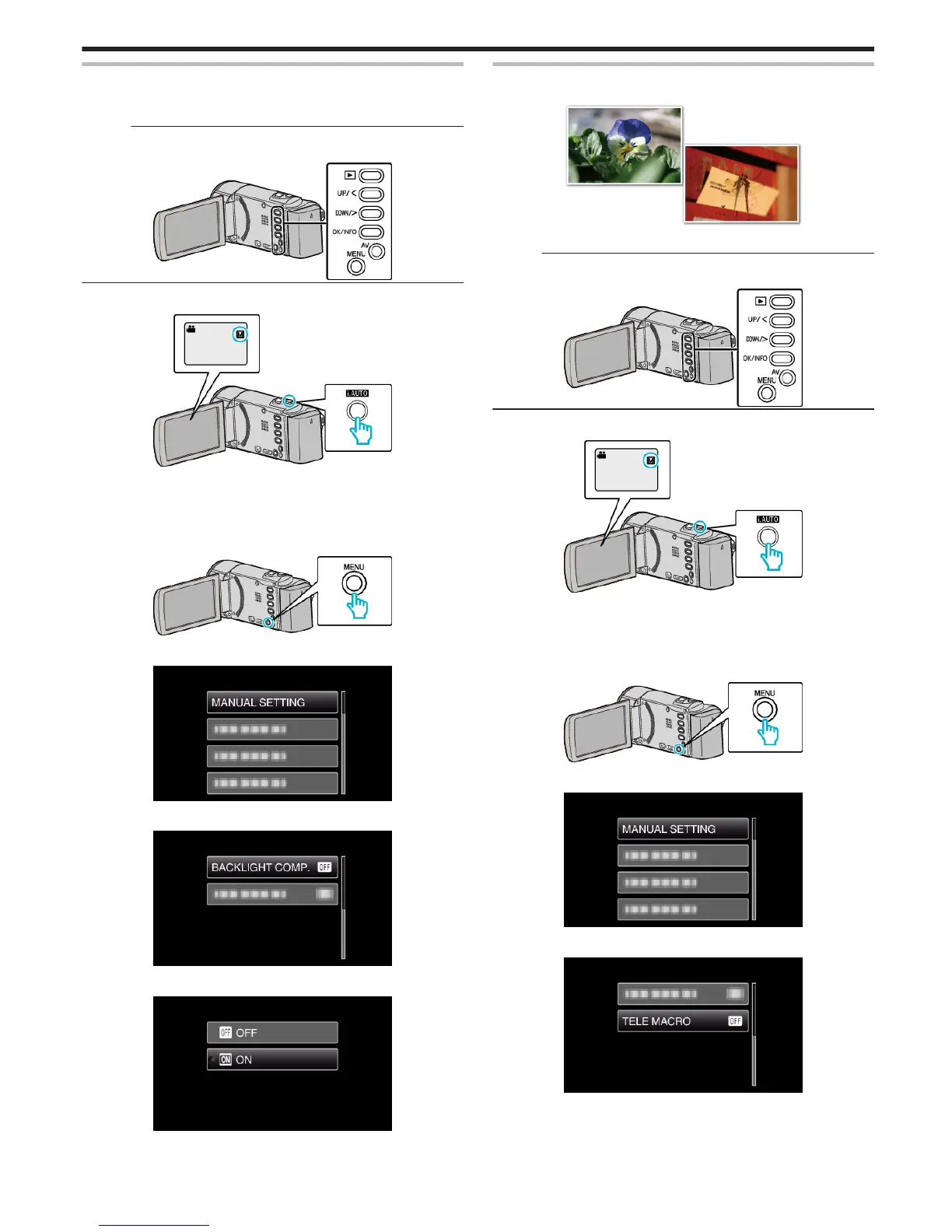
Setting Backlight Compensation
You can correct the image when the subject appears too dark due to
backlight.
Memo :
To select/move cursor towards up/left or down/right, press the button UP/<
or DOWN/>.
.
1
Select the Manual recording mode.
.
0
If the mode is P Intelligent Auto, press the i.AUTO button to switch
to
H
Manual.
The mode changes between Intelligent Auto and Manual with every
press.
2
Press MENU.
.
3
Select “MANUAL SETTING” and press OK.
.
4
Select “BACKLIGHT COMP.” and press OK.
.
5
Select “ON” and press OK.
.
0
After setting, the backlight icon l appears.
Taking Close-up Shots
You can take close-up shots of an object using the tele macro function.
.
*The image is only an impression.
Memo :
To select/move cursor towards up/left or down/right, press the button UP/<
or DOWN/>.
.
1
Select the Manual recording mode.
.
0
If the mode is P Intelligent Auto, press the i.AUTO button to switch
to
H
Manual.
The mode changes between Intelligent Auto and Manual with every
press.
2
Press MENU.
.
3
Select “MANUAL SETTING” and press OK.
.
4
Select “TELE MACRO” and press OK.
.
5
Select “ON” and press OK.
Recording
29








 To Next Page