38 EN
PLAYBACK
Basic Playback
1
LOAD A CASSETTE
Press OPEN/EJECT in the direction of the arrow
printed on it, then swing the cassette cover open until
it locks. The holder opens automatically.
Insert a tape and press “PUSH HERE” to close the
cassette holder.
2
SELECT MODE
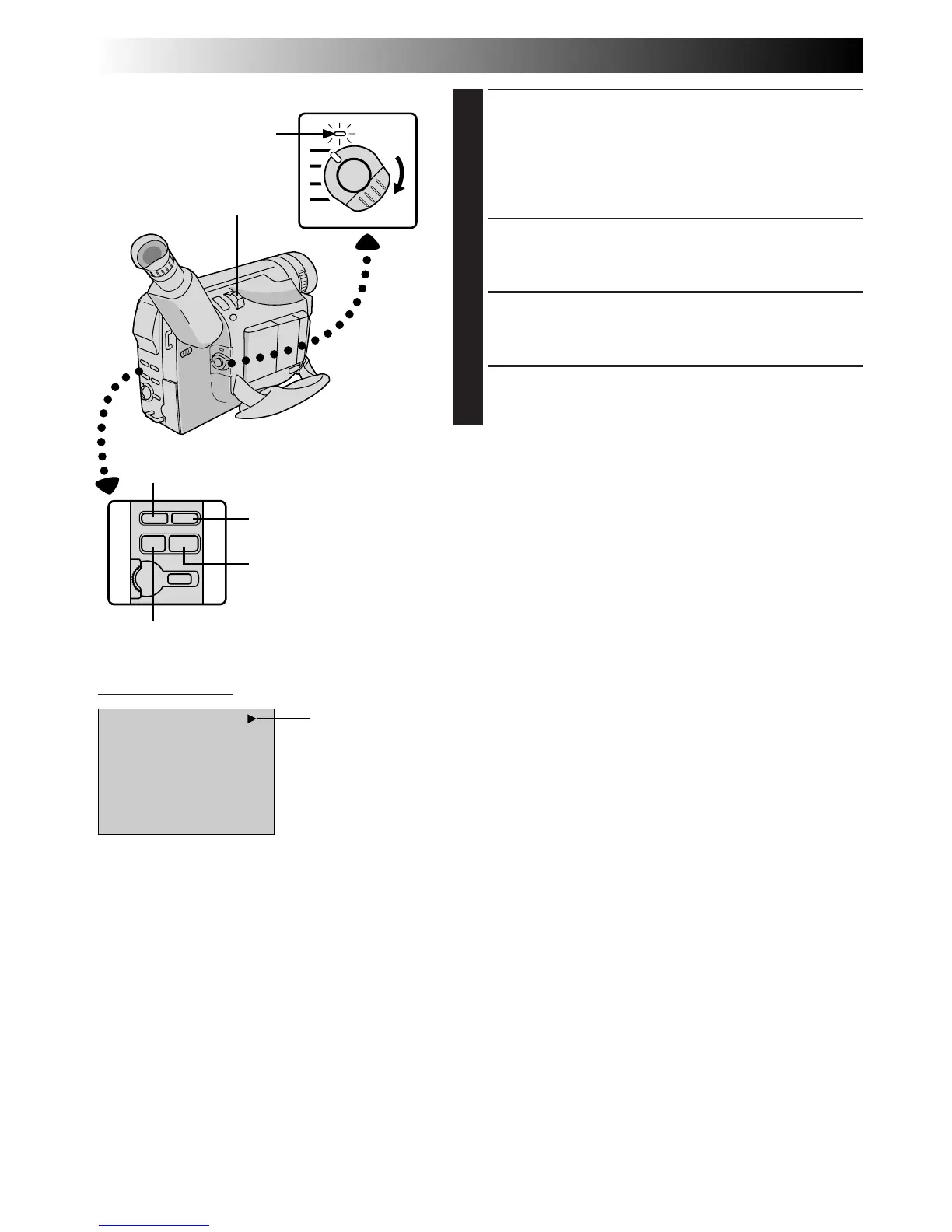
Set the Power Switch to “PLAY”. The power lamp
lights.
3
PLAY BACK
Press PLAY/PAUSE (
4
/6). The playback picture
appears.
4
STOP PLAYBACK
Press STOP (5).
Rewind or Fast-forward the tape
Press REW (
2
) to rewind, or FF (
3
) to fast-forward the
tape during Stop mode.
NOTES:
●
The camcorder shuts off automatically after about 5
minutes in Stop mode. To turn on again, set the Power
Switch to “POWER OFF”, then to “PLAY”.
●
Copy guarded tapes cannot be played back. The screen
becomes blue back.
Power Switch
Viewfinder Indication
Power lamp
Power Zoom Lever
Tape running
indicator
REW (
2
) Button
FF (
3
) Button
PLAY/PAUSE (
4
/6) Button
STOP (5) Button



 To Next Page