64 EN
INDEX
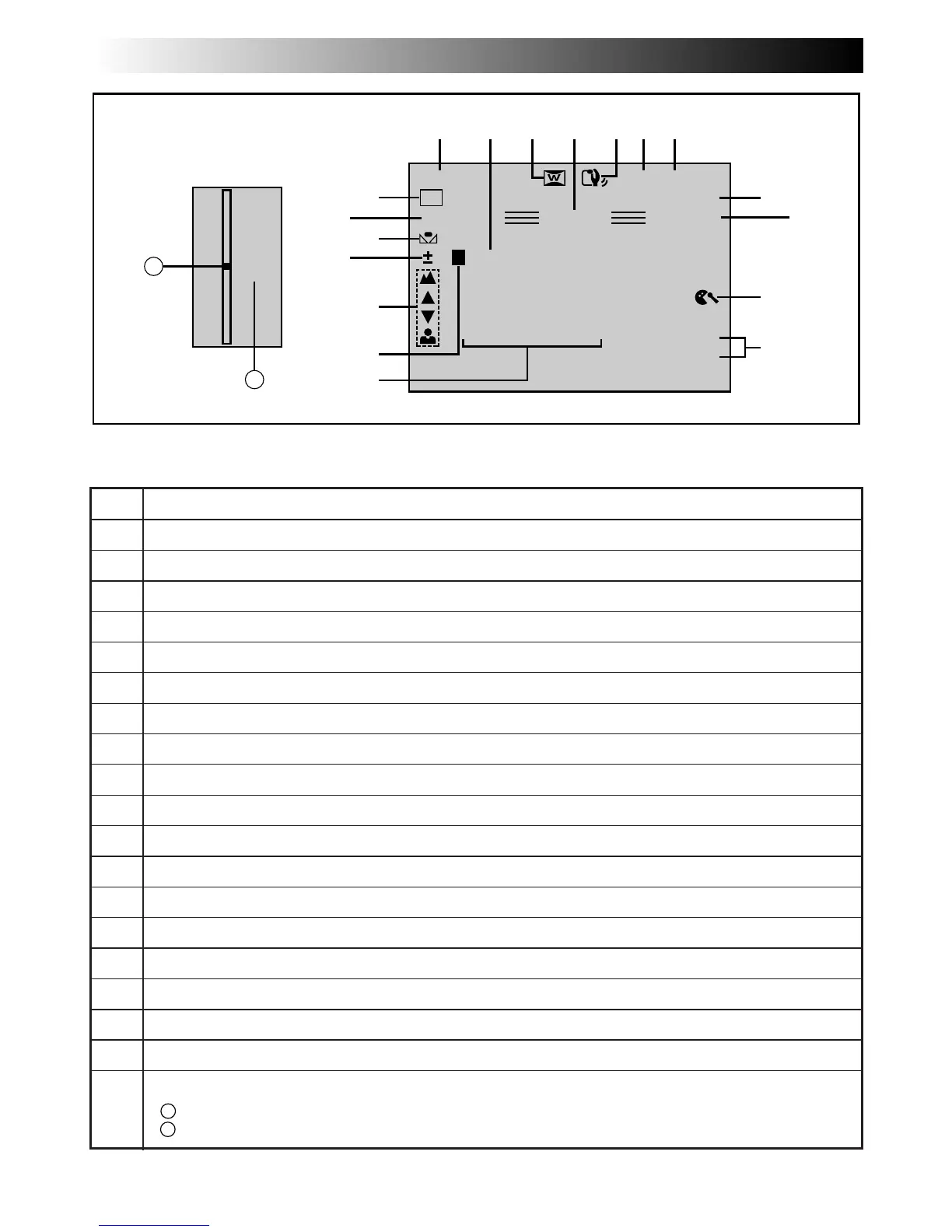
Indications
No. Function
1* Displays the operation mode position. (Z pg. 16)
2* Appears when taking a Snapshot. (Z pg. 22)
3 Appears when in the Squeeze or Cinema mode. (Z pg. 25)
4* Appears when in the Record-Standby mode. (Z pg. 16)
5 Appears when Picture Stabilizer is engaged. (Z pg. 18)
6* Displays the recording mode (SP or LP). (Z pg. 13)
7* Displays the tape remaining time. (Z pg. 17)
8* Appears during recording. (Z pg. 16)
9 Appears while the tape is running. (Z pg. 16)
0 Appears when the wind cut mode is engaged to cut down on noise created by wind. (Z pg. 26)
!* Displays the date/time. (Z pg. 21)
@ Displays the sound mode for approx. 5 seconds after turning on the camcorder. (Z pg. 26)
# Appears when the iris is locked. (Z pg. 35)
$ Appears when the focus is adjusted manually. (Z pg. 33)
% Appears when the exposure is adjusted. (Z pg. 34)
^ Appears when the white balance is adjusted. (Z pg. 37)
& Displays the selected Program AE with special effects. (Z pg. 31)
* Displays the selected Fade/Wipe effect. (Z pg. 29)
( Appears during zooming. (Z pg. 18)
a
Zoom level indicator
b
Approximate zoom ratio
Viewfinder Indications During Recording
* :Pressing DISPLAY for longer than 1 second lets you remove indications marked with * from the screen.
6w
TC
– – – – –
6– – – – –
VOLUME
12 : 34 : 24
0
MODE
SET
5S
DATE / TIME !
E01
TAPE !
A
PRO. LP 35 min
PAUSE
444
REC
0 L PHOTO
W
H
1/250
DEC 25 ’ 98
PM 5 : 30
32kHz
SOUND
1* 2* 3 5 6*7*4*
8*
0
9
$
#
%
^
*
&
!*
@
(
D
T
W
5X
a
b



 To Next Page