Filename [XVC2829US_06Index.fm]
Masterpage:Left+
10 EN
Page 10 8 December 2004 9:56 am
INDEX (cont.)
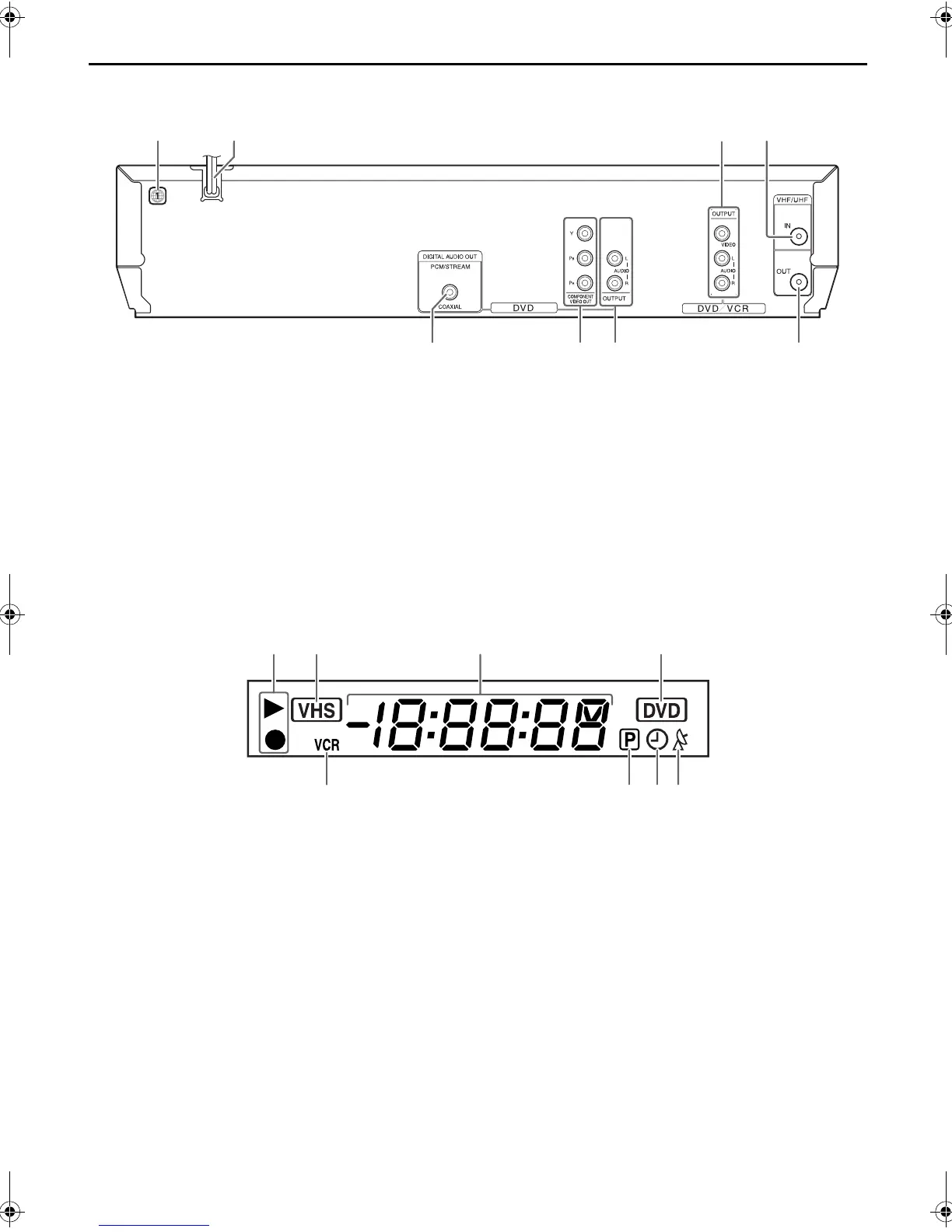
Rear View
A Region Number Label 墌 pg. 7
B AC Power Cord 墌 pg. 13, 14
C Audio/Video Output Connectors (AUDIO/
VIDEO OUTPUT) 墌 pg. 13, 14, 53
D Antenna Input Connector (VHF/UHF IN)
墌 pg. 13, 14
E Digital Audio Output Connector
(DIGITAL AUDIO OUT)* 墌 pg. 55
F Component Video Output Connectors
(COMPONENT VIDEO OUT)* 墌 pg. 14
G Audio Output Connectors (AUDIO OUTPUT
(L/R))*
H Antenna Output Connector (VHF/UHF OUT)
墌 pg. 13, 14
* These connectors are only for DVD deck.
Front Display Panel
A Operation Mode Indicators
B VHS Indicator*
* Lights up when selecting the VCR deck by pressing VCR/DVD on
the unit or VCR on the Remote.
C Channel/Clock
Auxiliary Input Mode Display (F-1) (VCR deck
only)
Counter Display (VCR deck)
Tape Speed (SP/EP) (VCR deck only)
Multi-information window** (DVD deck)
**The current group/title/track/chapter number(s), time and status
information.
D DVD Indicator
E VCR Indicator 墌 pg. 32
F Progressive Mode Indicator
墌 pg. 15
G “Timer” Indicator (VCR deck only) 墌 pg. 35, 39
H Satellite Auto Recording Indicator (N) (VCR deck
only) 墌 pg. 39
AB CD
EHFG
AB C D
EHG
F
XVC2829US_01.book Page 10 Wednesday, December 8, 2004 10:48 AM


 To Next Page