EasyManua.ls Logo

JVC KD-R310 - Bluetooth Mobile Phone Integration; Handling Incoming Calls; Receiving Text Messages; Making Calls and Remote Control

JVC KD-R310
49 pages
Print Icon
To Next Page IconTo Next Page
To Previous Page IconTo Previous Page
Loading...
q
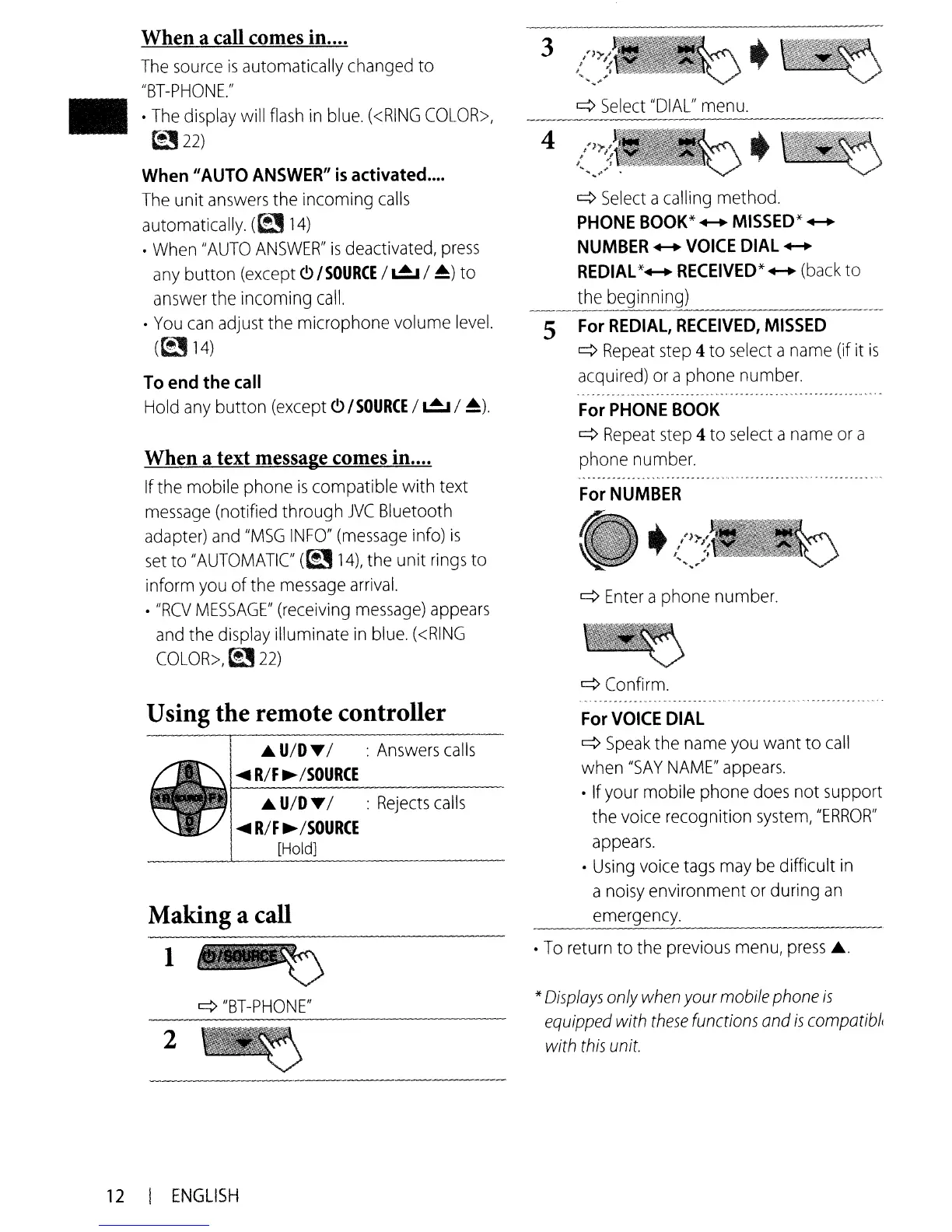
Select
"DIAL"
menu.
q
Enter
a phone
number.
For
PHONE
BOOK
q
Repeat
step
4 to
select
a
name
or
a
phone
number.
q
Select
a
calling
method.
PHONE
BOOK*
....
MISSED*
....
NUMBER
VOICE
DIAL
....
REDIAL
*
RECEIVED*
(back
to
the beginning)
----------
For
REDIAL,
RECEIVED,
MISSED
q
Repeat
step
4 to
select
a
name
(if it
is
acquired)
or
aphone
number.
5
4
3
When a text message comes in....
If
the mobile phone
is
compatible with text
message
(notified through
JVC
Bluetooth
adapter)
and
"MSG
INFO"
(message
info)
is
set
to
"AUTOMATIC
(~
14),
the unit
rings
to
inform
you
of the
message
arrival.
•
"RCV
MESSAGE"
(receiving
message)
appears
and
the
display
illuminate
in
blue.
«RING
COLOR>,
~
22)
When a call comes in....
The
source
is
automatically
changed
to
"BT-PHONE."
•
The
display
will
flash
in
blue.
«RING
COLOR>,
t!J
22)
When
II
AUTO
ANSWER
II
is
activated
....
The
unit
answers
the incoming
calls
automatically.
(~
14)
•
When
"AUTO
ANSWER"
is
deactivated,
press
any
button
(except
<9
/SOURCE
I
~
/
~)
to
answer
the incoming
call.
•
You
can
adjust
the microphone volume
level.
((214)
To
end
the
call
Hold
any
button
(except
<9
/SOURCE
I
~
I
~).
•
¢
Confirm.
q
"BT-PHONE"
Using the remote controller
Making a call
l~
*
Displays
only
when
your mobile
phone
is
equipped
with
these
functions and
is
compotibh
with
this
unit.
For
VOICE
DIAL
q
Speak
the
name
you
want to
call
when
"SAY
NAME"
appears.
•
If
your
mobile phone
does
not support
the
voice
recognition
system,
"ERROR"
appears.
•
Using
voice
tags
may
be
difficult
in
a
noisy
environment
or
during
an
emergency.
•
To
return
to the
previous
menu,
press
...
..
U/D
...I :
Rejects
calls
~
R/F
~
/SOURCE
I [Hold]
I
..
U/D
.../ :
Answers
calls
~
R/F
~
/SOURCE
2
12
I
ENGLISH