EasyManua.ls Logo

JVC KD-R310 - Menu Operations; Navigating Menu Categories; Display, Clock, and Time Zone Settings; Tuner, SIRIUS ID, and HD Radio Settings

JVC KD-R310
49 pages
Print Icon
To Next Page IconTo Next Page
To Previous Page IconTo Previous Page
Loading...
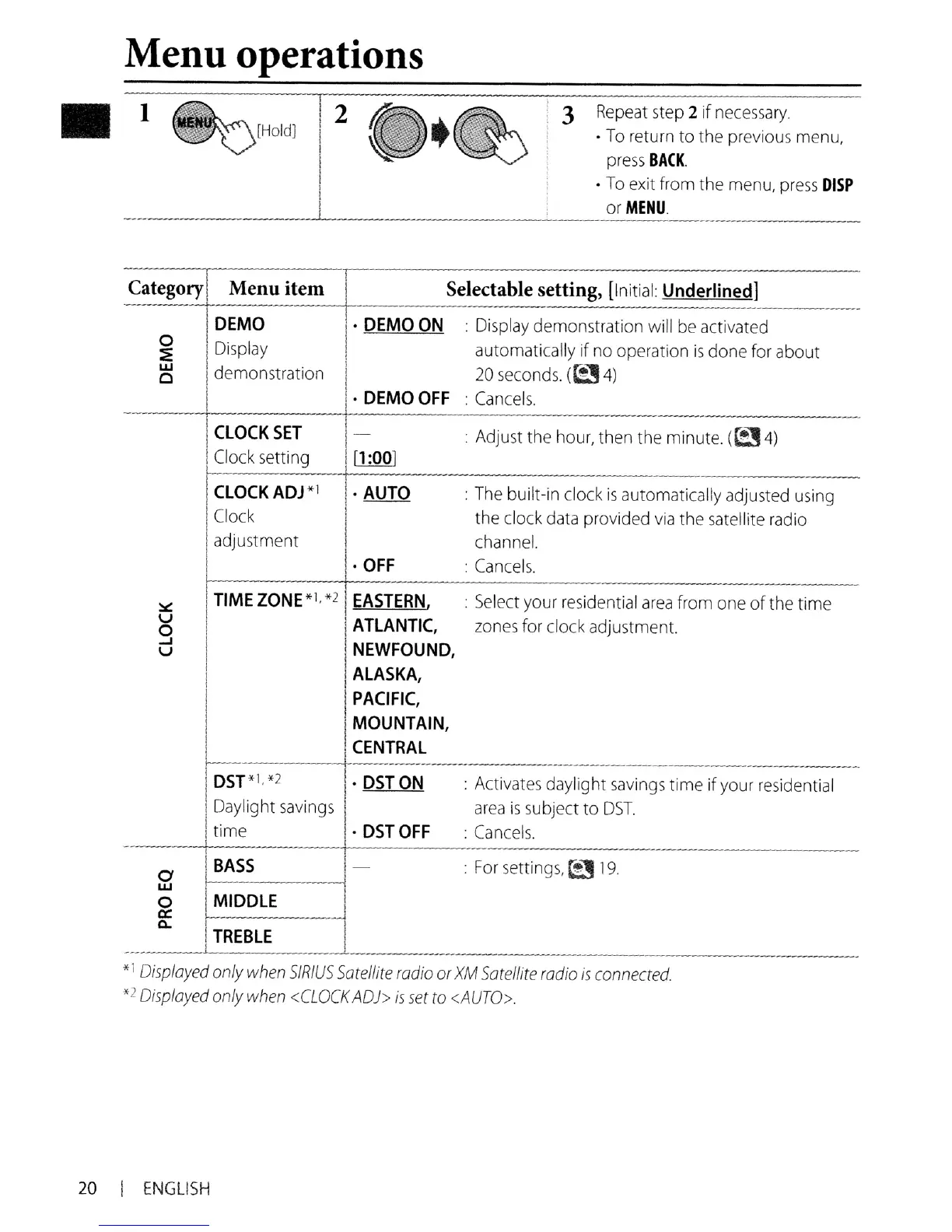
Menu operations
1
~[HOldJ
3
Repeat
step
2 if
necessary.
.
To
return to the
previous
menu,
press
BACK
.
To
exit
from
the
menu,
press
DISP
or
MENU.
Category Menu item
Selectable setting,
[Initial:
Underlined]
- -
DEMO
DEMO
ON
:
Display
demonstration will
be
activated
0
Display
automatically if
no
operation
is
done
for
about
::E
w
demonstration
20
seconds.
(t!J
4)
0
·
DEMOOFF
:
Cancels.
-
CLOCK
SET
-
:
Adjust
the
hour,
then
the
minute.
((24)
Clock
setting
[1
:001
ClOCKADJ*\
. AUTO
:
The
built-in clock
is
automatically adjusted
using
Clock
the
clock
data
provided
via
the
satellite
radio
adjustment
channel.
·
OFF
:
Cancels.
-
-
:.::
TIME
ZONE
*1, *2
EASTERN,
:
Select
your
residential
area
from
one
of
the
time
u
ATLANTIC,
zones
for
clock adjustment.
0
...J
NEWFOUND,
u
ALASKA,
PACIFIC,
MOUNTAIN,
CENTRAL
f---
--------------
-
----
DST*I, *2
·
DSTON
:
Activates
daylight
savings
time if
your
residential
Daylight
savings
area
is
subject to
DST.
time
·
DSTOFF
:
Cancels.
-
BASS
-
:
For
settings,
t!J
19.
0
w
0
MIDDLE
a:
0..
TREBLE
----
-
*1
Displayed
only
when
SIRIUS
Satellite
radio
or
XM
Satellite
radio
is
connected.
*2
Displayed
only
when
<CLOCK
AD»
is
set
to
<AUTO>.
20
I
ENGLISH

Other manuals for JVC KD-R310

Related product manuals