EasyManua.ls Logo

JVC KD-R310 - Selecting a Preset Sound Mode

JVC KD-R310
49 pages
Print Icon
To Next Page IconTo Next Page
To Previous Page IconTo Previous Page
Loading...
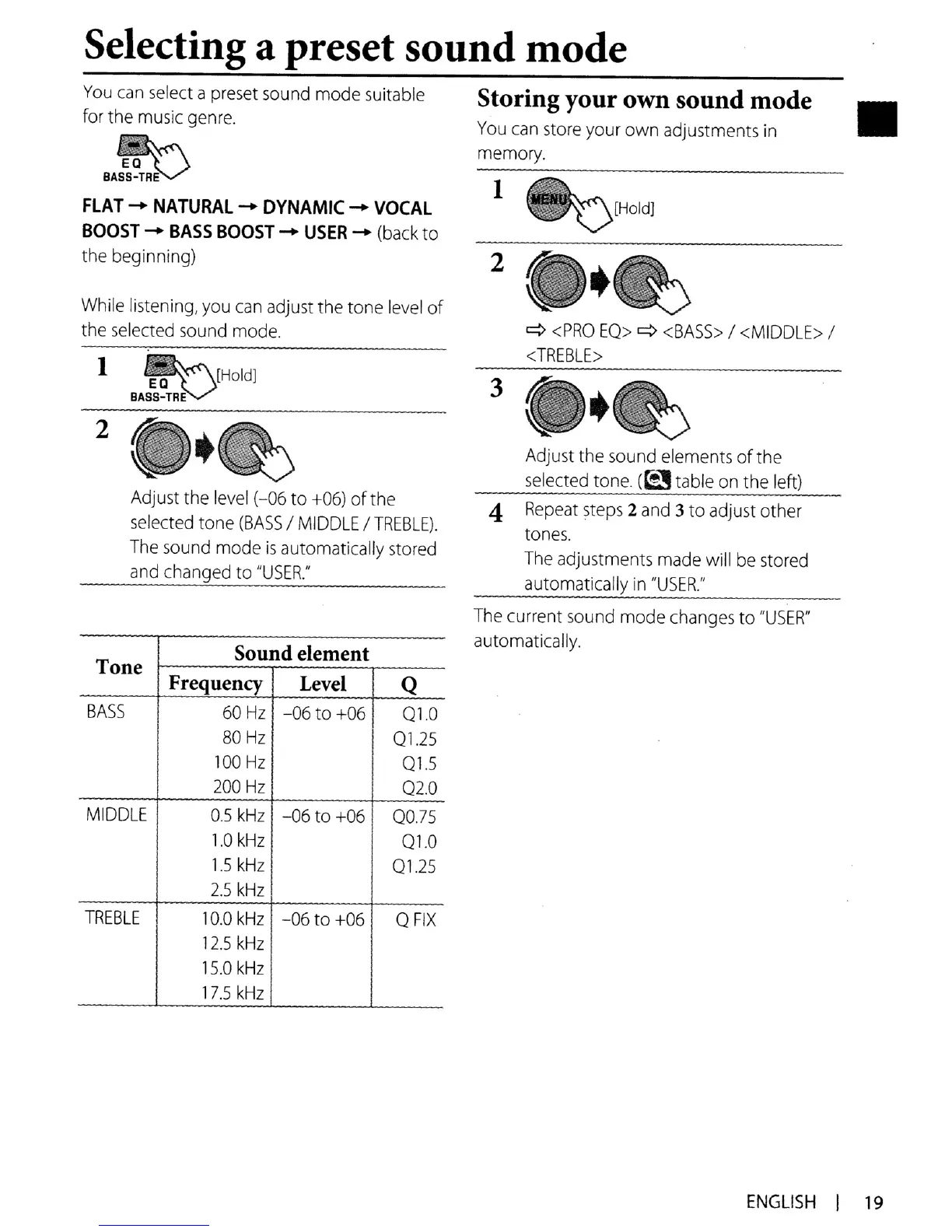
Selecting a preset sound mode
FLAT
-+
NATURAL
-+
DYNAMIC
-+
VOCAL
BOOST
-+
BASS
BOOST
-+
USER
-+
(back
to
the
beginning) 2
Adjust the
sound
elements ofthe
selected
tone.
(~table
on
the left)
~
<PRO
EQ>
~
<BASS>
/
<MIDDLE>
/
<TREBLE>
4
Repeat
steps
2
and
3to adjust other
tones.
The
adjustments
made
will
be
stored
automatically
in
"USER:
3
1
Storing your own sound mode
You
can
store
your own adjustments
in
memory.
[Holdl
Adjust
the
level
(-06 to
+06)
of
the
selected
tone
(BASS
/
MIDDLE
/
TREBLE).
The
sound
mode
is
automatically
stored
and
changed to
"USER:
1
You
can
select
a
preset
sound
mode suitable
for the
music
genre.
~
8AS~~TR~
While
listening,
you
can
adjust the tone
level
of
the
selected
sound
mode.
Tone
Sound element
Frequency Level
Q
BASS
60
Hz
-06 to
+06
Q1.0
80
Hz
Q125
100
Hz
Ql.5
200
Hz
Q2.0
MIDDLE
0.5
kHz
-06 to
+06
QO.75
1.0
kHz
Q1.0
1.5
kHz
Q1.25
2.5
kHz
TREBLE
10.0
kHz
-06 to +06
QFIX
12.5
kHz
15.0
kHz
17.5
kHz
The
current
sound
mode
changes
to
"USER"
automatically.
ENGLISH
I
19

Other manuals for JVC KD-R310

Related product manuals