EasyManua.ls Logo

JVC KD-R310 - Troubleshooting Guide; General, Radio, and Disc Playback Issues; MP3;WMA, Bluetooth, and HD Radio Problems

JVC KD-R310
49 pages
Print Icon
To Next Page IconTo Next Page
To Previous Page IconTo Previous Page
Loading...
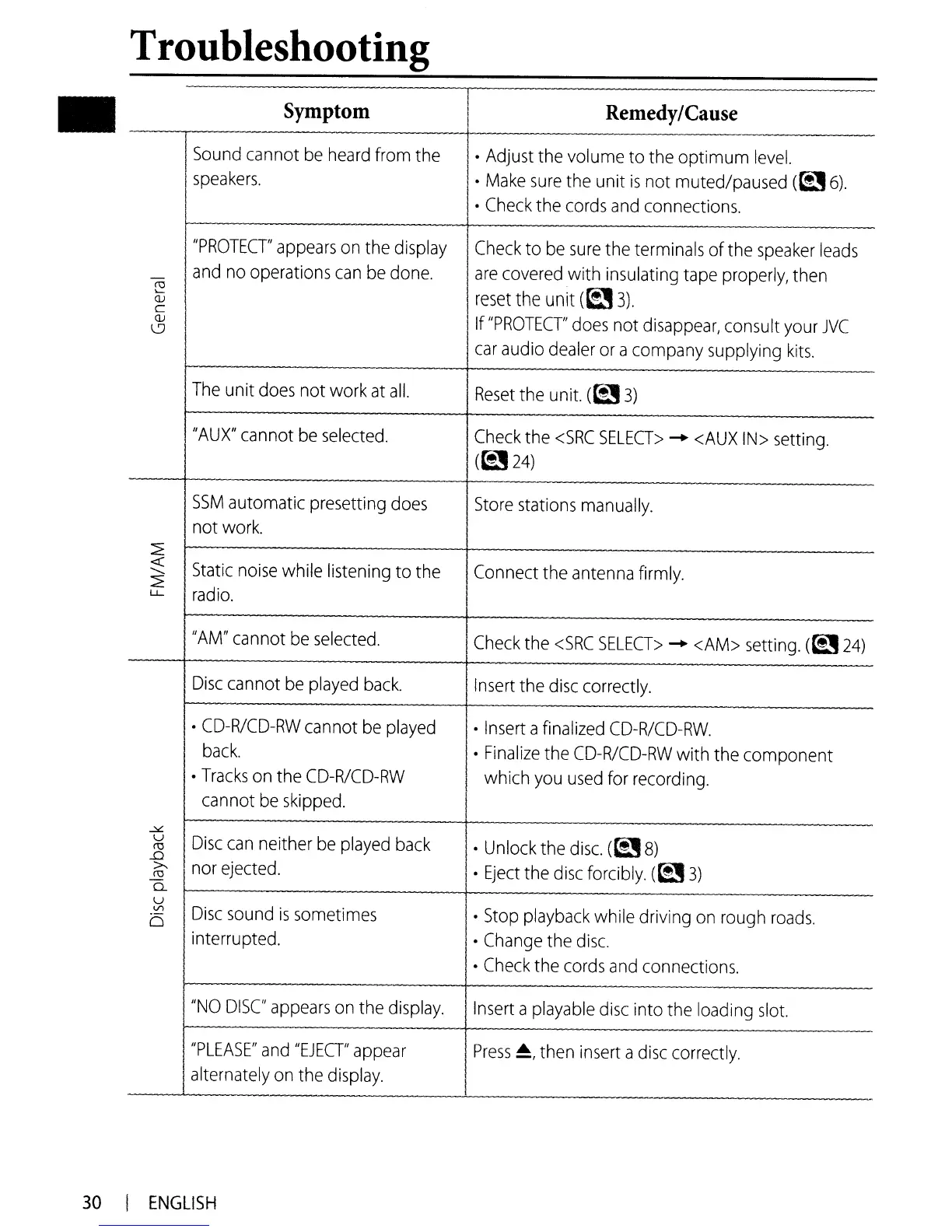
Troubleshooting
Symptom
-~nd
cannot
be
heard
from the
I
speakers.
I
,
Remedy/Cause
Adjust
the volume to the optimum
level.
Make
sure
the unit
is
not muted/paused
(~6).
Check
the
cords
and
connections.
I
JVC
I
Check
to
be
sure
the terminals of the
speaker
leads
I
I
are
covered
with insulating
tape
properly,
then
I
reset
the
unit
(~
3).
If
"PROTECT'
d
d'
Tracks
on
the
CD-R/CD-RW
I which
you
used
for
recording.
cannot
be
skipped.
\.9
I
oes
not
Isappear,
consu
t
your
I
car
audio
dealer
or
acompany supplying
kits.
i
The
unit
does
not work
at
all.
Reset
the
unit.
(~
3)
"AU
X"
cannot
be
selected.
Check
the
<SRC
SELECT>
-+
<AUX
IN>
setting.
I
(~24)
------+------
-
SSM
automatic presetting
does
Store
stations
manually.
not
work.
~
«
Static
noise
while listening to the Connect the
antenna
firmly.
.......
2
radio.
I
L.L
"AM"
cannot
be
selected.
Check
the
<SRC
SELECT>
-+
<AM>
setting.
(~24)
Disc
cannot
be
played
back.
Insert
the
disc
correctly.
I.
CD-R/CD-RW
cannot
be
played
Insert
a
finalized
CD-R/CD-RW
.
back
.
Finalize
the
CD-R/CD-RW
with the component
30
I
ENGLISH

Other manuals for JVC KD-R310

Related product manuals