25ENGLISH
Category
Menu item Selectable setting, [Initial: Underlined]
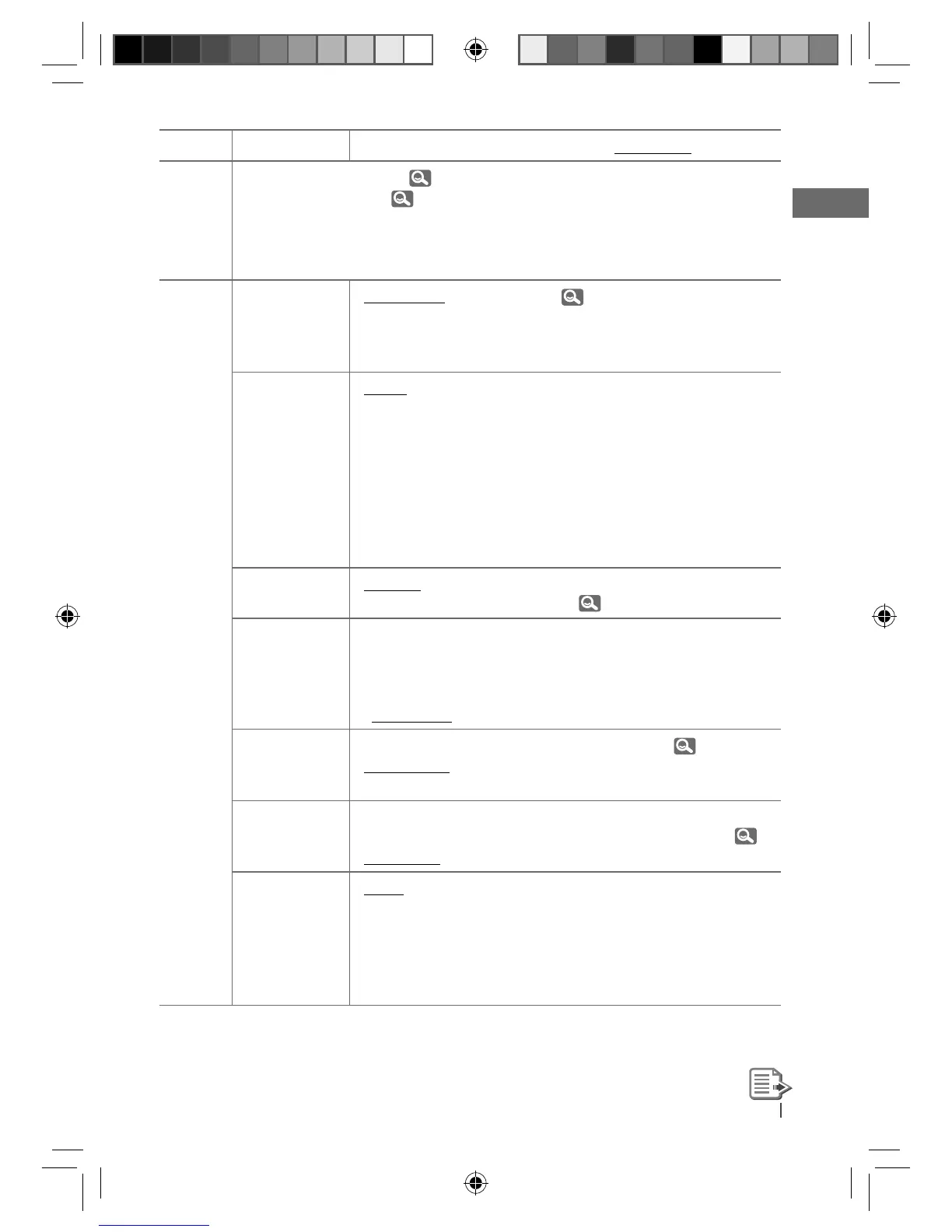
BLUETOOTH *
3
: For Bluetooth operations, 14 – 17.
: For Bluetooth settings, 18, 19.
TUNER
SSM *
4
Strong-station
Sequential
Memory
• SSM 01 – 06
• SSM 07 – 12
• SSM 13 – 18
: For settings,
7.
AF-REG *
5
Alternative
frequency/
regionalization
reception
• AF ON
• AF-REG ON
• OFF
: When the currently received signals become
weak, the unit switches to another station (the
programme may differ from the one currently
received). (The AF indicator lights up.)
: When the currently received signals become
weak, the unit switches to another station
broadcasting the same programme. (The AF
and REG indicators light up.)
: Cancels.
PTY-
STANDBY *
4,
*
5
• PTY OFF, PTY
codes
: Activates PTY Standby Reception with one of
the PTY codes ( 8).
TA VOLUME *
5
Traffic
announcement
volume
• VOLUME 00 –
VOLUME 50 (or
VOLUME 00 –
VOLUME 30) *
6
[ VOLUME 15 ]
:
—
P-SEARCH *
5
Programme
search
• SEARCH ON
• SEARCH OFF
: Activates Programme Search. (
9)
: Cancels.
MONO *
4
Monaural mode
• MONO ON
• MONO OFF
: Activate monaural mode to improve FM
reception, but stereo effect will be lost. ( 7)
: Restore the stereo effect.
IF BAND
Intermediate
frequency band
• AUTO
• WIDE
: Increases the tuner selectivity to reduce
interference noises between adjacent stations.
(Stereo effect may be lost.)
: Subject to interference noises from adjacent
stations, but sound quality will not be
degraded and the stereo effect will remain.
*
3
Displayed only when the USB Bluetooth Adapter (KS-UBT1) is connected.
*
4
Displayed only when the source is “FM.”
*
5
Only for FM Radio Data System stations.
*
6
Depends on the amplifier gain control.
EN22-29_KD-R711_003A_5.indd 25EN22-29_KD-R711_003A_5.indd 25 12/17/09 5:23:35 PM12/17/09 5:23:35 PM


 To Next Page
 Loading...