21ENGLISH
Listening to the other external components
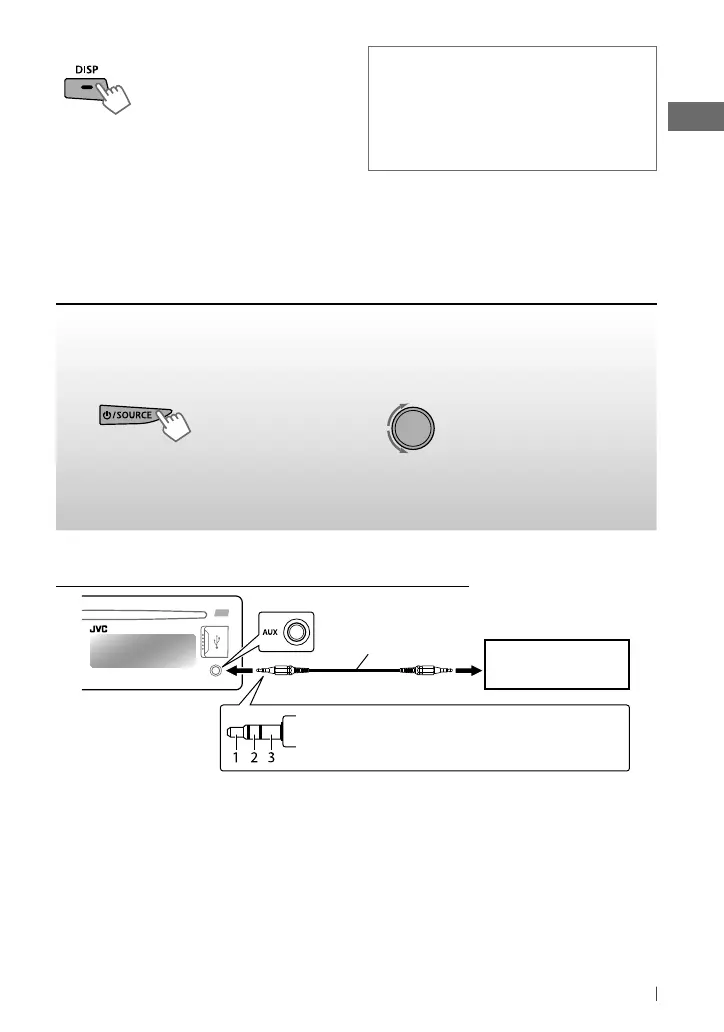
You can connect an external component to the AUX (auxiliary) input jack on the control panel.
Preparation:
Make sure <AUX ON> is selected for the <SRC SELECT>
=
<AUX IN> setting. (page 25)
• For details, refer also to the instructions supplied with the external components.
~
]
“AUX IN”
!
]
Adjust the volume.
Ÿ
Turn on the connected component and
start playing the source.
⁄
Adjust the sound as you want. (page 22)
Connecting an external component to the AUX input jack
3.5 mm (3/16”) stereo
mini plug (not supplied)
Portable audio player,
etc.
Recommended to use a 3-terminal plug head
stereo mini plug for optimum audio output.
Additional information
Pandora can be operated only for the compatible iPod
touch/iPhone. For iPod touch, Pandora can only be
controlled under Wi-Fi connection.
Due to music licensing restrictions, the Pandora radio
service application is available in the United States.
Changing the display information
Station name
=
Album name/Artist name
=
Track title
=
Elapsed playing time
=
Clock
time
=
(back to the beginning)
• Press and hold DISP to scroll the current
display information.
EN02-29_KD-R728BT[J]_f.indd 21EN02-29_KD-R728BT[J]_f.indd 21 1/14/11 9:43:18 AM1/14/11 9:43:18 AM


 To Next Page
 Loading...