20
ENGLISH
3 Select or adjust the selected PSM item.
4 Repeat steps 2 and 3 to adjust the
other PSM items if necessary.
5 Finish the procedure.
You can change PSM (Preferred Setting Mode)
items listed in the table that follows.
1 Enter the PSM menu (see page 4).
2 Select a PSM item.
General settings — PSM
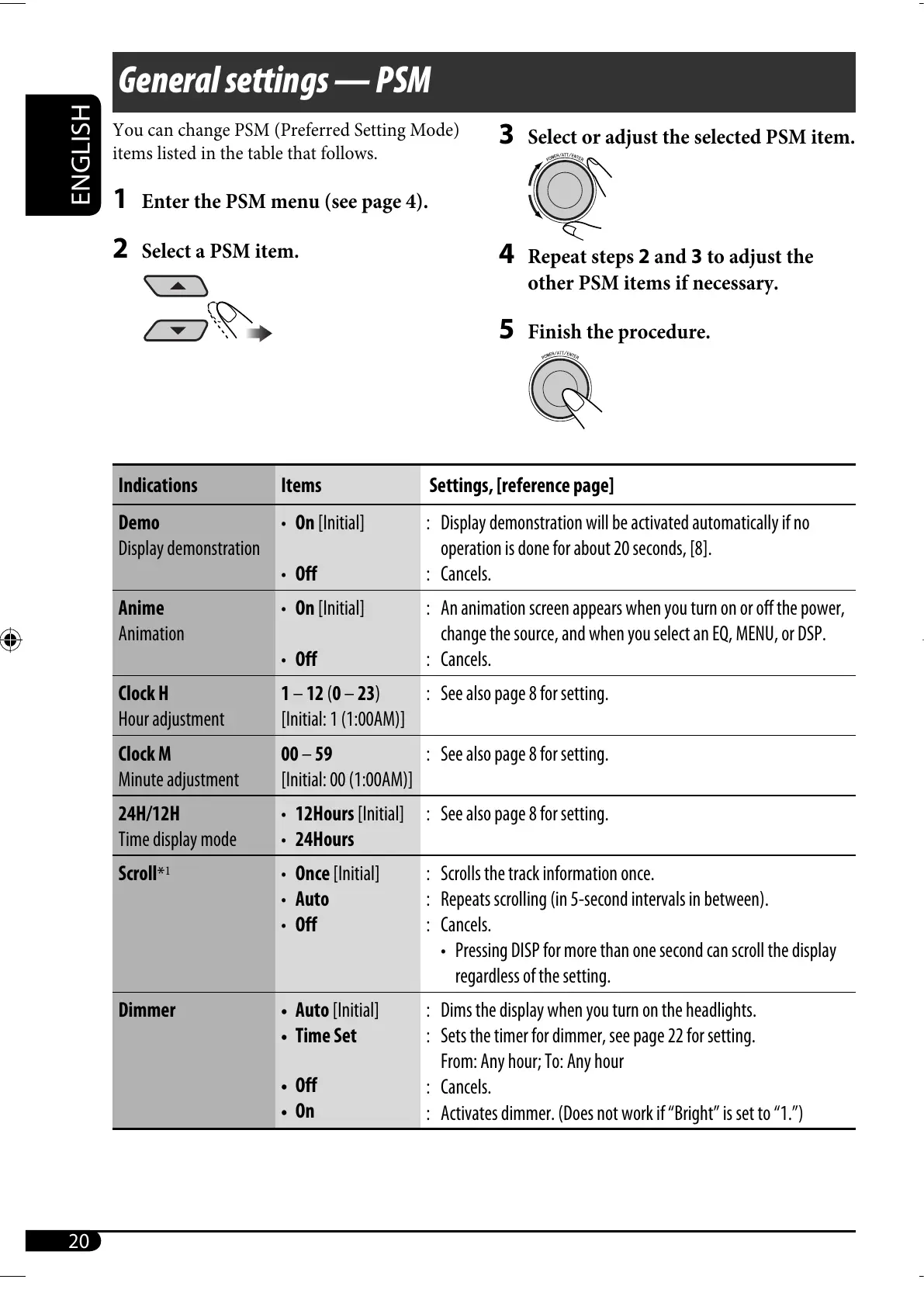
Indications Items Settings, [reference page]
Demo
Display demonstration
• On [Initial]
• Off
: Display demonstration will be activated automatically if no
operation is done for about 20 seconds, [8].
: Cancels.
Anime
Animation
• On [Initial]
• Off
: An animation screen appears when you turn on or off the power,
change the source, and when you select an EQ, MENU, or DSP.
: Cancels.
Clock H
Hour adjustment
1 – 12 (0 – 23)
[Initial: 1 (1:00AM)]
: See also page 8 for setting.
Clock M
Minute adjustment
00 – 59
[Initial: 00 (1:00AM)]
: See also page 8 for setting.
24H/12H
Time display mode
• 12Hours [Initial]
• 24Hours
: See also page 8 for setting.
Scroll
*
1
• Once [Initial]
• Auto
• Off
: Scrolls the track information once.
: Repeats scrolling (in 5-second intervals in between).
: Cancels.
• Pressing DISP for more than one second can scroll the display
regardless of the setting.
Dimmer • Auto [Initial]
• Time Set
• Off
• On
: Dims the display when you turn on the headlights.
: Sets the timer for dimmer, see page 22 for setting.
From: Any hour; To: Any hour
: Cancels.
: Activates dimmer. (Does not work if “Bright” is set to “1.”)
EN16-21_SH1000U_001A_3.indd 20EN16-21_SH1000U_001A_3.indd 20 1/12/06 4:08:31 PM1/12/06 4:08:31 PM



 To Next Page
 Loading...










