ENGLISH
5
How to change the display information and patterns
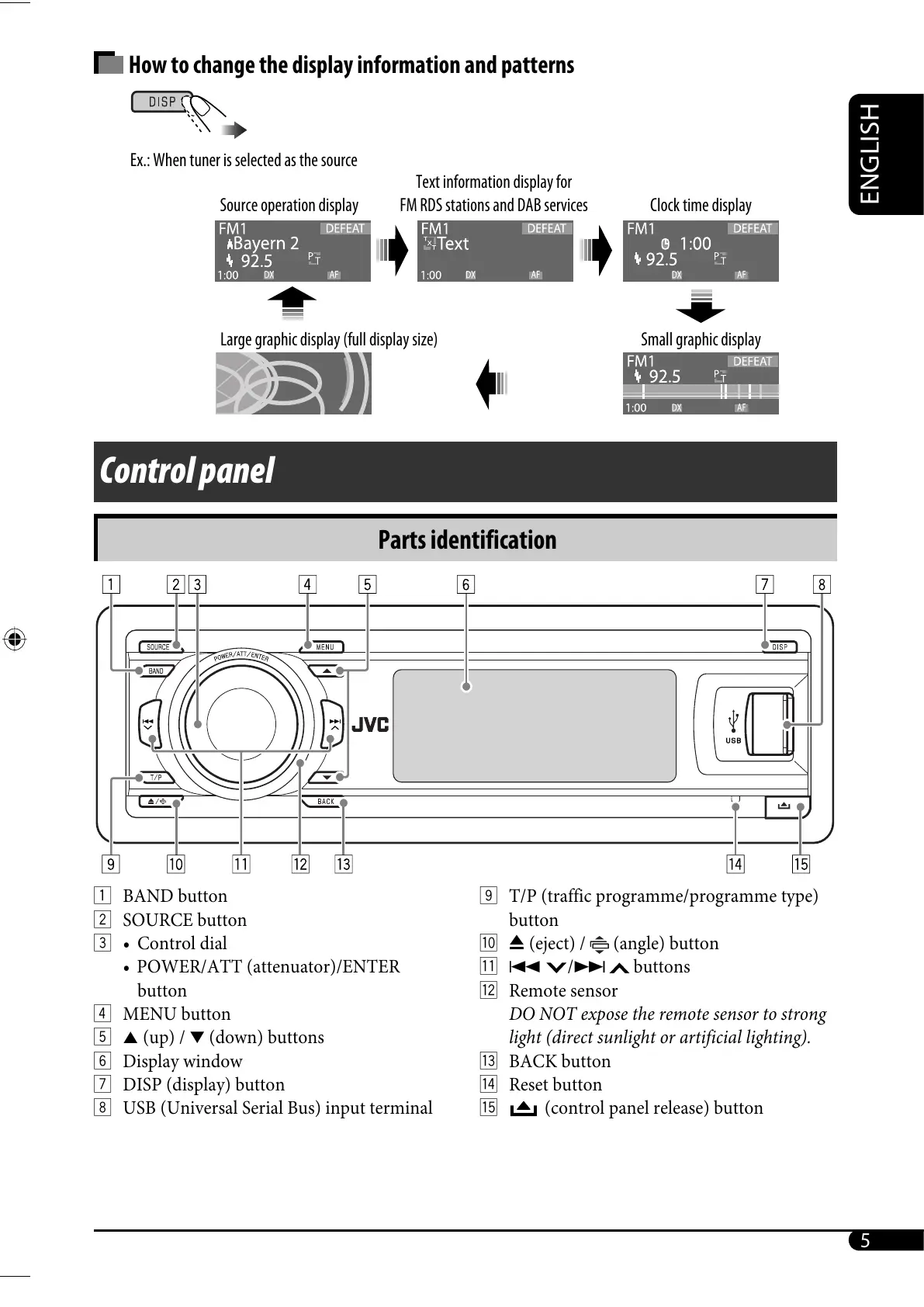
1 BAND button
2 SOURCE button
3 • Control dial
• POWER/ATT (attenuator)/ENTER
button
4 MENU button
5 5 (up) / ∞ (down) buttons
6 Display window
7 DISP (display) button
8 USB (Universal Serial Bus) input terminal
Parts identification
Control panel
9 T/P (traffic programme/programme type)
button
p 0 (eject) /
(angle) button
q 4
/¢ buttons
w Remote sensor
DO NOT expose the remote sensor to strong
light (direct sunlight or artificial lighting).
e BACK button
r Reset button
t
(control panel release) button
Source operation display
Text information display for
FM RDS stations and DAB services
Clock time display
Small graphic displayLarge graphic display (full display size)
Ex.: When tuner is selected as the source
EN02-09_SH1000E_003A_4.indd 5EN02-09_SH1000E_003A_4.indd 5 1/6/06 6:20:08 PM1/6/06 6:20:08 PM



 To Next Page
 Loading...










