
 To Next Page
J
jamesbaileySep 16, 2025
What does “CONNECT ERR” mean on JVC Car Receiver?
- AAmanda AndersonSep 16, 2025
If “CONNECT ERR” appears on your JVC Car Receiver, it indicates that the communication is unstable.

What does “CONNECT ERR” mean on JVC Car Receiver?
If “CONNECT ERR” appears on your JVC Car Receiver, it indicates that the communication is unstable.
What does “RATING ERR” mean on JVC KD-SR83BT Car Receiver?
If “RATING ERR” appears on your JVC Car Receiver, registration of thumbs up/thumbs down has failed due to insufficient network connectivity.
What does “THUMBS N/A” mean on JVC KD-SR83BT?
If “THUMBS N/A” appears on your JVC Car Receiver, registration of thumbs up/thumbs down is not allowed.
What does “LICENSE ERR” mean on JVC Car Receiver?
If “LICENSE ERR” appears on your JVC Car Receiver, you are trying to access Pandora from a country where it is not deliverable.
What does “NOT SUPPORT” mean on JVC Car Receiver?
If “NOT SUPPORT” appears on your JVC Car Receiver, the connected phone does not support the Voice Recognition feature.
Why station cannot be selected on JVC KD-SR83BT Car Receiver?
If a station cannot be selected on your JVC Car Receiver, and “Explicit Content” in [Account Settings] is checked in the web version of iHeartRADIO, custom stations become unavailable.
What does “NOT CONNCTD” mean on JVC Car Receiver?
If “NOT CONNCTD” appears on your JVC Car Receiver, it means that linking to the application is impossible.
How to fix JVC KD-SR83BT Car Receiver when no sound can be heard?
If you cannot hear any sound from your JVC Car Receiver, first, ensure that the volume is adjusted to an audible level. Then, check all cords and connections to confirm they are properly connected.
What does “UNSUPPORTED DEVICE” mean on my JVC KD-SR83BT Car Receiver?
If “UNSUPPORTED DEVICE” appears on your JVC Car Receiver, verify that the connected device is compatible with the unit and ensure the file systems are in supported formats.
What does “NOT SUPPORT” mean on my JVC Car Receiver?
If “NOT SUPPORT” appears and the track skips on your JVC Car Receiver, check whether the track is a playable format.
Emphasizes reading the manual, warnings, and cautions for proper use.
Advises against operating functions that distract from safe driving.
Adjust volume to hear outside sounds and avoid damaging speakers.
Avoid hindering safe driving, back up data, and prevent short circuits.
Diagram identifying key controls on the unit's faceplate.
Step-by-step guide for pairing a Bluetooth device with the unit for the first time.
Procedure to verify the Bluetooth device's compatibility with the unit.
Instructions on handling incoming calls, including answering, rejecting, and managing calls.
Methods to initiate calls from call history, phonebook, or by dialing a number.
Guide to using voice commands for making calls and controlling phone functions.
Operations for playing audio via Bluetooth, including playback control and track selection.
Instructions for streaming music from iPhone/iPod devices using Bluetooth.
Guide to calculating and setting speaker distance and gain for Digital Time Alignment.
Solutions for issues with disc ejection, playback order, and unsupported devices.
Troubleshooting for unresponsive devices, USB hubs, and playback errors on Android.
Solutions for station selection errors, upgrade failures, and connection problems.
Guidance for pairing errors, echo/noise, and interruptions during Bluetooth playback.
Recommended actions including checking the manual, resetting the unit, and contacting support.
Detailed instructions for installing the unit into the vehicle's dashboard.
Illustrates speaker wiring connections, color codes, and amplifier hookups.
 General
| Category | Car Receiver |
|---|---|
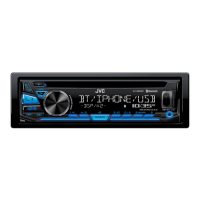
| Model | KD-SR83BT |
| Type | Single DIN |
| Bluetooth | Yes |
| USB Port | Yes |
| AUX | Yes |
| CD Player | No |
| Radio Tuner | Yes |
| Maximum Power Output | 50W x 4 |
| Display Type | LCD |
| Detachable Faceplate | Yes |
| Steering Wheel Control Ready | Yes |
| Android Music Playback | Yes |
| iPhone/iPod Music Playback | Yes |
| Compatible Formats | MP3, WMA |
| Preset Stations | 18 |