ENGLISH
10
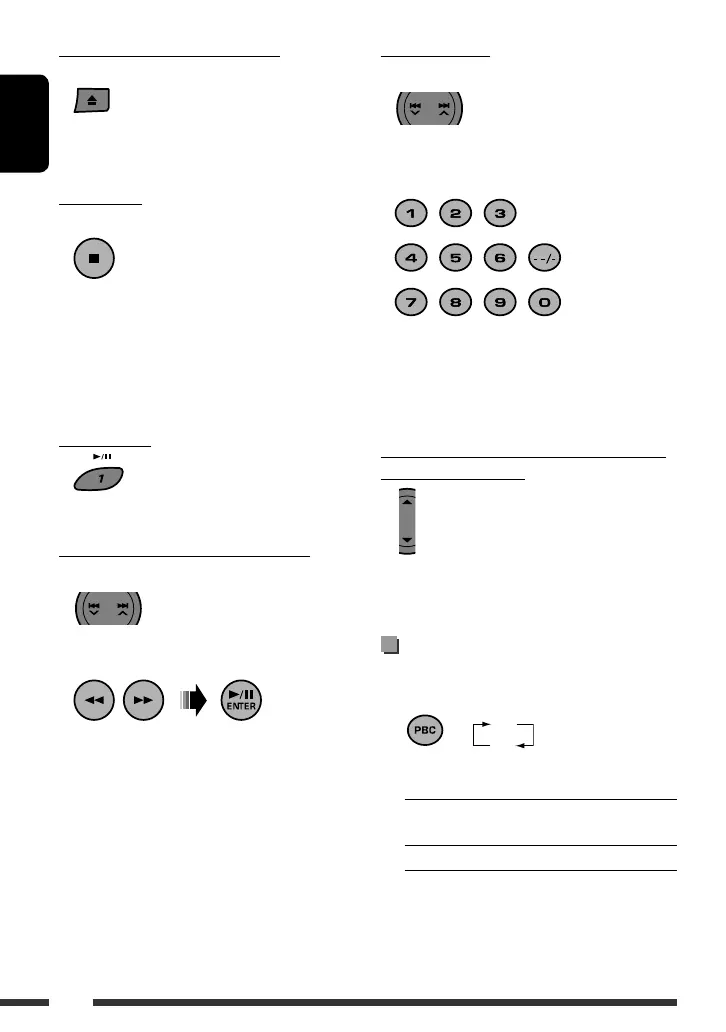
Selecting a track
On the Unit:
On the Remote:
• For audio CD, MP3 disc* or VCD without PBC only
• For details about using number buttons, see page 6.
• You can also use 4 / ¢ to select a track.
* You can specify the tracks in the current folder.
Selecting the next or previous folders (only
for MP3 or WMA discs)
• For MP3/WMA discs, see also “MP3/WMA control
screen operations” on page 12.
Playback Control (PBC) operations
On the Remote ONLY:
1 While playing a VCD...
The current setting is shown on the monitor.
ON: You can play the disc interactively using
the menu.
OFF: Cancels.
• A menu may be a list of items, submenus, or
some moving pictures.
Stop playing and ejecting the disc
On the Unit ONLY:
The disc is ejected and the source is changed to the
previous source.
Stop playing
On the Remote ONLY:
• The unit memorizes the position where the playback
has been stopped, and when you start playback again
by pressing 6, it starts from the position where
you have stopped—Resume Play.
To clear the memorized position, press 7 twice.
Pause playing
• Press the button again to start playback.
Fast-forwarding or reversing the track
On the Unit:
On the Remote:
[Hold]
OFF
ON
EN_KD-SV3706[US].indb 10EN_KD-SV3706[US].indb 10 08.12.11 3:10:06 PM08.12.11 3:10:06 PM


 To Next Page
 Loading...