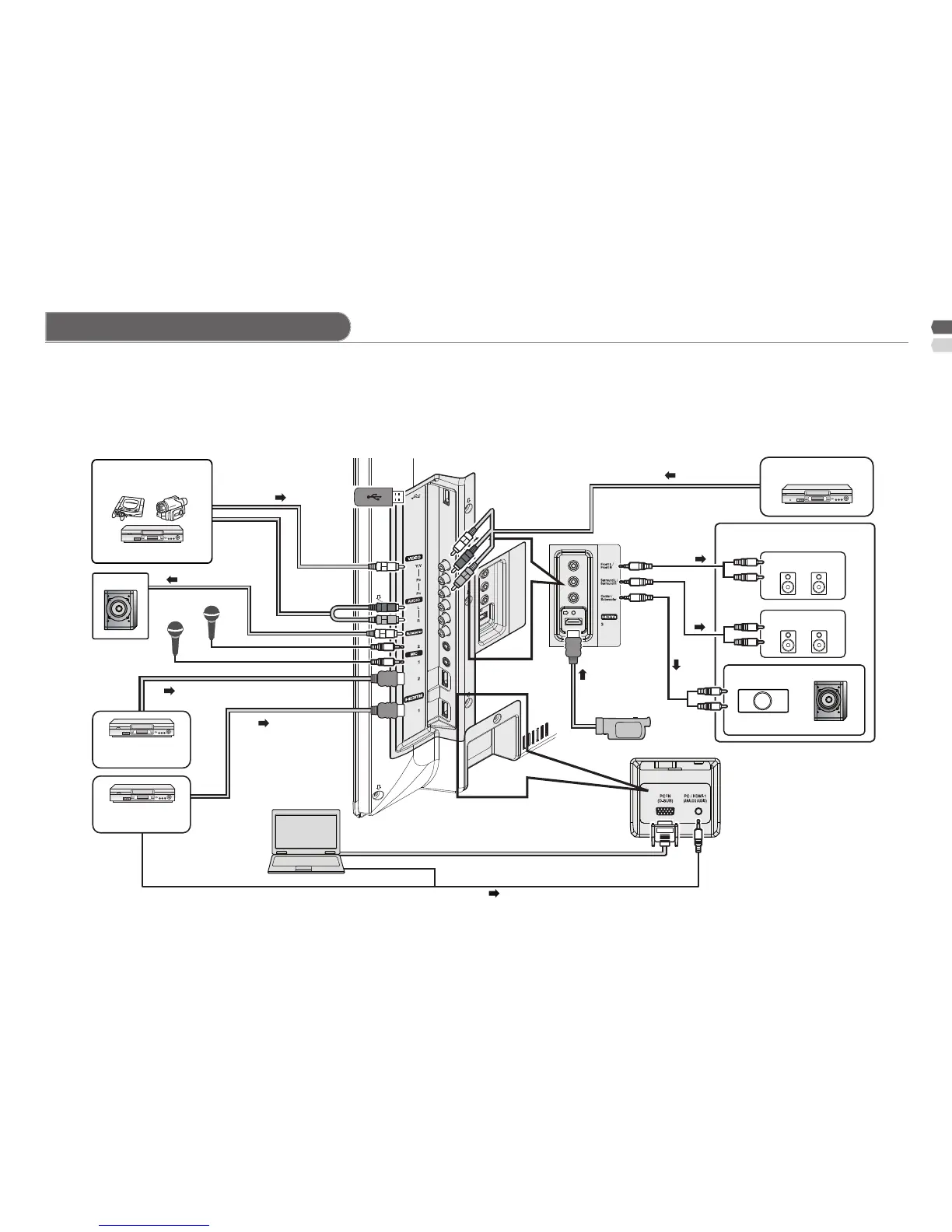
Connection to External device
Make sure all the devices and the TV are turned off. You can connect many different devices to the rear panel of the TV.
Please read the user manuals of each device before setting up. (Connecting cables are not supplied with this TV.)
Insert or remove USB devices gently and in the right position.•
Do not connect a mouse, keyboard or the like.•
Do not use a USB hub or extension cable.•
Consider to use USB device with the appropriate thickness.•
Composite input
VCR
Component input
DVD Player
Sound 5.1Ch output
Front Speaker
Surround Speaker
Center Speaker
(White jack) (Red jack)
HD Video camera
Subwoofer
Game Video
To "Video"
USB
To "Video"
To "HDMI-2"
To "HDMI-1"
To "HDMI-3"
PC
Microphone 2
Microphone 1
Subwoofer
PC input line in
HDMI-1 (DVI ANALOG AUDIO)
Digital satellite
broadcast tuner
DVD player
(HDMI compatible)
Check for PC compatibility. “PC signals that can be displayed” (P. 18).•
After connecting the •
speakers to a 5.1Ch output
you can check the accuracy
of the speaker connections
by using the function "Test
Tone" (P.11).



 To Next Page