IMPORTANT PREPARE USE SETTING TROUBLE?
30
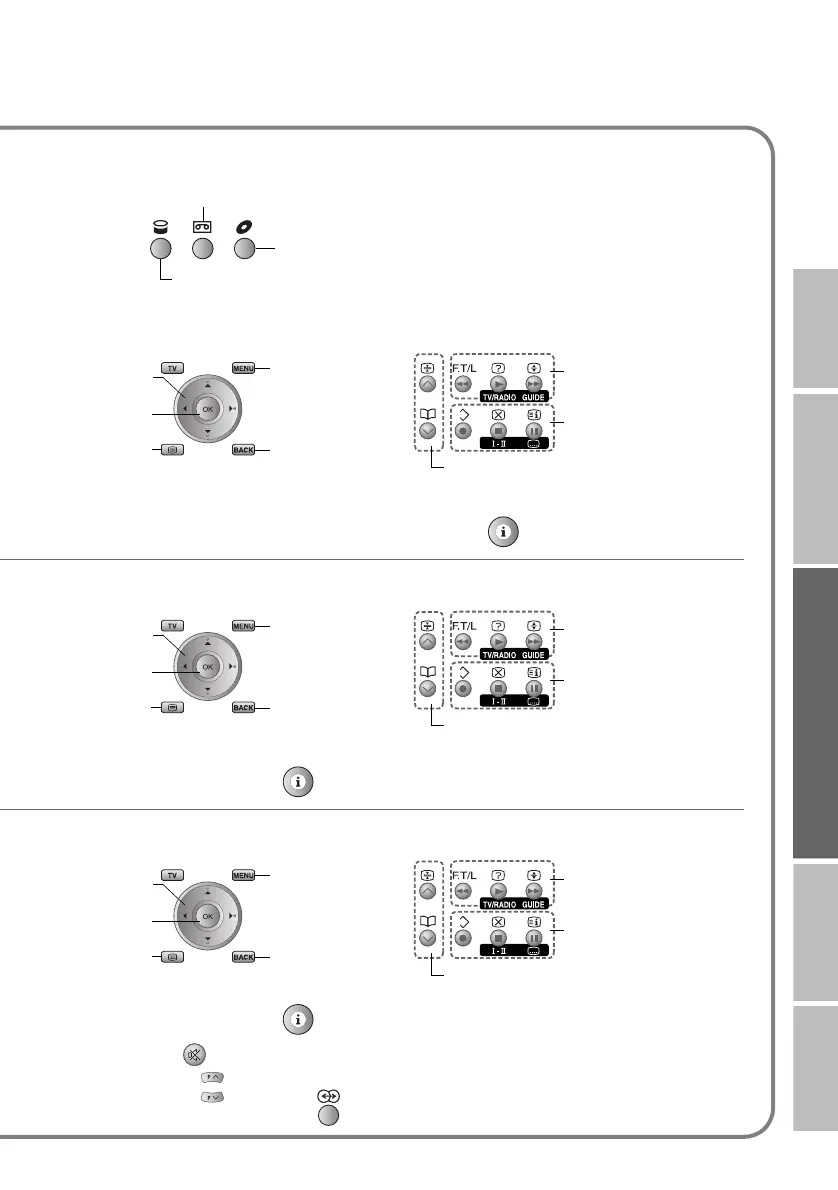
Select VCR / DVD recorder / HDD recorder
Operate DVD / HDD recorder menus Playback / Record etc.
Display the subtitle (DVD / HDD recorder mode) g Press “ ”
Operate DVD menus Playback etc.
Display the subtitle g Press “ ”
Operate HC menus Playback etc.
Display the subtitle g Press “ ”
Mute g Press “ ”
Volume g Press “ ”
Select a surround mode g Press “ ”
VCR
HDD recorders
DVD recorders
Display menu
Back to
previous menu
Display top
menu
Select
OK
Rewind / Playback /
Fast-forward
Record / Stop / Pause
Select a chapter
Display menu
Back to
previous menu
Display top
menu
Select
OK
Rewind / Playback /
Fast-forward
Stop / Pause
Select a chapter
Display menu
Back to
previous menu
Display top
menu
Select
OK
Rewind / Playback /
Fast-forward
Stop / Pause
Select a chapter
and other devices
LT-42DV8BJ.book Page 30 Friday, July 6, 2007 11:23 AM



 To Next Page