EasyManua.ls Logo

JVC RA-D58B - Wireless Password Entry

JVC RA-D58B
44 pages
Print Icon
To Next Page IconTo Next Page
To Previous Page IconTo Previous Page
Loading...
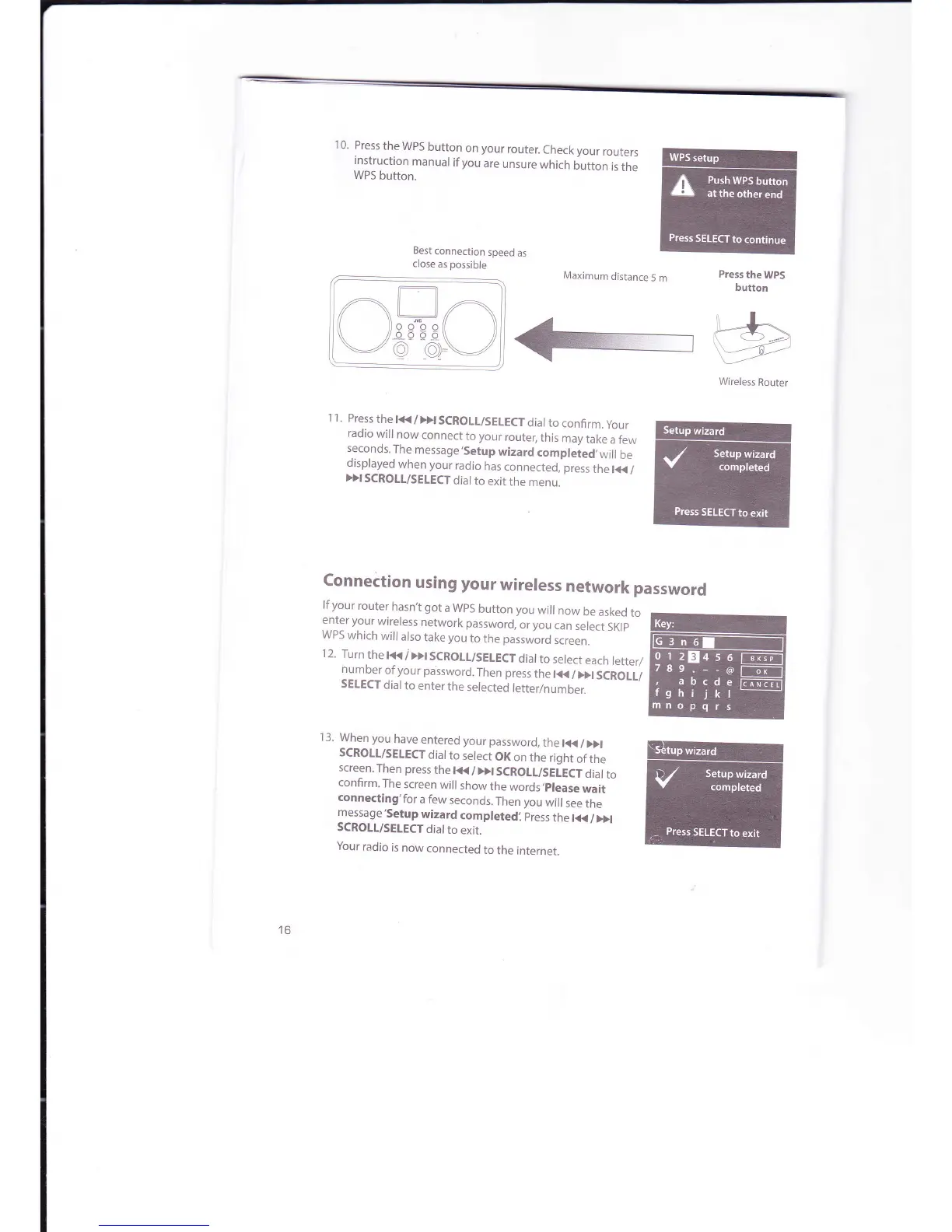
10.
Press
the
WPS
button
on
your
router.
Check
your
routers
instruction
manual
if
you
are
unsure
which
button
is
the
WPS
button.
Best
connection
speed
as
close
as
possible
Maximum
distance
5
m
Press
the
WPS
button
}A
\_:{;3
Wireless
Router
Connection
using
your
wireless
network
password
1 1.
Press
the
t<<
/Dt SCROLT/SELECT
dial
to
confirm.
your
radio
will
now
connect
to
your
router,
this
may
take
a
few
s.econds.The
message,Setup
wizard
compleied,will
be
displayed
when your
radio
has
connected,
press
the
l+<
/
Dl
SCROTL/SELECT
dial
to
exit
the
menu.
lf
your
router
hasn,t got
a WpS
button
you
will
now
be
asked
to
enter your
wireless
network
password,
or
you
can
select
SKlp
WPS
which
will
also
take you
to
the
password
screen.
'12.
Turn
the
t<<
I
>>l
SCROII/SELECT
dial
to
select
each
letter/
number
of
your
password.
Then press
the
tt(
/
Dl
SCROLL/
SETECT
dial
to
enter
the
selected
letter/number.
I 3.
When you
have
entered
your
password,
the
l<K
/
>>l
SCROII/SELECT
dial
to
select
OK
on
the
right
of
the
screen.Then
press
the
t(
/Dt SCROIL/SEIECT
dial
to
confirm.
The
screen
will
show
the
words,please
wait
connecting'for
a few
seconds.
Then you
will
see
the
message
'Setup
wizard
completedi
press
the
l(
/
>>t
SCROLL/SEtECT
dial
to
exit.
Your
radio
is
now
connected
to
the
internet.
16

Related product manuals