EasyManua.ls Logo

JVC RA-D58B - Hints and Tips; General Troubleshooting; Radio Reception Issues

JVC RA-D58B
44 pages
Print Icon
To Next Page IconTo Next Page
To Previous Page IconTo Previous Page
Loading...
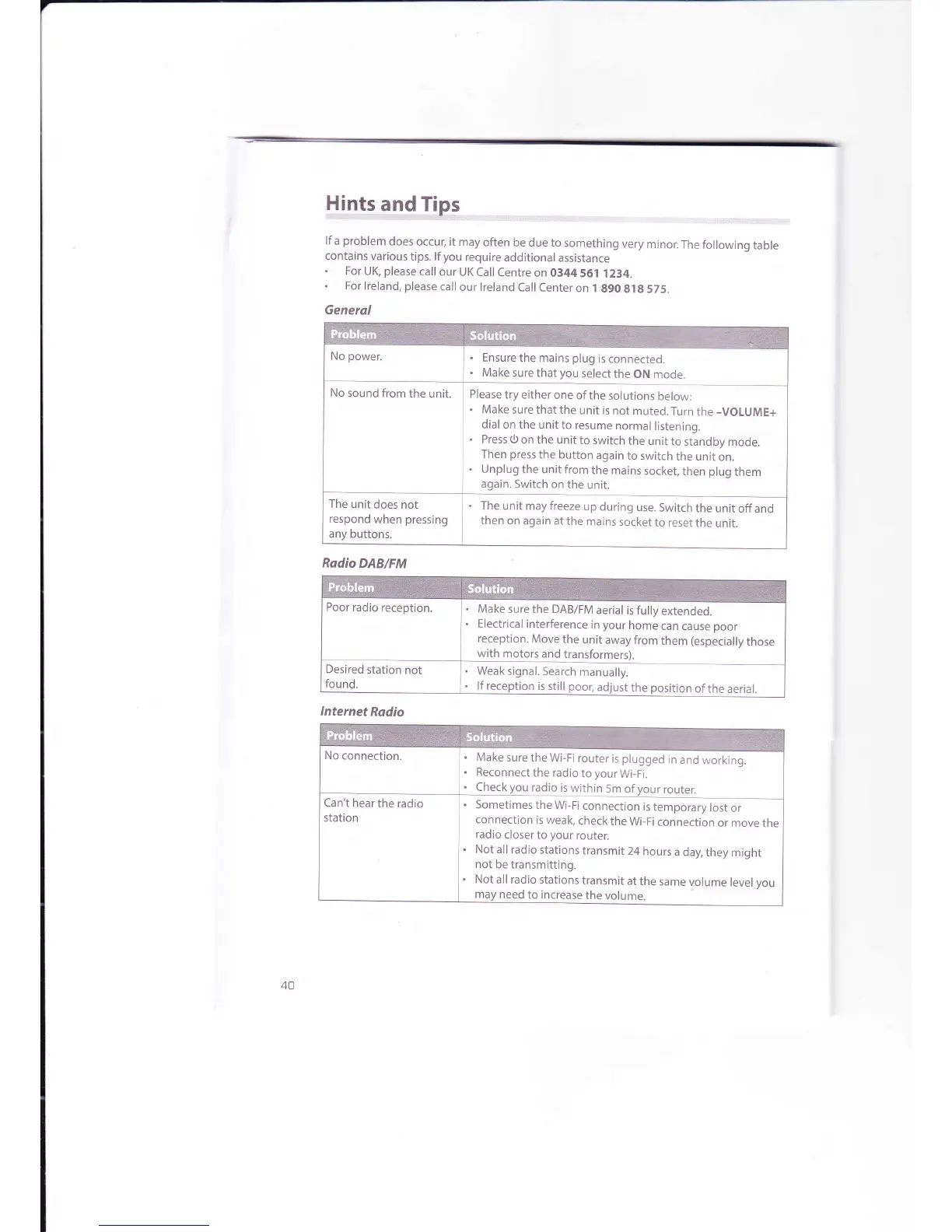
Hints
and Tips
lf
a
problem
does
occur,
it may
often
be due to
something
very
minor.
The following
table
contains
various
tips. lf
you
require
additional
assistance
.
For
UK,
please
call
our
UK Call
Centre on 0344
561 1234.
.
For
lreland,
please
call
our lreland
Call
Center
on I
g9O
gl8
575.
Ensure
the mains
plug
is
connected.
Make
sure that
you
select
the
ON
mode.
No
sound from
the
unit.
Please
try either
one
of
the solutions
below:
.
Make
sure that the
unit is
not
muted.Turn
the
-VOLUME+
dial on the
unit to
resume
normal
listening.
.
Press O
on the unit
to switch
the unit
to
standby
mode.
Then
press
the
button
again
to switch
the unit
on.
.
Unplug
the unit from
the
mains
socket,
then
plug
them
again.
Switch on
the
unit.
The
unit does not
respond
when
pressing
any buttons.
The
unit may freeze
up
during
use.
Switch
the
unit off
and
then on
again at
the
mains
socket
to reset
the
unit.
Poor
radio
reception.
.
Make
sure the DAB/FM
aerial
is fully
extended.
.
Electrical
interference
in
your
home
can
cause
poor
reception.
Move
the
unit
away
from
them
(especially
those
with motors
and
transformers).
.
Weak signal.
Search
manually.
.
lf reception
is still
poor,adjustthe
position
oftheaerial.
.
Make
sure
the Wi-Fi
router
is
plugged
in
and
working.
.
Reconnect
the radio
to
your
Wi-Fi.
Check
you
radio
is
within
5m
of
your
router.
Can't
hear
the radio
station
.
Sometimes
the
Wi-Fi
connection
is
temporary
lost
or
connection
is weak,
check
the
Wi-Fi
connection
or move
the
radio
closer
to
your
router.
.
Not all
radio stations
transmit
24
hours
a day,
they might
not
be transmitting.
.
Not
all radio
stations
transmit
at the
same
volume
level you
need
to increase
the
volume.
40

Related product manuals