EasyManua.ls Logo

JVC RA-D58B - Finding Podcasts; Adding Favourite Radio Stations

JVC RA-D58B
44 pages
Print Icon
To Next Page IconTo Next Page
To Previous Page IconTo Previous Page
Loading...
i
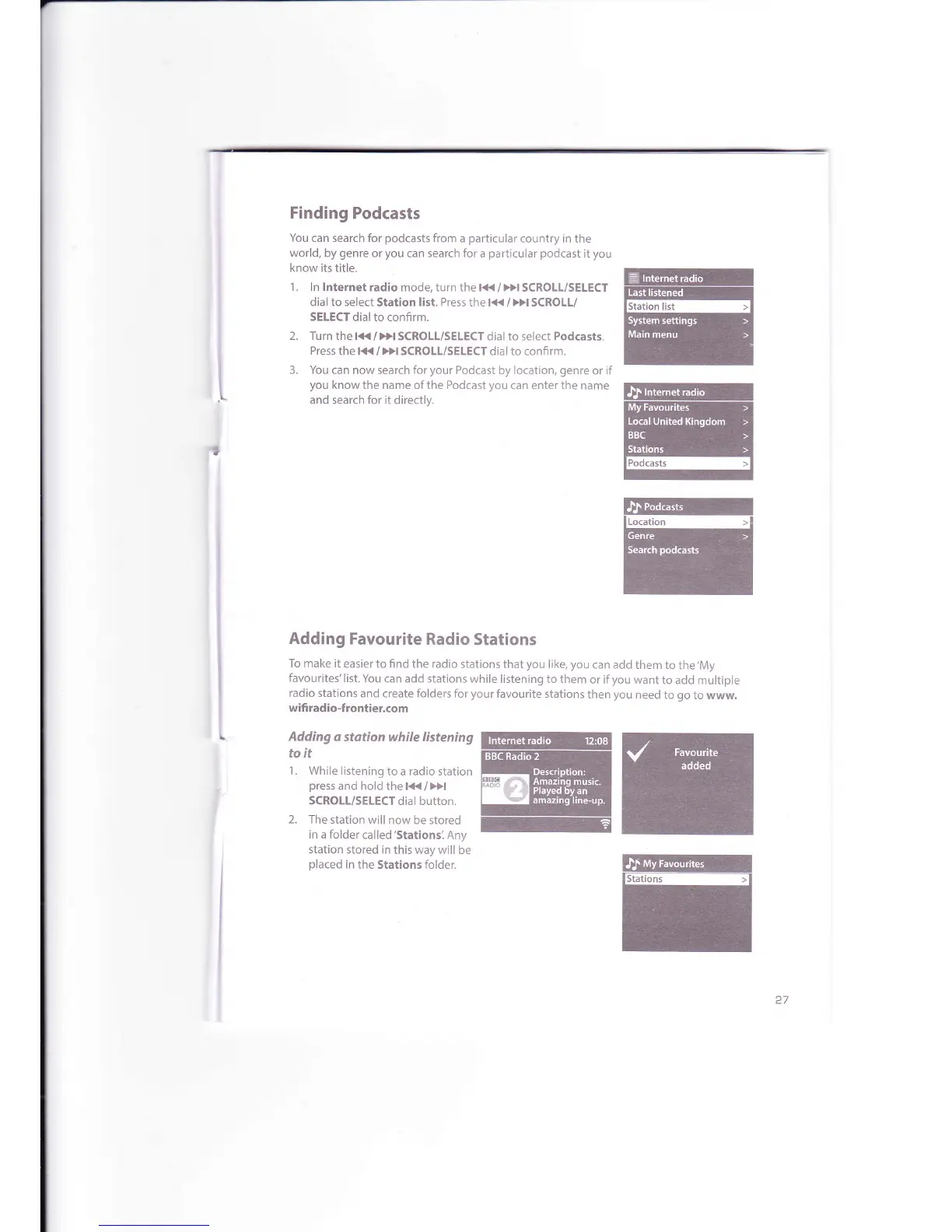
Finding
Podcasts
You
can search for
podcasts
from
a
particular
country in
the
world,
by
genre
or
you
can search for
a
particular podcast
it
you
know its title.
1. ln lnternet
radio mode, turn the la{
/
Dl
SCROLL/SELECT
dial to select
Station
list. Press
the l<t<
/
Dl
SCROLL/
SELECT
dialto confirm.
2. Turn
thel<</>>ISCROLL/SELECTdial
to select
Podcasts.
Press
the l{(
/
}>l SCROLL/SELECT
dial to confirm.
3. You can now
search
for
your
Podcast by location,
genre
or if
you
know
the name ofthe Podcast
you
can enter
the
name
and search for it
directly.
Adding
q
stqtion while listening
to it
1.
While listening
to
a
radio
station
press
and hold
thet<</>>t
SCROLL/SELECT
dial button.
2.
The station
will now be stored
in a folder
called'Stationsl
Any
station
stored in
this way will
be
placed
in
the Stations folder.
@n
E@il
=
*
@
ffi
E@
ffi
Adding
Favourite
Radio
Stations
To make
it easier
to
find
the
radio
stations
that
you
like, you
can add
them to
the'My
favourites'list.
You
can add stations
while listening to them
or if
you
want
to add
multiple
radio
stations
and create folders for
your
favourite stations
then
you
need
to
go
to www.
wifi radio-frontier.com

Related product manuals