16
English
R
L
ZONE 2
PRE OUT
+
–
FRONT1 SPEAKERS
RIGHT
LEFT
RIGHT
LEFT
CAUTION : SPEAKER IMPEDANCE
FRONT1
OR
FRONT2 :
8
16
FRONT1 AND FRONT2 :
16
32
FRONT2 / ZONE2
SPEAKERS
ZONE2 :
8
16
R
L
R
L
Multi-room Operations
Before operating this receiver any further, be familiar with this multi-room function.
This function enables you to listen to different sources in two different places (we call these two places “Zone 1 (main
room)” and “Zone 2 (sub-room)”) by using this receiver.
This section explains only the required speaker connections, the concept, and basic operations of the multi-room
function. For more detailed operations, see the respective pages in this manual.
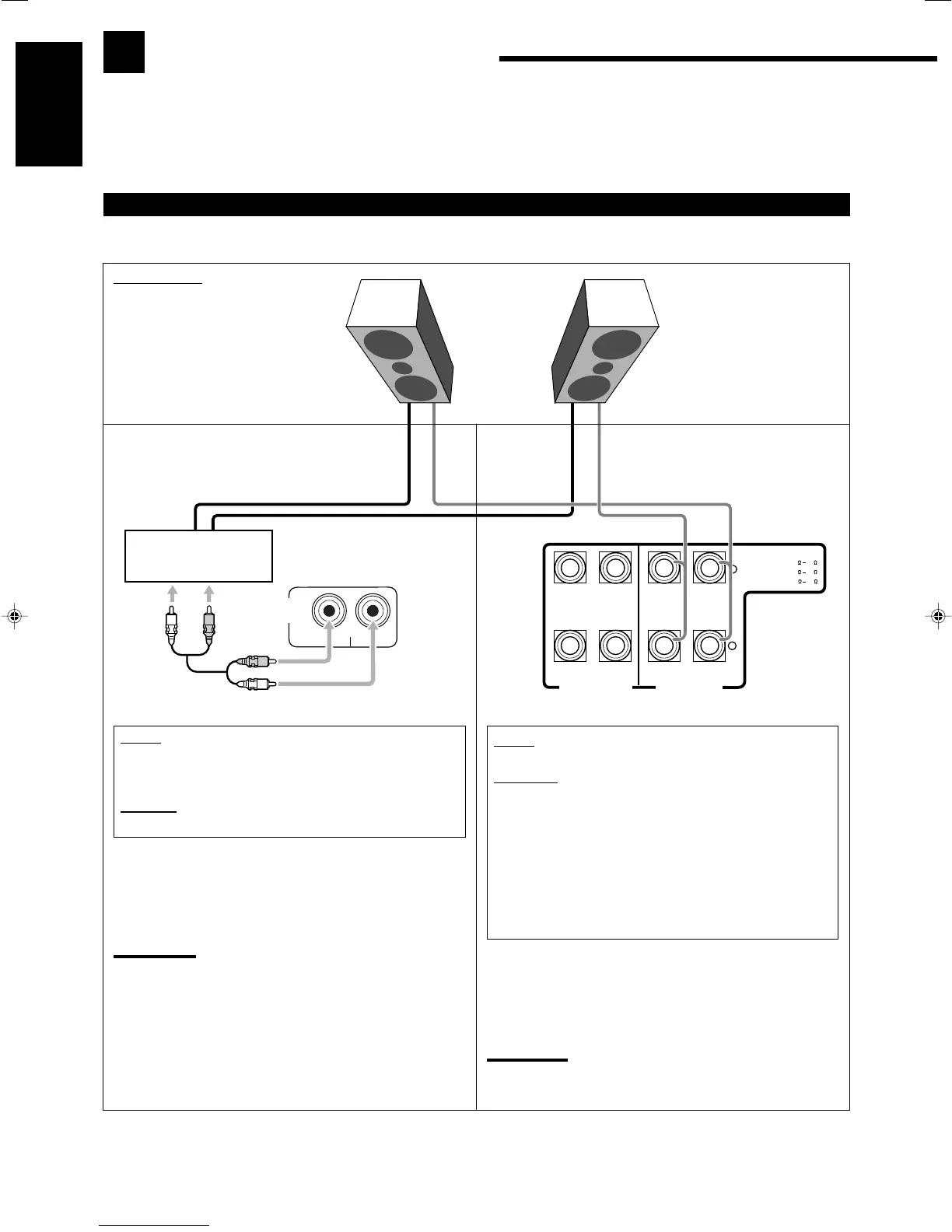
Required Connections for Zone 2
Connect front speakers by using one of the methods described below (either Connection Å or Connection ı).
Merit:
This connection DOES NOT require another amplifier.
Demerits:
• When the Zone 2 speakers are activated, this connection
DOES NOT allow you to use the Surround/DSP modes using
the center, surround, and surround back speakers (see pages
42 to 49) and the DVD MULTI playback mode (see page 50)
for the Zone 1 source.
• When the Surround/DSP modes using the center, surround,
and surround back speakers, or when the DVD MULTI
playback mode is activated for the Zone 1 source, this
connection DOES NOT allow you to use the Zone 2 speakers.
To use the Zone 2 front speakers connected to the FRONT2/
ZONE2 SPEAKERS terminals
See “Setting the Zone 2/Speakers 2” on page 38, and “Activating
the Zone 2 Front Speakers” on page 29.
Note:
Usage of long speaker signal cables will deteriorate the signals and
degrade the sound quality.
Merit:
This connection DOES allow you to always use the
Surround/DSP mode using the center, surround, and surround
back speakers (see pages 42 to 49) for the Zone 1 source.
Demerit:
This connection DOES require another amplifier.
To use the Zone 2 front speakers connected through the
ZONE 2 PREOUT jacks
Turn on and operate the other amplifier connected to the ZONE 2
PREOUT jacks correctly.
Note:
Usage of long audio cables/long speaker signal cables will
deteriorate the signals and degrade the sound quality.
Connection Å
Connect the input jacks of another amplifier to the
ZONE 2 PREOUT jacks on the rear panel, using a
cable with RCA pin plugs (not supplied).
Connection ı
Zone 2 layout
Left front speaker
Right front speaker
Power amplifier
16-29_8040[C].p65 04.5.14, 11:2916


 To Next Page
 Loading...