WARNING:
Very hot water –scalding hazard!
NOTE:
Each activation of the Easy Clean process conducts some steam and hot water
to the steam system drip tray. Therefore, empty this regularly.
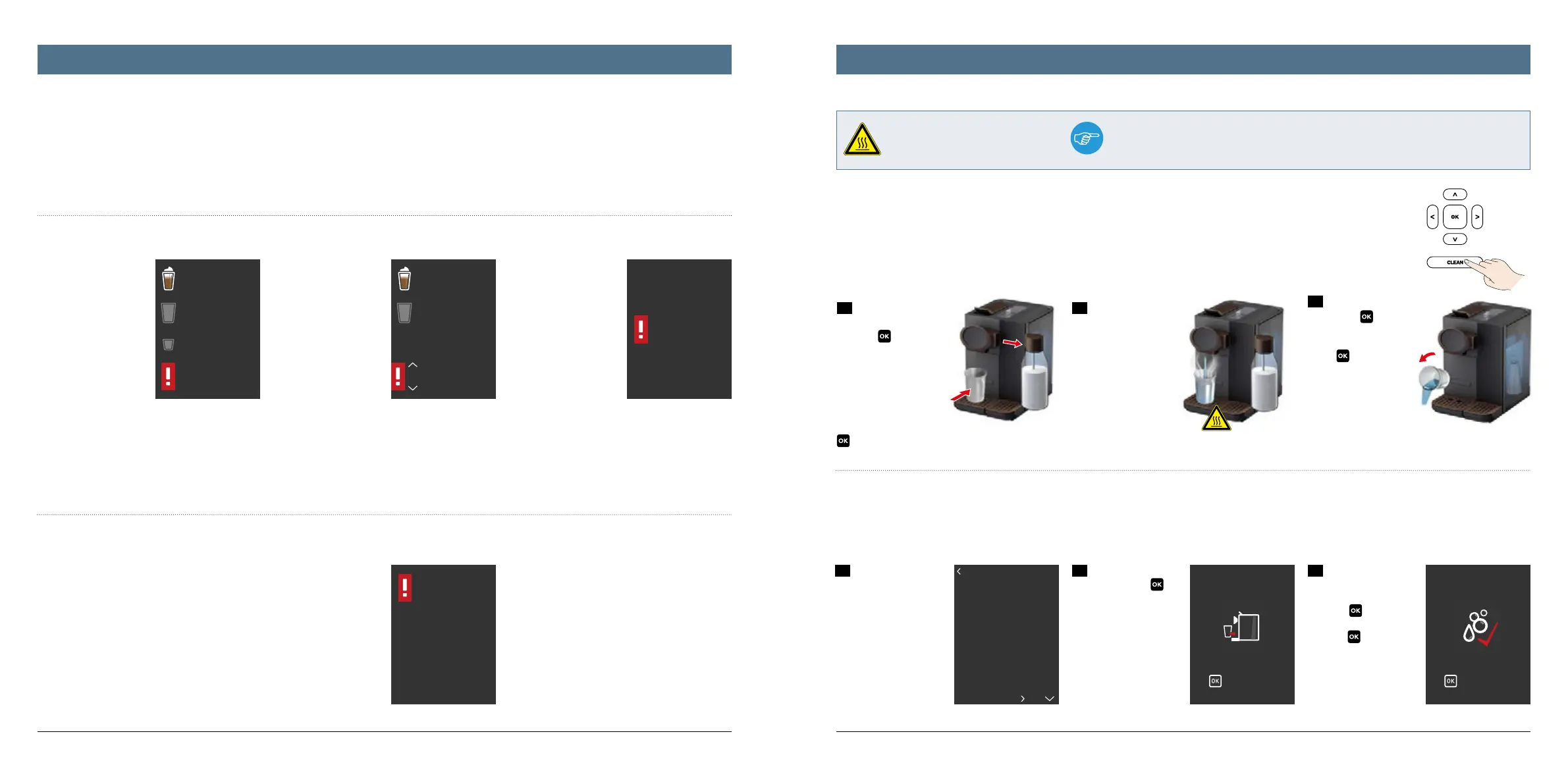
Espresso
Coffee
specialities
Coffee
Check water
level
Coffee
specialities
Coffee
Please descale
to start now
to delay
Water tank is
empty
Please refill now
Error number
1
No respond
from heater
Please unplug
appliance and try
again in one hour
If error continues
to persist please
contact hotline
1/7
Clean coffee system
Clean milk system
Descale
Replace water filter
to continue
Place cup under spout
to continue
Rinse complete
2524
Alerts
Your new K-fee® – your system LATTENSIA + automatically recognises whether all basic requirements for maximum drinking pleasure and optimal appliance
condition are ensured at all times. If this is no longer the case in certain areas, a corresponding warning appears on the display – an easy to recognise white
exclamation mark on a red background. You must observe this and follow the system‘s suggested actions.
These alerts can be:
General, helpful infor-
mation – for example
if the water tank is al-
most empty. This alert
remains on the display
until you either press
any button or refill the
water tank. As such,
the system ensures that
you have not overloo-
ked the information.
Instructions for upco-
ming operating steps:
Please descale, clean
coee system, clean
milk system, replace
water filter. In such ca-
ses, the system always
asks if you would like to
initiate the respective
process immediately or
later. In these cases,
you must actively make
a selection using the up
and down arrow keys.
Instructions that must
be performed immedia-
tely because otherwise
the appliance is no lon-
ger ready for use. These
could be fill the empty
water tank, empty the
overfilled capsule con-
tainer or filled drip try,
or also the warning
that the appliance has
overheated and must
be switched o.
Error messages
In addition to these alerts the appliance display informs you of technical er-
rors, malfunctions and faults. These clear, comprehensible messages are al-
ways accompanied by an instruction – such as disconnect the appliance from
the power supply and try again in one hour.
There is a total of 5 possible errors:
1. Heater / Thermoblock not heating
2. Temperature sensor (NTC) defect
3. Ceramic valve defect
4. PCB failure
5. Heater / Thermoblock too cold
1. Easy Clean
For hygiene reasons, the system recommends performing a
quick clean of the milk system using the Easy Clean program -
180 seconds after each beverage containing milk is prepared as
well as after each time the machine is switched on.
We recommend always activating the Easy Clean program after
each beverage containing milk is prepared (if several beverages
are prepared at once, after the last beverage). To do so, all you
have to do is press the CLEAN button and proceed as follows:
2. Rinsing the coee system
Each time the appliance is switched on from standby mode, you must briefly rinse the coee system with hot water.
3
The system is rin-
sed. Finally, remove the
container, confirm by
pressing
then com-
plete the process by
pressing
.
2
Place a cup under
the spout. Press
to
confirm.
1
To do this, in the
“Settings menu“ select
the submenu „Mainte-
nance / Cleaning“ and
from there select the
program „Rinse coee
system“.
1
After pressing the
CLEAN button or by
pressing
to confirm
the request on the dis-
play, place a heat-re-
sistant cup under the
spout. Then remove the
milk bottle (if it will not
be used, place it back in
the refrigerator). Press
to confirm.
3
Finally, empty the
cup. Press
to con-
firm. The system reports
„Easy Clean complete“.
Press
to return to
the main menu.
2
The system is rin-
sed with hot water. The
rinse cycle is indicated
by the rotating circle.
Easy Clean milk system / rinsing the coee systemAlerts and errors




 To Next Page