INFO!
This water filter protects your appliance
from limescale and reduces the number
of times descaling is required. It also removes
unwanted smells and tastes such as chlorine etc.
and thereby improves the quality of your bever-
ages. Please use only water filters suitable for
K-fee® – your system capsule machines. All re-
levant information can be found on our website:
www.k-fee.com.au
SAFETY NOTE!
Carefully read the instructions for use
and safety information for the water
filter. For hygiene reasons, we recommend repla-
cing the water filter at least every 3 months.
NOTE!
When inserting a water filter, you must
also activate the appliance for the wa-
ter filter and set the water hardness. For more
information, please read page 36.
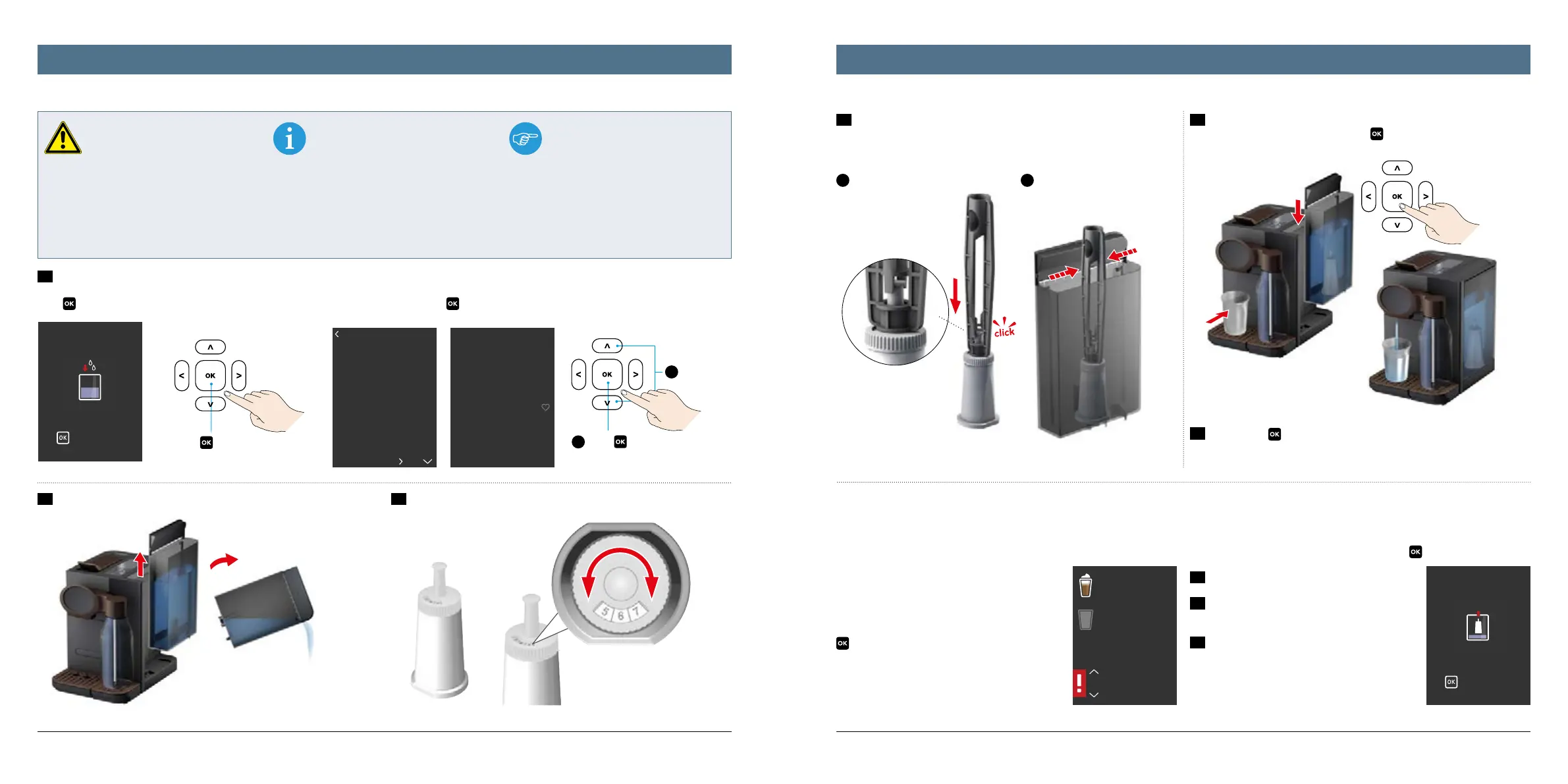
The easiest way to insert the water filter is to use
the supplied water filter tool.
1
To grip the water
filter, put the tool
over the water filter
and allow it to click
into place.
2
To loosen after insertion, press
both arms of the tool together.
1
Select
2
Press
to confirm
Press to confirm
Use waterfilter?
Yes
No
to continue
Insert water filter
and fill tank
Step 2 of 3
6/11
Water hardness
Water filter
Maintenance / cleaning
Info / statistics
Coffee
specialities
Coffee
Replace water
filter
to start now
to delay
to continue
Remove water filter
3332
1
1a) The use of a water filter has already been recommen-
ded by the system during the course of the initial start-up.
Press
to access the installation program from here.
2
Remove and empty the water tank.
3
On the water filter, set the date of
insertion by turning the month dial.
This automatically displays the month
of replacement.
1b) You can, however, postpone the insertion of a water filter until later. Then you must
trigger the installation program manually: in the main menu „Settings“, go to the „Water
filter“ submenu and press
to confirm both.
4
Now insert the water filter into the empty water tank. To do so, please use
the supplied water filter tool:
6
Finally, press
and empty the cup.
5
Now fill the water tank with water and place it back in the appliance. Then
please place a cup under the spout. Press
to confirm. This starts the rinsing
process and the water filter is simultaneously filled with water.
In case of an individual replacement, please begin the program via „Settings“
– „Water filter“ – „Replace water filter“ and press
to confirm.
1
Remove and empty the water tank.
2
Remove the water filter using the water filter
tool.
3
From this point on, please follow steps 3 to 6
of the instructions on the initial insertion of the
water filter (see end of page 32 to 33).
Replacing the water filter
The appliance recognises when the water filter must be replaced and provides
a corresponding alert on the display. You can, however, also find the date on
the set range of the water filter. As a general rule,
the filter must be replaced every three months.
If there is an alert, use the up and down arrow
buttons to either carry out the water filter repla-
cement immediately or to postpone it. Then press
to confirm your decision.
Replacing the water filterOptional: Inserting the water filter (sold separately)




 To Next Page