NOTE:
You can change the set language at any time.
INFO:
The water hardness essentially indicates how much calcium car-
bonate your water contains. The more calcium and magnesium
ions it contains (these then forming insoluble compounds such
as limescale or lime soaps when dissolved in water), the harder
the water. Hard water leads to limescale deposits and calcifica-
tion of the appliance while soft water is ideal for heating and
better protects the appliance.
INFO:
It therefore essential to set the water hardness, because this in-
fluences the descaling intervals and other functions recommen-
ded by the system, among other things – for optimal protection
to ensure the unimpaired functionality of your capsule machine.
NOTE:
Use the supplied test strip to determine the hardness of your
local water. Fill a cup with water from the water supply. The
colour change on the test strip indicates the water hardness.
Then set this accordingly in the appliance.
1
Select
program
2
Press
to confirm
1
Select
program
2
Press
to confirm
3
Select shut
o time
4
Press
to confirm
3
Select new
language
4
Press
to confirm
3
Select the
correct water
hardness
4
Press
to confirm
Select water hardness
level
Hard: > 20°d
Middle: > 15°d
Soft: > 10°d
to continue
Test water hardness
Refer to instruction
manual
Step 1 of 3
4/11
Favorites
Language
Auto off
Water hardness
Select water hardness
level
Very hard: > 25°d
Hard: > 20°d
2/11
Favorites
Language
Auto off
Water hardness
Select language
English
German
3/11
Favorites
Language
Auto off
Water hardness
Duration until auto off
5 minutes
15 minutes
30 minutes
1
Select
program
2
Press
to confirm
3736
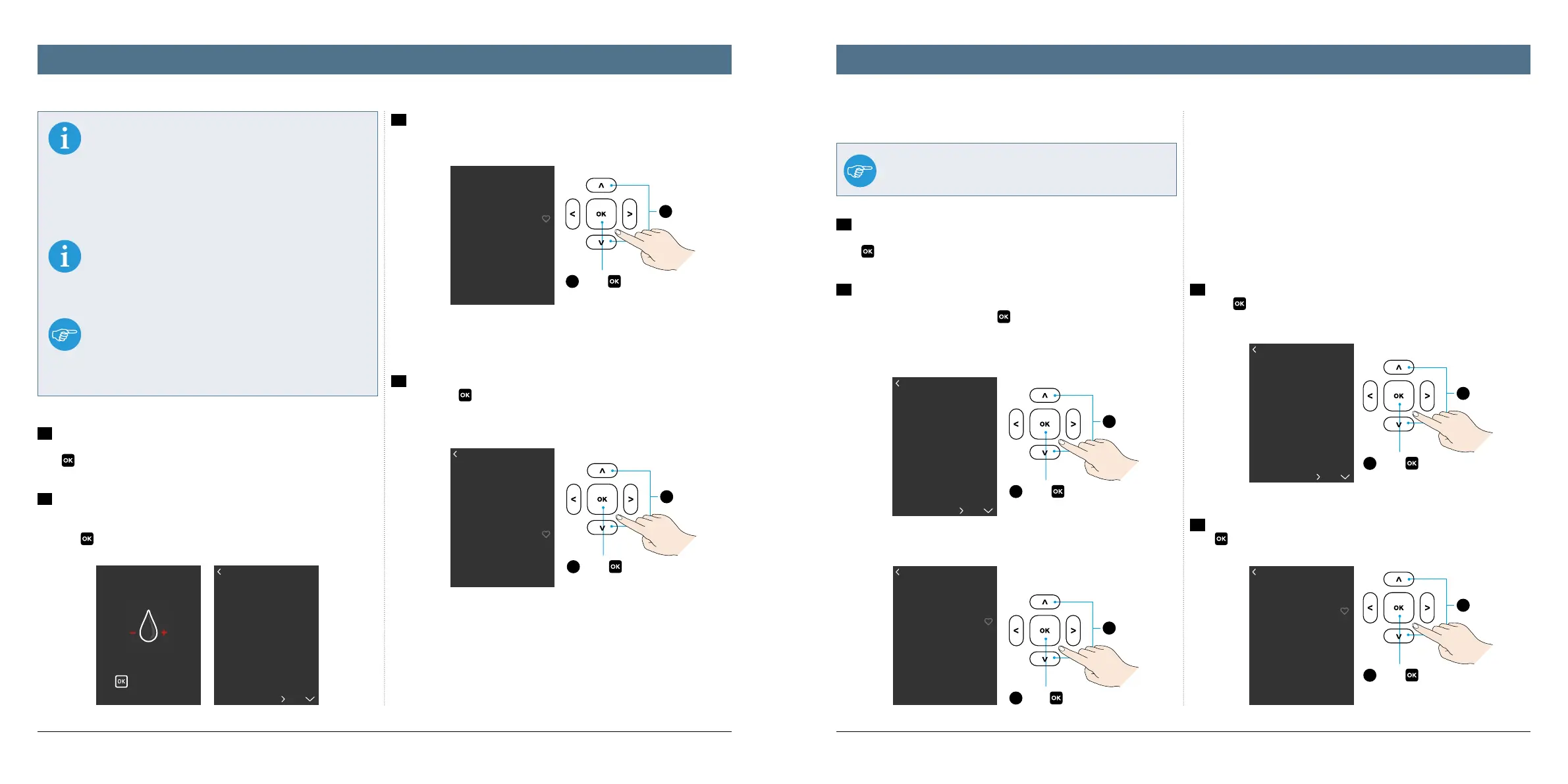
1a
The water hardness setting has been specified by the system during
the course of the initial start-up. The appliance cannot be used without this.
Press
to access the program from here.
1b
You can, however, also modify the water hardness at a later date (for
example after a house move). Then you must trigger the installation program
manually: In the main menu „Se
ttings“, go to the „Water hardness“ submenu
and press
to confirm both.
2
Five dierent water hardnesses are provided by the system: very hard, hard,
middle, soft, super soft.
3
In the program, select the water hardness corresponding to your measure-
ment and press
to confirm.
Auto o
By default, your K-fee® - your system capsule machine shuts down if not used
for 5 minutes and switches to standby mode.
This prevents unnecessary energy consumption, saves electricity and protects
the environment.
You can, however, change this presetting to your personal preference at any
time. Three shut down limits are available: 5, 15 or 30 minutes.
1
Select program: In the main menu „Settings“, go to the „Auto O“ submenu
and press
to confirm both.
2
Then use the up/down arrows to select the required shut down time and
press
to confirm.
Setting the language
1a
The operating language setting has been specified by the system during
the course of the initial start-up. The appliance cannot be used without this.
Press
to access the program from here.
1b
You can, however, also change the language at a later date. Then you must
trigger the installation program manually: In the main menu „Settings“, go to
the „Language“ submenu and press
to confirm both.
Setting the language and auto oSetting the water hardness




 To Next Page