SAFETY NOTE!
Before using this appliance for the first time, read the safety
information on pages 4–7.
WARNING!!
Before using this appliance for the first time, check that the
voltage of your supply corresponds to that stated on the
rating plate (on underside of appliance).
WARNING:
Very hot water – scalding hazard!
NOTE!
1. If the appliance has been subjected to very cold tempera-
tures or frost, please wait at least three hours before swit-
ching it on. Allow the appliance to warm up to room tempera-
ture first – risk of malfunctions.
2. We recommend using a water filter for long-lasting, maxi-
mum coee enjoyment. Please insert this as part of the initial
start-up. For more information, please read the instructions
on pages 32–33.
NOTE:
Initial start-up from standby mode
To start the system from standby mode,
press any operating button, open the hand-
le or remove the capsule container.
The K-fee® – your system logo appears on
the display while the appliance is heating
up. The system is ready for use when it rea-
ches 60ºC.
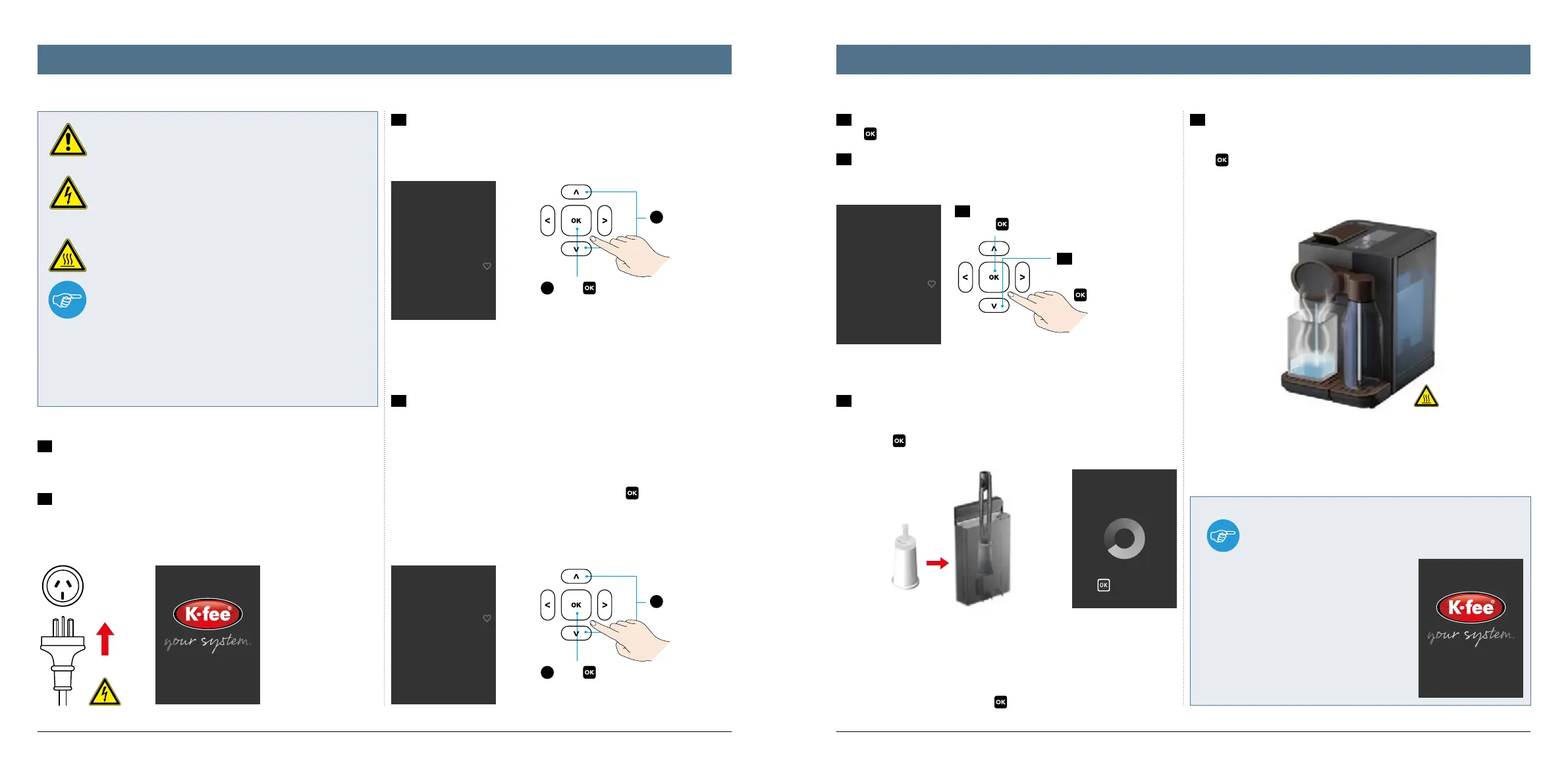
1
Select
2
Press
to confirm.
5b
To decline, press the
down arrow until „No“
is selected and press
to confirm.
5a
Confirm the insertion of a water filter
with
(recommended).
1
Select
2
Press
to confirm.
Welcome
English
German
Select water hardness
level
Hard: > 20°d
Middle: > 15°d
Soft: > 10°d
Use waterfilter?
Yes
No
Priming cycle
to pause
1716
1
Before using the appliance for the first time, please remove the water tank
and milk bottle, rinse them out with a mild cleaning solution and dry using a
soft cloth.
2
Connect the appliance to the electricity supply. The handle must be clo-
sed. The appliance recognises when it is operated for the first time and auto-
matically guides you through the initial operation. Simply follow the instruc-
tions on the display.
6
When using a water filter for the first time, please place a heat-resistant
cup under the beverage spout first. Then remove the water tank, insert the
water filter and fill the tank with water. Then put the tank back in the applian-
ce and press
to confirm.
The appliance is rinsed automatically.
For more information on using and replacing the water filter, please refer to
pages 32–33.
After rinsing, empty the cup. The appliance is ready for use. If you would like
to prepare a beverage, please press
first.
7
If you do not want to insert a water filter now, please place a heat-resis-
tant cup under the beverage spout first.
Then remove the water tank, fill with water and place back in the machine.
Press
to confirm. The system is rinsed automatically and is then ready for
use.
4
Set your local water hardness.
4.1. The appliance allows you to choose between various water hardnesses
(including hard, middle, soft). Test your domestic water hardness using the
supplied test strips.
4.2 Scroll up or down using the arrow buttons until you have found the ap-
propriate water hardness. When this lights up, press
to confirm. For more
information on water hardness see p. 36.
5a
The appliance now asks if you would like to use a water filter. If yes,
press
to confirm. Continue from point 6.
5b
If no or later, select the down arrow and press OK to confirm. Continue
from point 7.
3
First select the desired language.
Initial start-up Initial start-up




 To Next Page