d
b
c
a
1/9
Espresso
Coffee
specialities
Coffee
Drinks on ice
1110
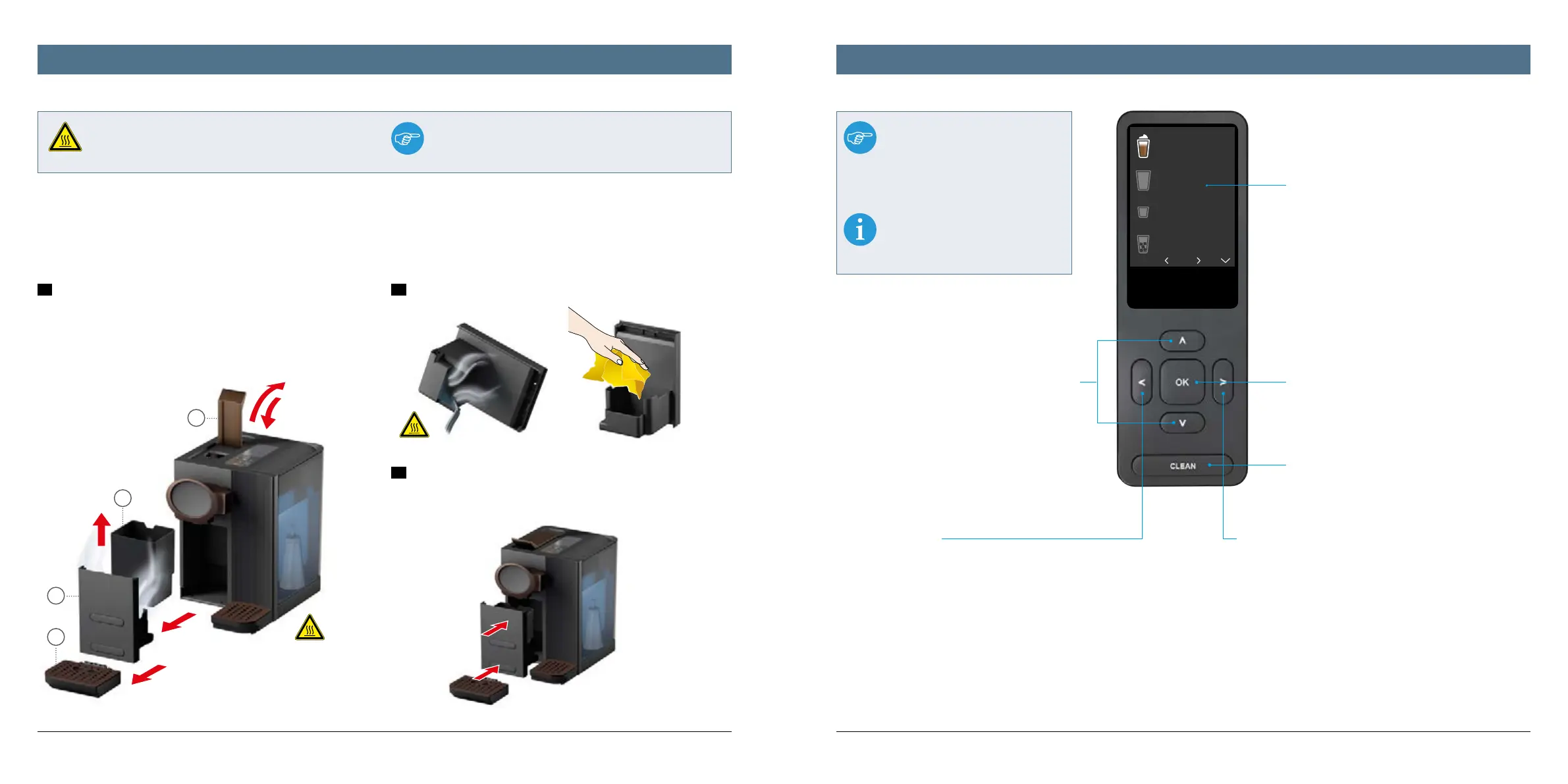
Using the steam system drip tray Explanation of the display and functions
OK button:
To confirm all instructions, operating instructions
and selections
Display:
• Displays up to four menu items at once
• For additional menu items, please use the arrow
buttons to scroll down
• All information, explanations and instructions
appear as a combination of text and a graphical
symbol
• Please use the buttons below the display for all
operating steps specified by the system
CLEAN button:
Activates the Easy Clean quick clean program to rinse
the milk system with hot water – recommended and
required by the system after the preparation of bever-
ages containing milk. Pressing the CLEAN button lon-
ger than 3 seconds leads you to the cleaning menu.
Right arrow:
For scrolling down quickly: Press once to to jump down four
positions on the activated page
Left arrow:
1. During the preparation of beverages: press once to return to
the previous menu/press and hold to return to the main menu
2. During the operation of settings: press and hold to return to
the main menu
3. During the management of favourites: to delete the selected
beverage from the list of favourites
Up and down arrows:
1. In general: intended for scrolling up
and down within each menu list and for
selecting the required menu item
2. When managing favourites: pressing
can shift the order of the favourites
3. In case of information messages, pres-
sing the arrow buttons confirms instruc-
tions such as descaling and starts the
corresponding program („up“ arrow) or
postpones until later („down“ arrow)
The drip tray for the steam system is fixed to the inside of the front cover. It collects hot water and condensate resulting from the following applications: the
preparation of all beverages containing milk, the activation of the CLEAN button, rinsing and cleaning the milk and coee system as well as purging the system
with steam. We therefore recommend emptying the steam system drip tray at regular intervals. The use of the steam system drip dray is only indicated auto-
matically by the relevant program during descaling. Please follow the instructions on the display at this point.
To empty the drip tray, please proceed as follows:
1
Open the handle to eject the inserted capsule (a). Then remove the drip
tray for the coee spout (b). Now remove the front cover by gripping the drip
tray slot with your fingers and pull the cover forwards (c). Finally, please re-
move the used capsule container (d).
Caution: The steam system drip tray can contain very hot water!
2
Now empty the removed drip tray and dry it using a soft cloth.
3
Finally, please place all components back in the machine: return the used
capsule container to the slot above the steam system drip tray, push the front
cover back in front of the opening until it clicks into place, and finally press
the drip tray for the coee spout back into the slot.
The machine is then
automatically ready
for use again.
Note:
Some operating buttons have several
functions – depending on the active
menu. Multiple functions of individual
operating buttons are distinguished by
1, 2 or 3 in this overview.
To switch on the appliance, press any
operating button, open the handle or
remove the used capsule container.
Very hot water – risk of scalding!
Please note:
The display does not indicate if the drip tray for the steam system
is full. Therefore, please empty it at regular intervals.
WARNING!




 To Next Page