Delete User PIN Code
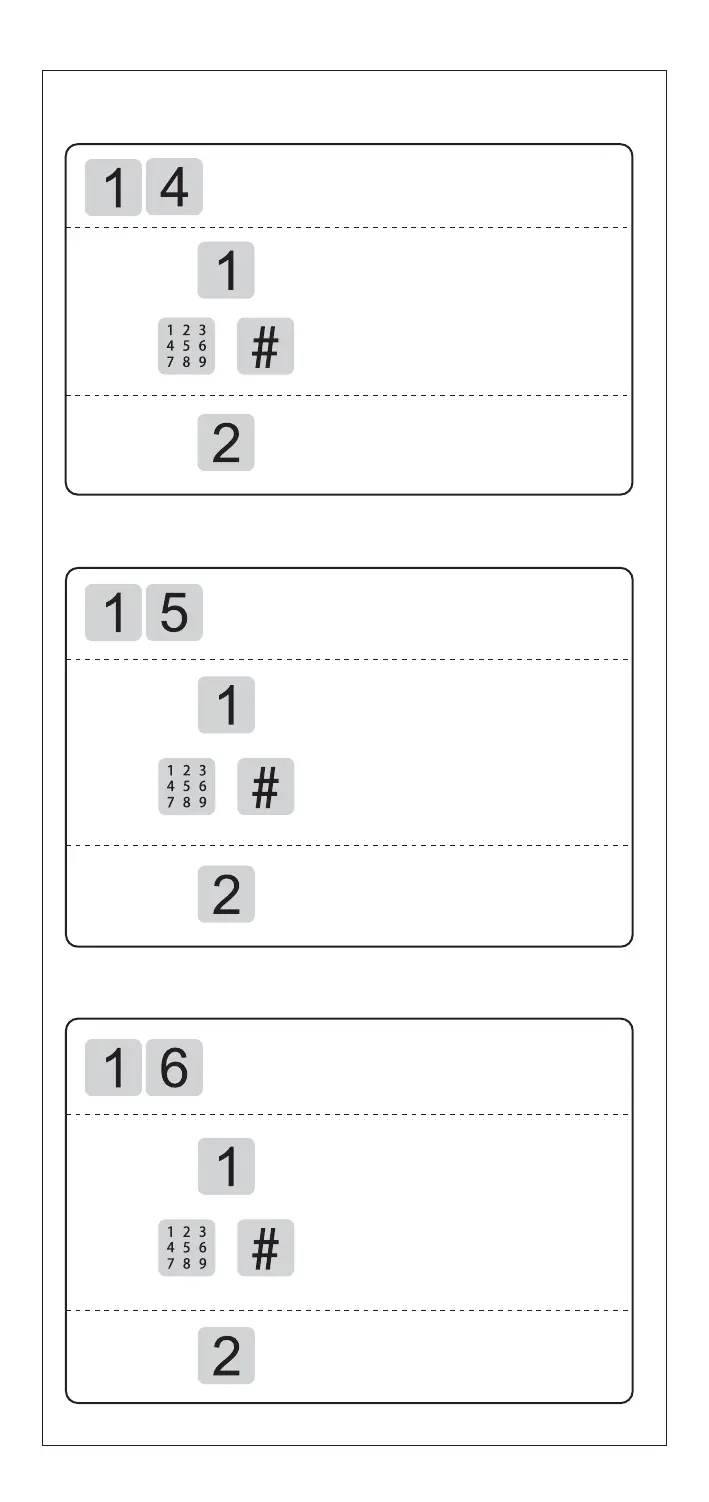
Access into master mode, press [1] for user
setting.Then press [4] to delete user PIN code.
Press [1] to delete single user
Enter 2 digital user number ( 00-09),
and confirm with [#] key
Voice prompt of "Deletion succeeded"
Press [2] to delete all users
Voice prompt of "Deletion succeeded"
Delete User Fingerprint
Access into master mode, press [1] for user
setting.Then press [5] to delete user fingerprint.
Press [1] to delete single user
Enter 2 digital user number (00-99),
and confirm with [#] key OR Place
the related finge
r on the fingerprint
sensor to delete until one beep sound.
Voice prompt of "Deletion succeeded"
Press [2] to delete all users
Voice prompt of "Deletion succeeded"
Delete User Card
Access into master mode, press [1] for user
setting.Then press [6] to delete user card.
Press [1] to delete single user
Enter 2 digital user number (00-99),
and confirm with [#] key OR Place
the related RF card on the card icon
area to delete until one beep sound.
Voice prompt of "Deletion succeeded"
Press [2] to delete all users
Voice prompt of "Deletion succeeded"


 To Next Page