User settings
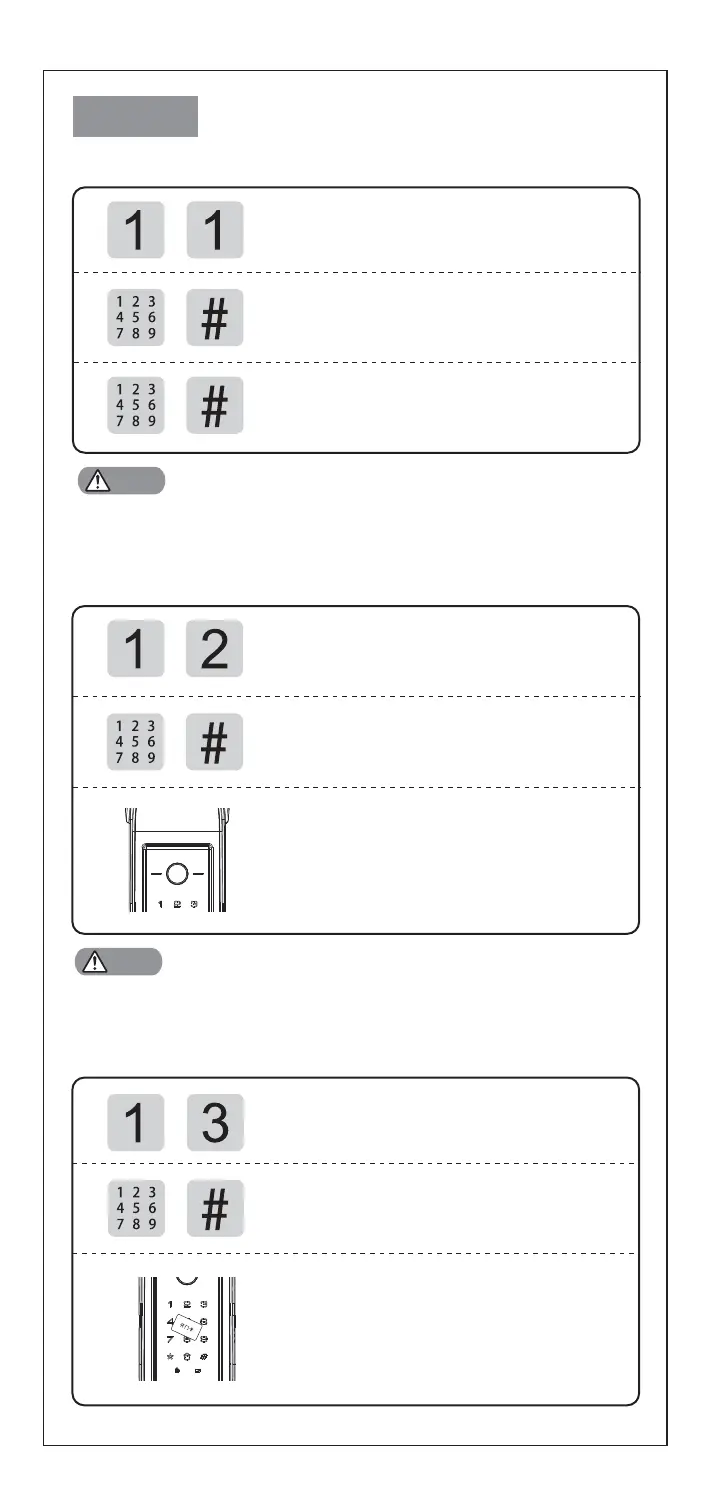
Enroll User PIN Code
Access into master mode, press [1] for user
setting.Then press [1] to enroll user PIN code.
Enter 2 digital user number (00-09),
and confirm with [#] key.
Enter user PIN code (6-12 digits) , and confirm
with [#] key; Then repeat above operations .
Voice prompt of "settings succeed",
Refer to 1 Cautions.[00-04] : Normal User [05-08] : Temporary User [09] : Duress User
Enroll Fingerprint
Access into master mode, press [1] for user
setting.Then press [2] to enroll user
fingerprint.
Enter 2 digital user number (00-99),
and confirm wi
th [#] key.
Place your finger on the fingerprint sensor,
then take away your finger after voice prompt
"Remove finger and scan again".
Repeat above steps multiple times until
voice prompt "settings succeed".
Refer to 1 Cautions.[00-94] : Regular fingerprint [95-99] : Duress fingerprint
Enroll Card
Access into master mode, press [1] for user
setting.Then press [3] to enroll user card.
Enter 2 digital user number (00-99),
and confirm with [#] key.
Place card on the card icon area until
beep sound and voice prompt
"se
ttings succeed".
Notes
Notes


 To Next Page