Katherm HK
Assembly, installation and operating instructions
65
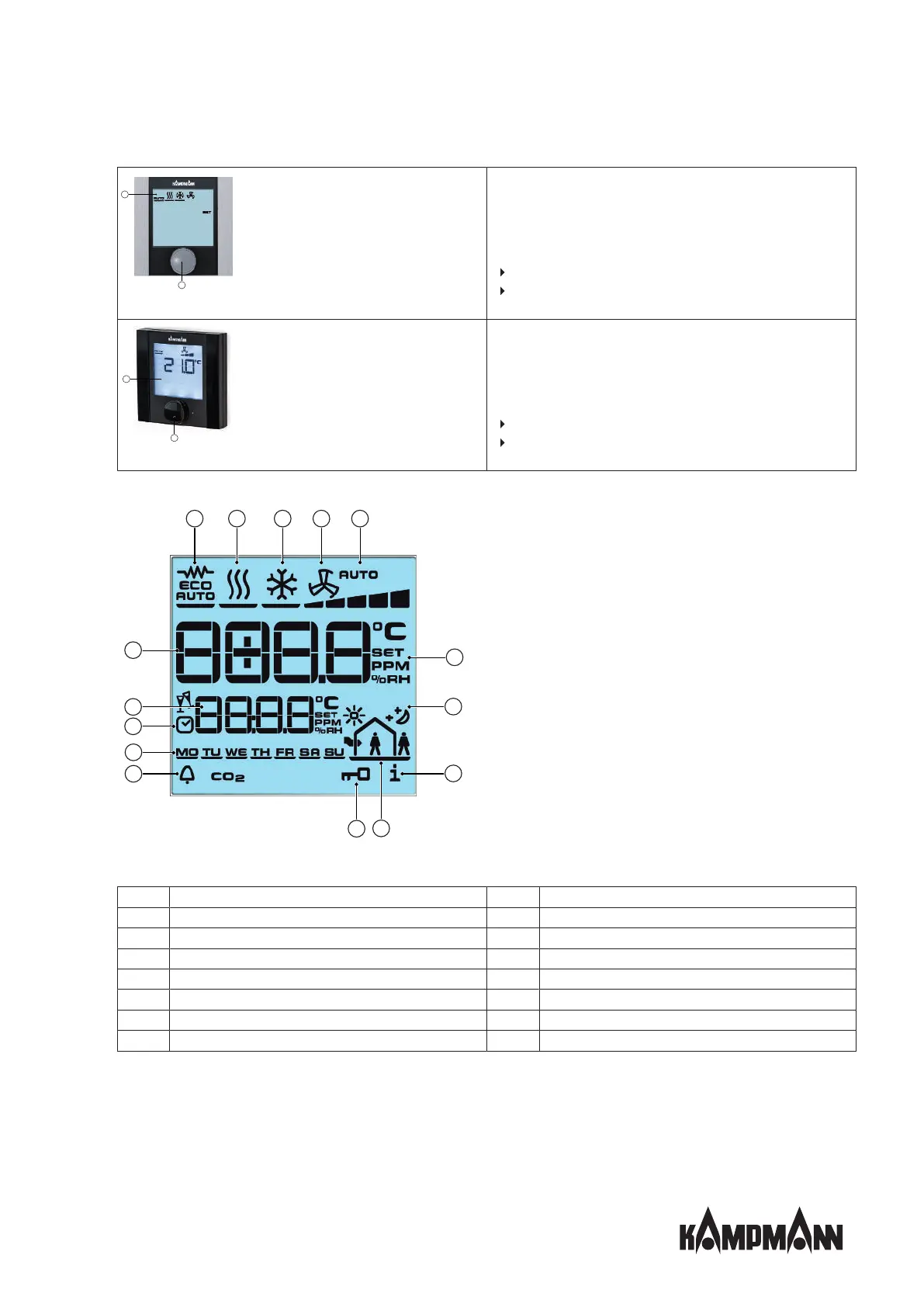
Fig.23: KaController type 3210001
KaController without operating keys (one-button operation)
type 3210001
1. Display with LED background lighting
2. Navigator dial
Change settings
Call up menus
Fig.24: KaController black, type 3210006
KaController, black without function keys (one-button opera-
tion) type 3210006
1. Display with LED background lighting
2. Navigator dial
Change settings
Call up menus
The symbols shown on the display depend on the application (2-pipe, 4-pipe etc.) and the parameters set.
Fig.25: Display
1
Display of setpoint room temperature
2
Current time
3
Timer program enabled
4
Weekday
5
Alarm
6
Selected function is locked
7
“External ventilation“ mode is locked
8
Filter alert
9
Eco mode
10
Setpoint setting enabled
11
Fan control setting Auto-0-1-2-3-4-5
12
Ventilation mode
13
Cooling mode
14
Heating mode
15
Automatic Heating/Cooling changeover mode



 To Next Page