Katherm HK
Assembly, installation and operating instructions
64
9.2 Operation of the KaController
The following information is limited to the key content on the operation of the KaController and KaControl system. More in-
formation is included separately in the KaControl SmartBoard user manual.
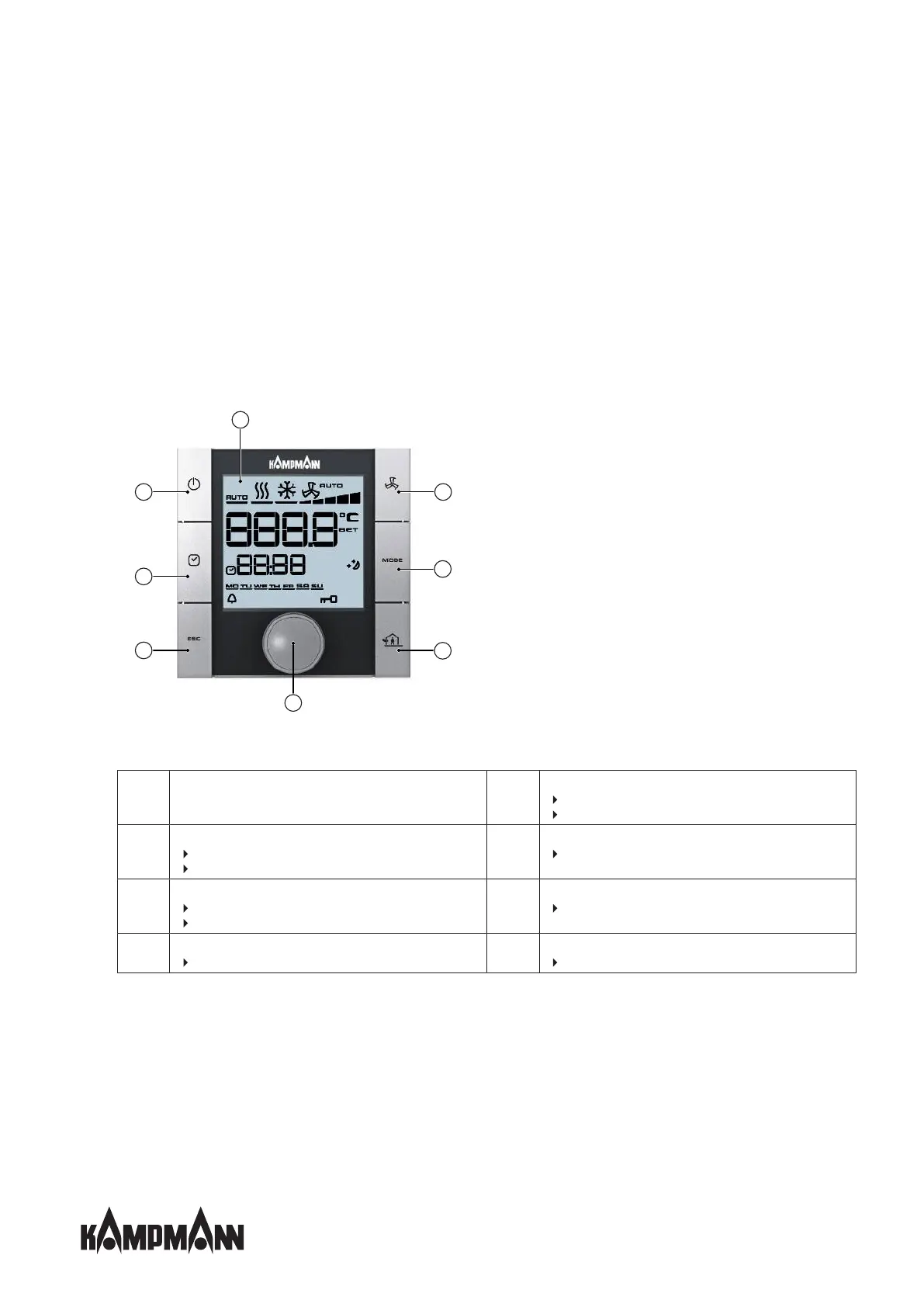
9.2.1 Function keys, display elements
All menus can be selected and set using the navigator dial.
The LED background lighting is automatically switched off 5 seconds after the KaController is last used. The LED background
lighting can be permanently disabled using a parameter setting.
Fig.22: KaController with function keys, type 3210002
1
Display with LED background lighting
2
ON/OFF key (depending on setting)
ON/OFF
Eco mode/Day mode (factory setting)
3
TIMER button
Set time
Set timer programs
4
ESC button
back to standard view
5
Navigator dial
Change settings
Call up menus
6
House symbol
External ventilation
7
MODE button
Set operating modes (disabled with 2-pipe applications)
8
FAN button
Set fan control



 To Next Page