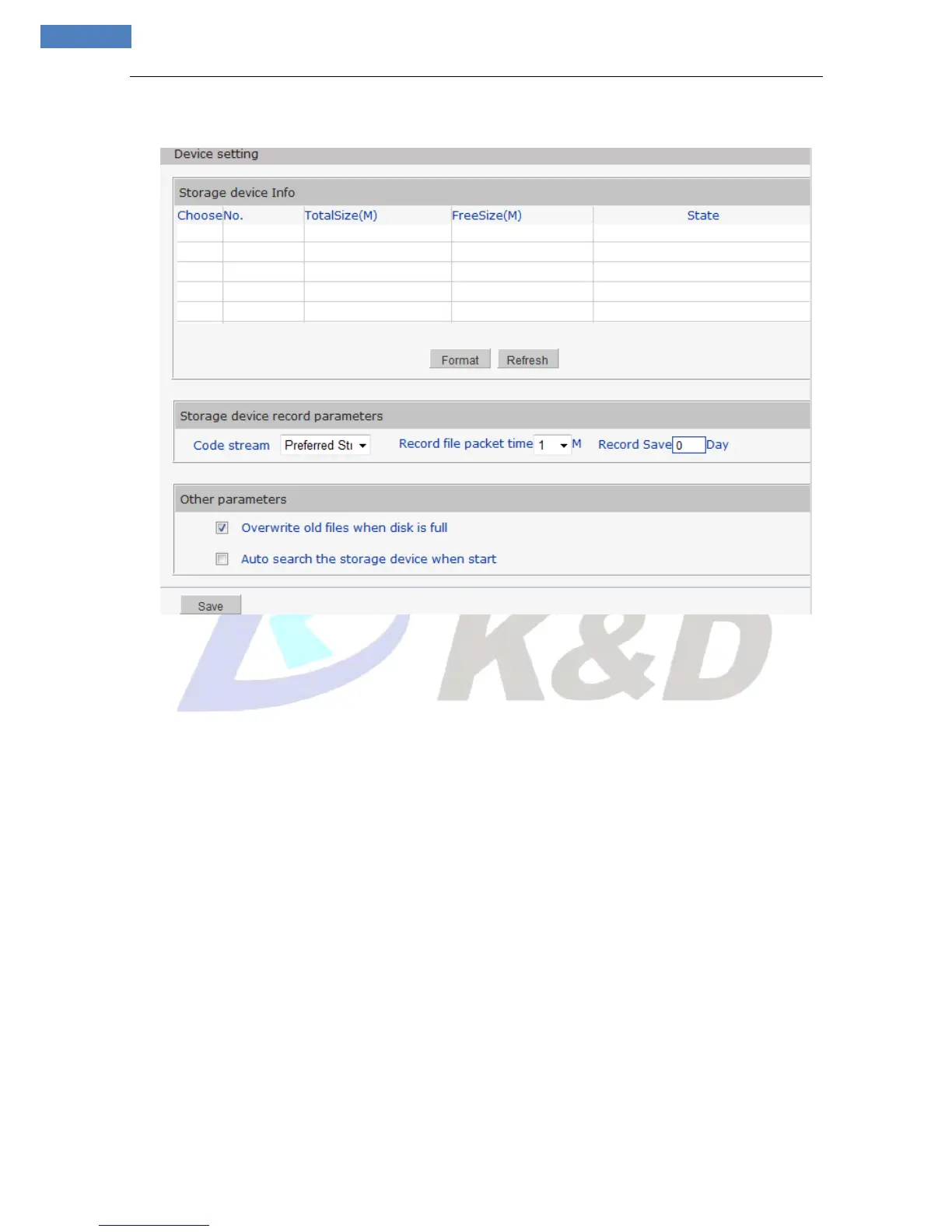
See Figure 33 for the interface of “Device Setting”:
Figure 33
[Storage Device Info]: View information of SD card here, including No., TotalSize, FreeSize and Status.
Users can also click [Format] button to format SD card, during the formatting process, please click
[Refresh] button to the display formatting completion percentage.
[Storage device record parameters]
Code stream: Set record stream for SD card, preferred stream and alternate stream are selectable.
Record file packet time: Set packing intervals for each segment of record file when SD card is recording.1
means files will be packed every 1 minute.
Record Save: 0 means unlimited
[Other Parameters]
Overwrite old files when disk is full: When the storage capacity of SD card is used up, the device will
delete old files automatically. The way to delete old files: first delete the files of the earliest date, if the
space is still not enough, then delete the files of the earliest date but one, then go on like this if necessary.
If the record files are taken on the current date, then first delete the files of the earliest hour. But files of
the current hour cannot be deleted, if the SD card gets full in one hour, the device will stop recording and
snapping images. After the one-hour session ends, system will delete the files of the hour and continue to
record and snap pictures.
Auto search the storage device when start: Check storage device or not when IP camera starts.
Note:
Hot-plugging is not recommended for SD card, compulsory hot-plugging may damage the SD card,
causing data loss or abnormal operation.
Do not cut off the power of the device during formatting process.
Ext2 file is used to format system by default.



 To Next Page