720P HD Vandal Proof Fixed Dome Camera
Appendix 1 Network Interface of IP Camera
The default network ports of IP camera are:
Communication port, audio/video data transmission port, talkback data
transmission port
Audio/video data transmission port
Multicast original port + channel number
Appendix 2 Default Network Parameters
Default network parameters
Appendix 3 Apply for DDNS domain name service
1. IP camera DDNS introduction
DDNS function of IP camera
DDNS (Dynamic Domain Name Service) refers to the real-time analysis of a fixed domain name and the
dynamic public IP address of the IP camera.
With this function, all Internet users can visit the IP camera via a fixed domain name.
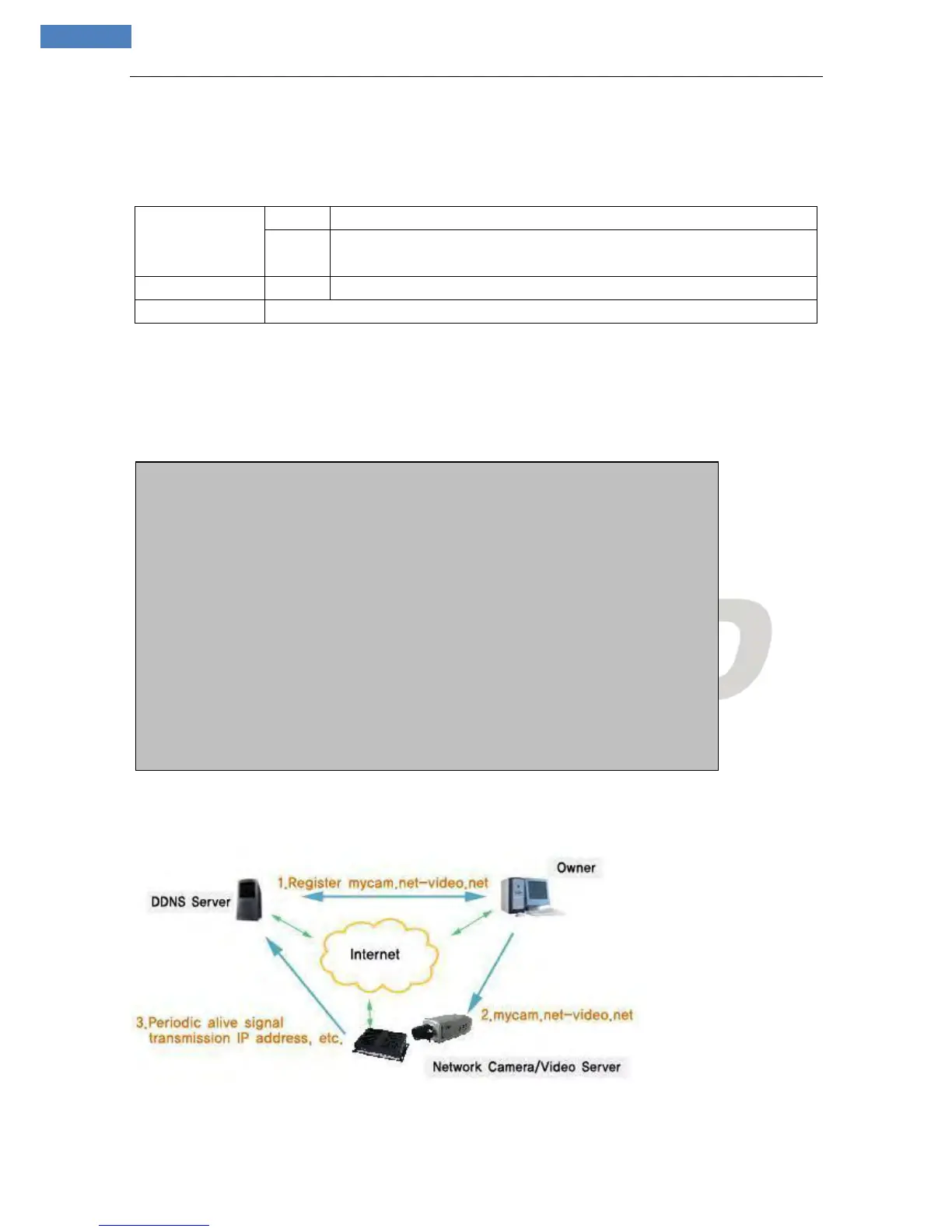
The DDNS process of IP camera is as follow:
The DDNS process flow diagram of IP camera
2. Apply for DDNS domain name service
Step 1: Sign up
Wired Network:
IP Address: 192.168.55.160 Data Port: 5000
Subnet mask: 255.255.255.0 Web Port: 80
Gateway: 192.168.55.1 DHCP: Off
Wireless Network:
IP Address: 192.168.1.160 Frequency: Auto
Gateway: 192.168.1.1 Mode: Auto
Subnet mask: 255.255.255.0



 To Next Page