Home
K&D
Security Camera
720P
Page 44
K&D 720P - Page 44
47 pages
Manual
Save Page as PDF
To Next Page
To Next Page
To Previous Page
To Previous Page
Loading...
44
7
2
0
P
H
D
V
a
n
d
a
l
P
r
o
o
f
F
i
x
e
d
D
o
m
e
C
a
m
er
a
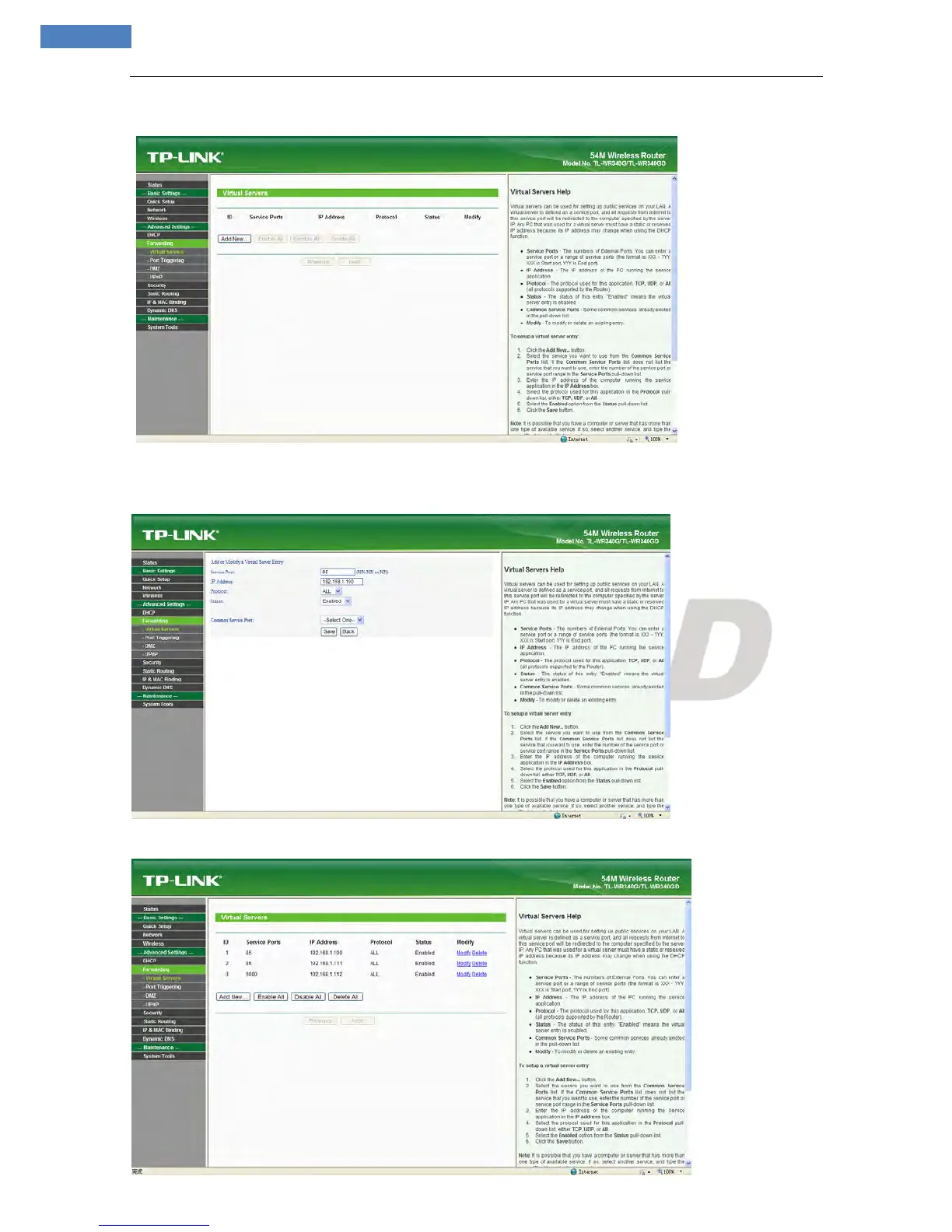
Ste
p
3
:
S
e
l
e
c
t
“
Ad
d
N
e
w
I
t
e
m
s
”
,
e
n
t
er
t
h
e
I
P
a
d
d
r
e
ss
o
f
t
h
e
I
P
c
a
m
e
r
a
(
e
.
g
.
1
9
2.
1
6
8
.
1
.
1
00
)
,
p
o
r
t
(
e
.
g.
8
5
)
,
s
t
a
t
u
s
(
va
l
id
)
a
n
d
o
t
h
er
i
n
fo
r
m
a
t
i
o
n
,
c
li
c
k
s
a
ve
,
s
e
e
b
e
l
o
w
p
i
c
t
u
r
e
:
Ste
p
4
:
A
ft
e
r
s
a
v
e
s
u
c
c
e
s
s
f
u
l
l
y,
b
e
l
o
w
s
c
r
e
e
n
a
p
p
e
ar
s
:
43
45
Table of Contents
Main Page
Table of Contents
4
Connect Fixed Box Camera with Computer and Install Activex
5
Figure
10
Login the Device
10
Live Preview
11
Figure
12
Record Playback
12
Set System Parameters
15
Local Config
15
Remote Config
16
Audio Setting
16
Video Settings
16
Network
19
Storage
28
Alarm Settings
31
COM Setting
34
System Setting
35
Appendix 1 Network Interface of Ip Camera
38
Appendix 2 Default Network Parameters
38
Appendix 3 Apply for Ddns Domain Name Service
38
Appendix 4 Visit Ip Camera under Different Network Environments
40
Appendix 5 Faqs
45



 To Next Page