Page 7
English 18259
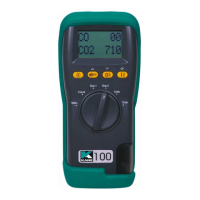
4. USING THE ROTARY DIAL (starting from Menu):
Rotating the dial selects the display’s 2
nd
line, unless MENU is selected.
Rotor positions are:
• Menu the MENU options are listed below
• Count displays time to next Autostore in minutes if set.
• Gas 1 displays CO reading in ppm
• Gas 2 displays CO
2
reading in ppm
• Date the date format is user defined
• Time military time format
4.1 MENU SELECTION (auto store must be off to access menu).
MENU
Rotate the dial to MENU and use the UP, DOWN and ENTER buttons
as described fully below to select and change the following functions:
1. Time – Uses “Military” time as standard:
7am = 07:00, 7pm = 19:00
2. Date with date format selection
3. Pump speed control: full speed or 'quiet' mode which reduces
power consumption.
4. The display’s contrast
5. Language (this product is configured for English only)
6. ZERO – AIR - to set apply fresh air then use up or down to set for
about 400ppm
ZERO -TRUE – to set use a CO
2
zero calibration module (or
‘stripper’)
Press enter to start. Zero will run for about 45 seconds.
7. Alarm setting- user settable alarms to audibly warn of high
readings. Pre-sets are 35 ppm for CO and 1000ppm for CO
2
8. Service – Password protected, for authorized service personnel
only.
9. Memory functions


 To Next Page