SmartVision & SmartVision LITE – User Guide (Rev. 2.7) – Version 1943.4105 67
SOS application set up
Before using the SOS function, you need to configure the application as follows:
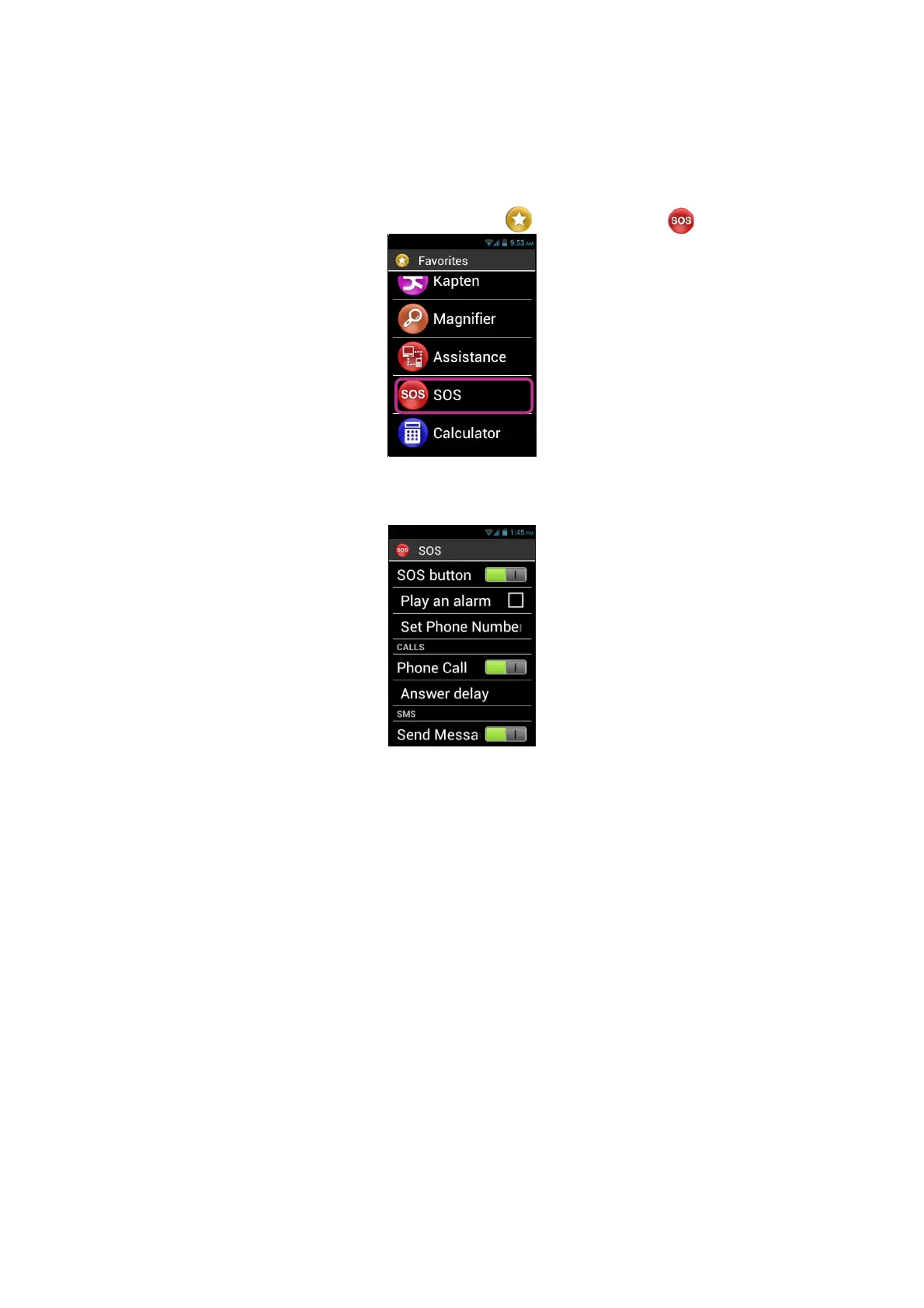
1. From the home screen, click on "Favorites" , then on "SOS" Icon.
2. Read the warning and "Accept" to continue.
3. The SOS function configuration screen appears.
The SOS application configuration options are:
- "SOS button", enables or disables the SOS button on the back of the handset.
- "Play an alarm", activates the emission of a loud warning signal.
- "Set Phone Numbers", sets emergency numbers that you want to call or send
an SMS to in an emergency.
- "Phone Call", activates telephone calls to your emergency numbers. Calls are
made one by one, in the order defined in the "Set Phone Numbers" option
until a call is answered.
- "Answer delay", modifies the maximum wait time for a call to be answered
before moving on to the next contact on the emergency contact list (30
seconds by default).
- "Send Message", programmes the sending of SMS to your emergency
numbers.
- "Send Location", reports your geographical location in the message, if the
information is available when the emergency call is sent.
- "Message text", customises the contents of the message to be sent to your
emergency numbers.



 To Next Page